如何批量上传行动
本文由英文机器翻译。 当前显示英文原文。
If you have an action list document in XLS format, you can mass upload its actions into TeamGuru.
Prepare the file
-
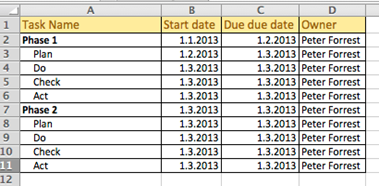
Prepare the action list. Prepare the action list you want to upload.
-
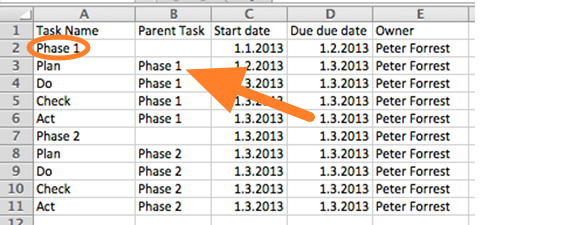
Indicate parent tasks. When uploading a subtask structure, indicate the parent task of each action.
-
Use an accepted date format. Accepted date formats are D.M.YYYY or YYYY-M-D (e.g. 1.3.2013 for March 1st, 2013).
You can upload the file in two ways: A) using the clipboard, or B) using a predefined template.
A) Upload the actions using the clipboard
-
Copy the data. Select the data in your prepared XLS file and copy it (Ctrl+C).
-
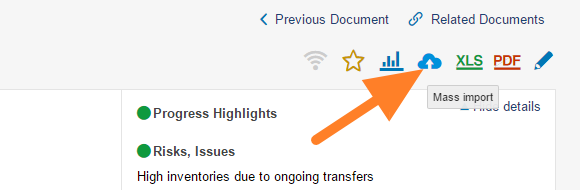
Open the mass import. Go to the action list and click the Mass Import icon.
-
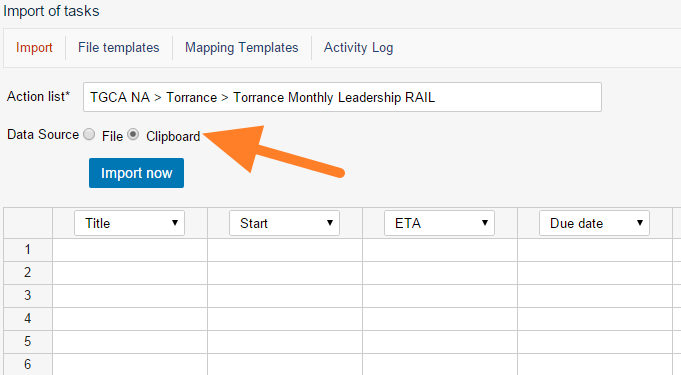
Choose the clipboard. As the Data Source, select Clipboard.
-
Paste the actions. Click into the first cell and paste the actions (Ctrl+V).
-
Set the column order. Set up the order of the columns by changing the column headers as needed.
-
Import the actions. Click the Import now button.
B) Upload the file using a predefined template
-
Save the file as CSV. In Excel, click Save As and select the CSV file format.
-
Open the mass import. Go to the action list and click the Mass Import icon.
-
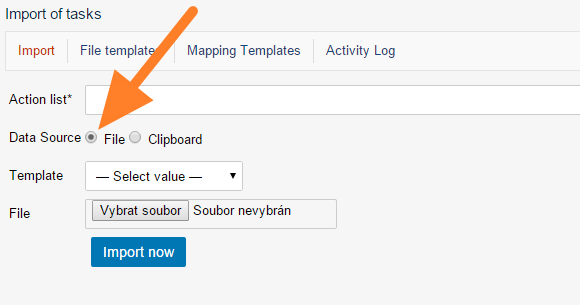
Choose a file. As the Data Source, select File.
-
Select the template. Select a predefined template (see how to create a file template).
-
Upload the file. Upload your CSV file.
-
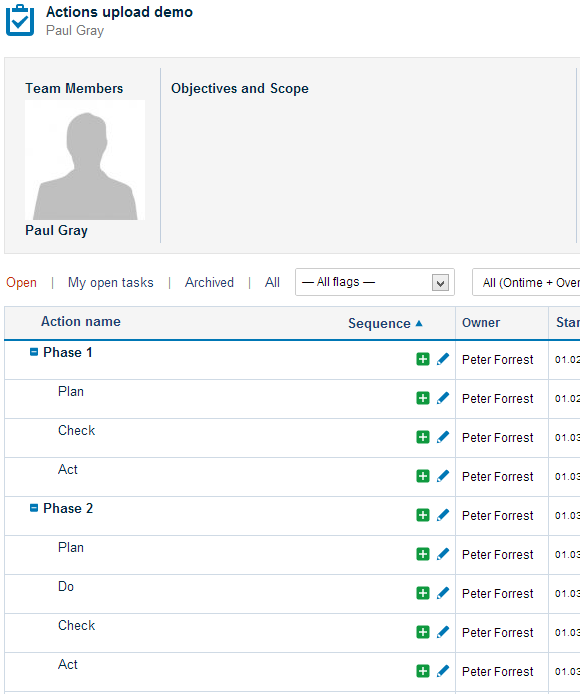
Check the results. Go to your TeamGuru action list to check the upload results.
如果您有XLS格式的行动清单文档,可以将其中的行动批量上传到TeamGuru。
准备文件
-
准备行动清单。 准备好要上传的行动清单。
-
标明父任务。 上传子任务结构时,请标明每项行动的父任务。
-
使用支持的日期格式。 支持的日期格式为D.M.YYYY或YYYY-M-D(例如1.3.2013表示2013年3月1日)。
上传文件有两种方式:A)使用剪贴板;B)使用预定义模板。
A)使用剪贴板上传行动
-
复制数据。 在准备好的XLS文件中选中数据并复制(Ctrl+C)。
-
打开批量导入。 进入行动清单,点击 批量导入 图标。
-
选择剪贴板。 在 数据源 中选择 剪贴板。
-
粘贴行动。 点击第一个单元格,粘贴行动(Ctrl+V)。
-
设置列顺序。 根据需要更改列标题,设置列的顺序。
-
导入行动。 点击 立即导入 按钮。
B)使用预定义模板上传文件
-
将文件另存为CSV。 在Excel中点击 另存为,选择CSV文件格式。
-
打开批量导入。 进入行动清单,点击 批量导入 图标。
-
选择文件。 在 数据源 中选择 文件。
-
选择模板。 选择一个预定义模板(参见如何创建文件模板)。
-
上传文件。 上传您的CSV文件。
-
检查结果。 打开TeamGuru中的行动清单,检查上传结果。
还需要帮助吗?
请给我们留言。工作日我们通常会在一小时内回复。