如何设置自动包含所有子项目的主项目
本文由英文机器翻译。 当前显示英文原文。
You can add subprojects to your main project automatically, based on the project type and location. This gives you a simple overview of your subprojects: you can see their completion status and their open and total actions, and navigate from one place to all subproject documents via live links.
Video guide (text instructions below):
Set up the subprojects
Assign a project type to each subproject
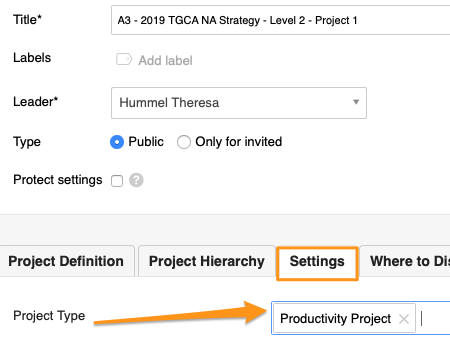
Set up your A3 projects (action lists) with a project type; do this for your subprojects. Open the action list settings, scroll down to the Settings tab and choose a Project Type from the submenu. You can select from the project types already created in the system.

Please note: If you need to create a new project type and don’t have a sufficient role to do so, please contact us or your system administrator for assistance.
Set up the main action list
Add subprojects automatically
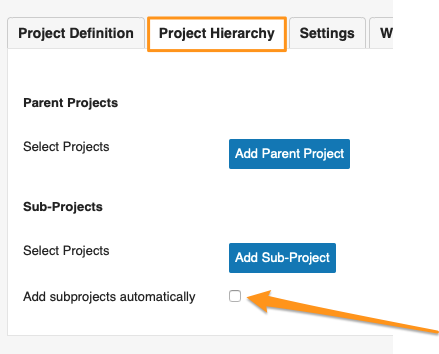
Open the settings of your main action list (parent project), scroll down to the Project Hierarchy tab and tick Add subprojects automatically.
Select the subproject criteria
Select the Project Type, Project Location and Project Status. Then scroll up and click Save & View.
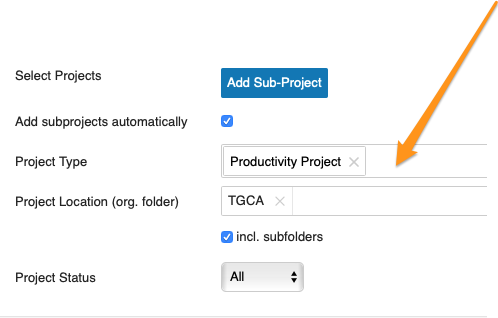
Please note: If you don’t specify a location, your action list includes all subprojects set up with that project type across your whole company.
Review the subprojects
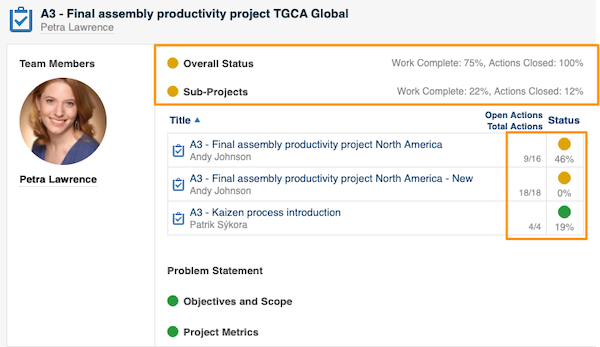
Your main action list now includes all subprojects based on your selection. You can use the live links and view the open/total actions and the completion status of each subproject.
Related articles
您可以根据项目类型和位置,将子项目自动添加到主项目中。这样就能简单地总览子项目:查看其完成状态、未完成行动数和行动总数,并通过链接从一处打开所有子项目文档。
视频指南(文字说明见下方):
设置子项目
为每个子项目指定项目类型
为A3项目(行动清单)设置项目类型,所有子项目都需要设置。打开行动清单设置,向下滚动到 设置 选项卡,从子菜单中选择 项目类型。可以从系统中已创建的项目类型中选择。
请注意:如果您需要新建项目类型,但角色权限不足,请联系我们或系统管理员协助。
设置主行动清单
自动添加子项目
打开主行动清单(父项目)的设置,向下滚动到 项目层级 选项卡,勾选 自动添加子项目。
选择子项目条件
选择 项目类型、项目位置 和 项目状态。然后向上滚动,点击 保存并查看。
请注意:如果未指定位置,行动清单将包含全公司所有设置了该项目类型的子项目。
查看子项目
主行动清单现在会根据您的选择包含所有子项目。您可以使用链接,并查看每个子项目的未完成/总行动数和完成状态。
相关文章
还需要帮助吗?
请给我们留言。工作日我们通常会在一小时内回复。