如何为组织结构的各个部分设置成本中心?
本文由英文机器翻译。 当前显示英文原文。
A TeamGuru administrator has the right to assign cost centers to each part of your organization structure. Document charges can then be split into several cost centers according to the monthly summary report. Cost centers are assigned in the organization structure:
-
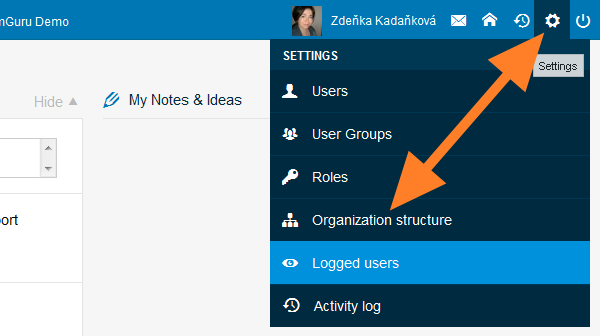
Open the organization structure. Go to the Organization Structure menu.
-
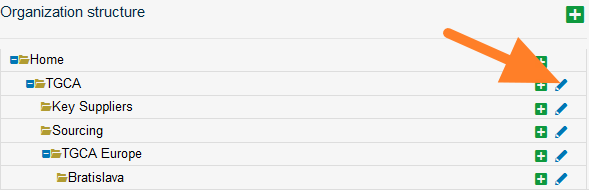
Edit the organization unit. Click the edit icon of the organization unit.
-
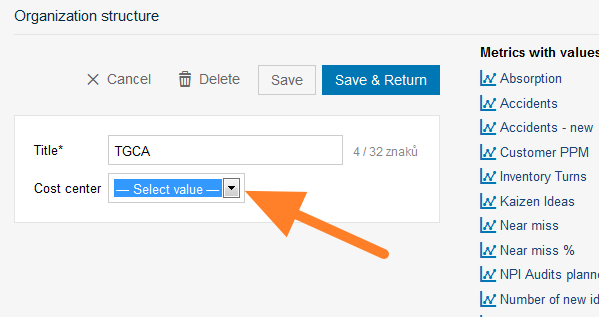
Select the cost center. Select the cost center and save.
Documents in a subfolder are counted toward the cost center of its main folder, unless the subfolder has been assigned a different one.
For example, if the Liverpool subfolder has a different cost center than TGCA Europe, all documents under Liverpool and its subfolders are assigned to the Liverpool cost center. If Livigno – Engines has no cost center assigned, it is automatically counted toward its main folder, TGCA Europe.
TeamGuru管理员有权为组织结构的各个部分分配成本中心。之后,可以根据月度汇总报告将文档费用分摊到多个成本中心。成本中心在组织结构中分配:
-
打开组织结构。 进入 组织结构 菜单。
-
编辑组织单元。 点击组织单元的编辑图标。
-
选择成本中心。 选择成本中心并保存。
子文件夹中的文档计入其主文件夹的成本中心,除非该子文件夹另外分配了成本中心。
例如,如果Liverpool子文件夹的成本中心与TGCA Europe不同,则Liverpool及其子文件夹下的所有文档都计入Liverpool成本中心。如果Livigno – Engines未分配成本中心,则自动计入其主文件夹TGCA Europe。
还需要帮助吗?
请给我们留言。工作日我们通常会在一小时内回复。