在指标仪表板中自定义对象
本文由英文机器翻译。 当前显示英文原文。
You can track and report data for your own, customized metric objects. Define them in the Custom Metric Objects submenu of the Metric Dashboards module.
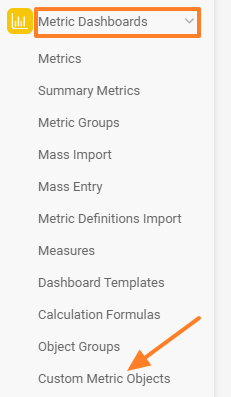
Open the custom metric objects
In the Metric Dashboards module, select Custom Metric Objects from the submenu.
Create an object group
Create a new group of custom objects with the green Create New button.

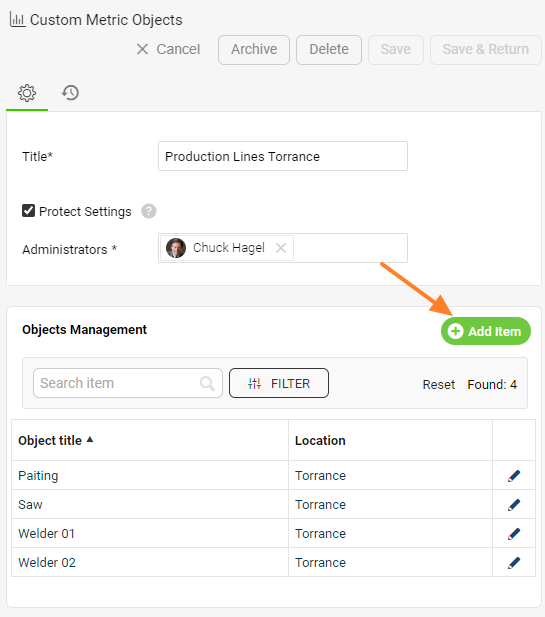
Add objects to the group
Create the new objects under that group.
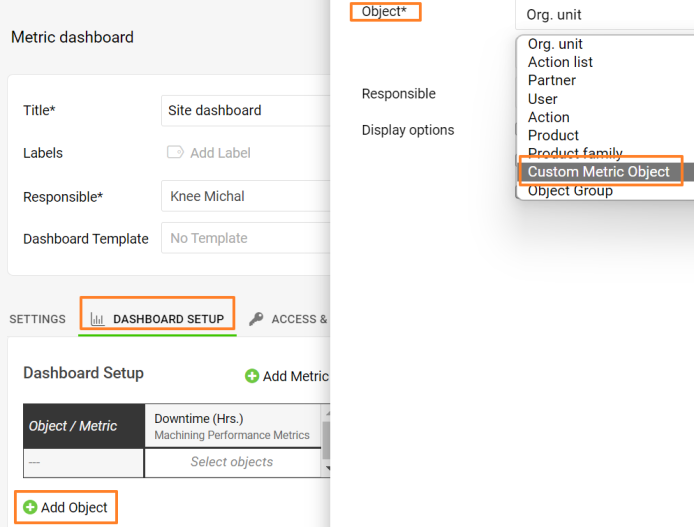
Select the objects in your dashboard
Then select your custom objects on the Dashboard Setup tab of your dashboard’s settings.
Related article: Dashboard settings
您可以为自定义的指标对象跟踪和报告数据。请在指标仪表板模块的自定义指标对象子菜单中定义这些对象。
打开自定义指标对象
在指标仪表板模块中,从子菜单中选择自定义指标对象。
创建对象组
使用绿色的新建按钮创建新的自定义对象组。
向组中添加对象
在该组下创建新对象。
在仪表板中选择对象
然后在仪表板设置的仪表板设置选项卡中选择自定义对象。
相关文章:仪表板设置
还需要帮助吗?
请给我们留言。工作日我们通常会在一小时内回复。