指标定义和相关文档
本文由英文机器翻译。 当前显示英文原文。
Make your metric definition clear, easily accessible and visible in all the dashboards where the metric is used. It helps your employees understand how to report data correctly while following your company’s standardized procedures. You can also link your metrics to related documents (internal or external).
Watch the video guide, or follow the text instructions below.
View the metric definition
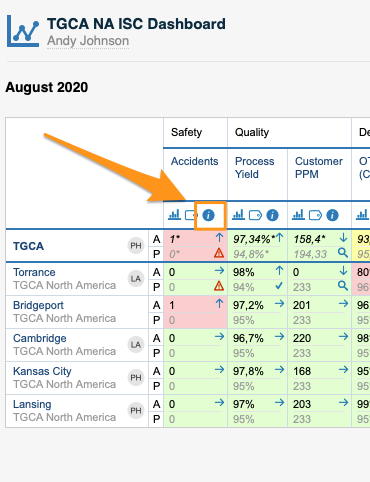
To view your metric definition, click the blue circle i button. You then see the title of your metric, its definition and the linked documents.
Edit the metric definition
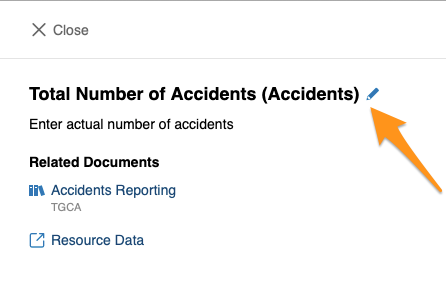
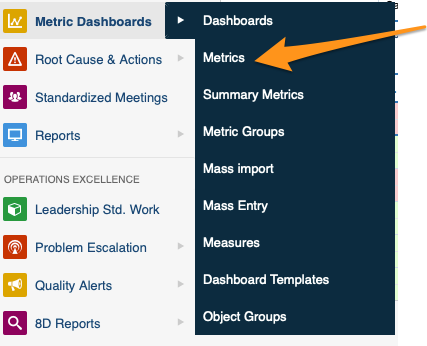
You can edit your metric definition either directly from your dashboard, or in the metric’s settings in the Metric Dashboards module. You need sufficient rights to make any modifications.
Link related documents
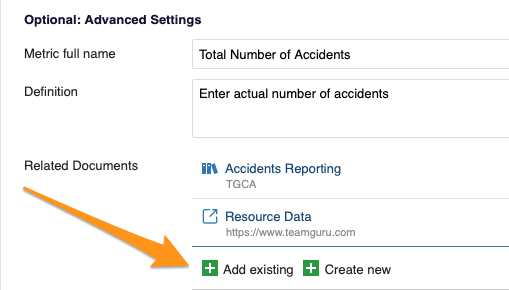
In Optional: Advanced Settings, you can link your metric either to existing documents within TeamGuru or to an external link.
让指标定义清晰明了、便于查阅,并在使用该指标的所有仪表板中可见。这有助于员工按照公司的标准化流程正确报告数据。您还可以将指标与相关文档(内部或外部)关联。
观看视频指南,或按照下方的文字说明操作。
查看指标定义
要查看指标定义,请点击蓝色圆形 i 按钮。随后会显示指标的标题、定义以及关联的文档。
编辑指标定义
您可以直接在仪表板中编辑指标定义,也可以在 指标仪表板 模块的指标设置中编辑。进行任何修改都需要具备相应的权限。
关联相关文档
在 可选:高级设置 中,可以将指标关联到TeamGuru中的现有文档或外部链接。
还需要帮助吗?
请给我们留言。工作日我们通常会在一小时内回复。