Definícia metriky a súvisiace dokumenty
Strojový preklad z angličtiny. Zobrazený je anglický originál.
Make your metric definition clear, easily accessible and visible in all the dashboards where the metric is used. It helps your employees understand how to report data correctly while following your company’s standardized procedures. You can also link your metrics to related documents (internal or external).
Watch the video guide, or follow the text instructions below.
View the metric definition
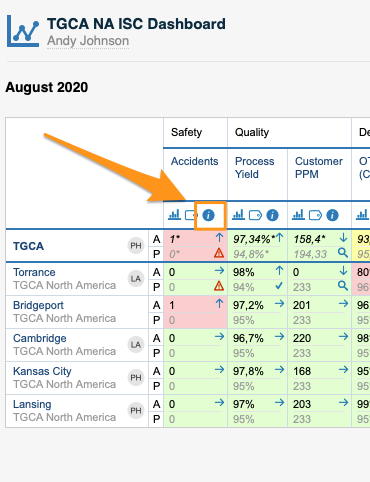
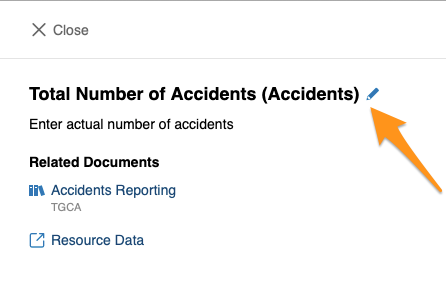
To view your metric definition, click the blue circle i button. You then see the title of your metric, its definition and the linked documents.
Edit the metric definition
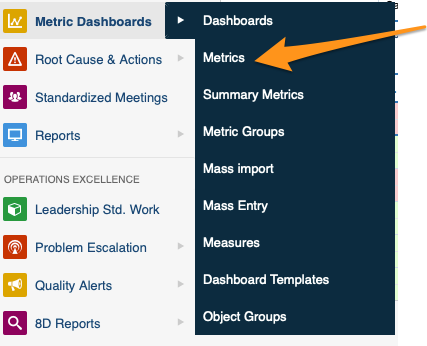
You can edit your metric definition either directly from your dashboard, or in the metric’s settings in the Metric Dashboards module. You need sufficient rights to make any modifications.
Link related documents
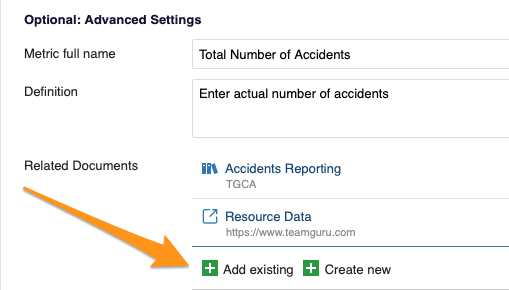
In Optional: Advanced Settings, you can link your metric either to existing documents within TeamGuru or to an external link.
Urobte definíciu metriky jasnou, ľahko dostupnou a viditeľnou vo všetkých dashboardoch, kde sa metrika používa. Zamestnanci tak pochopia, ako správne vykazovať údaje podľa štandardizovaných postupov vašej firmy. Metriky môžete prepojiť aj so súvisiacimi dokumentmi (internými alebo externými).
Pozrite si video návod alebo postupujte podľa textu nižšie.
Zobrazenie definície metriky
Definíciu metriky zobrazíte kliknutím na modré krúžkové tlačidlo i. Uvidíte názov metriky, jej definíciu a prepojené dokumenty.
Úprava definície metriky
Definíciu metriky môžete upraviť priamo z dashboardu alebo v nastaveniach metriky v module KPI dashboardy. Na akékoľvek zmeny potrebujete dostatočné oprávnenia.
Prepojenie súvisiacich dokumentov
V časti Voliteľné: rozšírené nastavenia môžete metriku prepojiť s existujúcimi dokumentmi v TeamGuru alebo s externým odkazom.
Potrebujete ďalšiu pomoc?
Napíšte nám. V pracovné dni zvyčajne odpovedáme do hodiny.