Definice metriky a související dokumenty
Strojový překlad z angličtiny. Zobrazen anglický originál.
Make your metric definition clear, easily accessible and visible in all the dashboards where the metric is used. It helps your employees understand how to report data correctly while following your company’s standardized procedures. You can also link your metrics to related documents (internal or external).
Watch the video guide, or follow the text instructions below.
View the metric definition
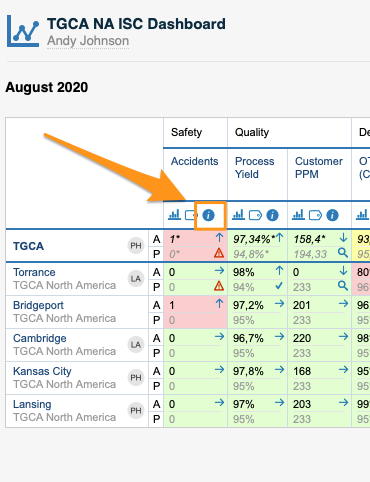
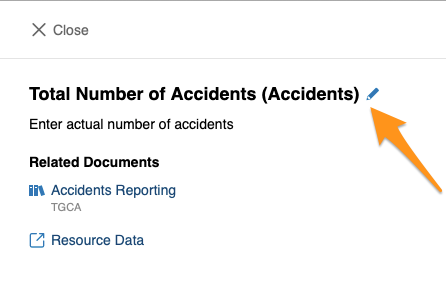
To view your metric definition, click the blue circle i button. You then see the title of your metric, its definition and the linked documents.
Edit the metric definition
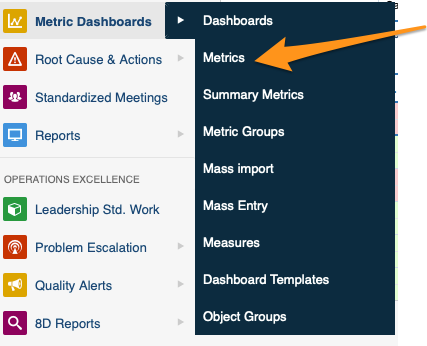
You can edit your metric definition either directly from your dashboard, or in the metric’s settings in the Metric Dashboards module. You need sufficient rights to make any modifications.
Link related documents
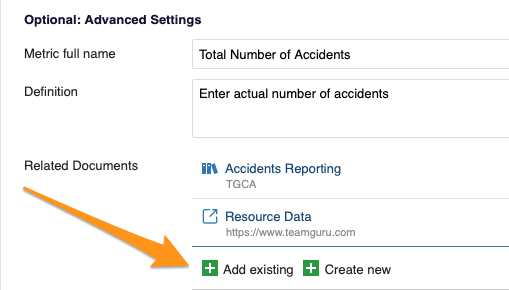
In Optional: Advanced Settings, you can link your metric either to existing documents within TeamGuru or to an external link.
Zajistěte, aby definice metriky byla srozumitelná, snadno dostupná a viditelná ve všech dashboardech, kde se metrika používá. Zaměstnanci tak snáz pochopí, jak správně vykazovat data podle standardizovaných postupů vaší firmy. Metriky můžete také propojit se souvisejícími dokumenty (interními i externími).
Podívejte se na video návod, nebo postupujte podle textového návodu níže.
Zobrazení definice metriky
Definici metriky zobrazíte kliknutím na modré kulaté tlačítko i. Uvidíte název metriky, její definici a propojené dokumenty.
Úprava definice metriky
Definici metriky můžete upravit buď přímo z dashboardu, nebo v nastavení metriky v modulu Metrikové dashboardy. K úpravám potřebujete dostatečná oprávnění.
Propojení souvisejících dokumentů
V části Volitelné: Pokročilé nastavení můžete metriku propojit buď s existujícími dokumenty v TeamGuru, nebo s externím odkazem.
Potřebujete další pomoc?
Napište nám. V pracovní dny obvykle odpovídáme do hodiny.