可以为某项技能添加相关文档(作业指导)吗?
本文由英文机器翻译。 当前显示英文原文。
Yes, you can attach a document as follows:
-
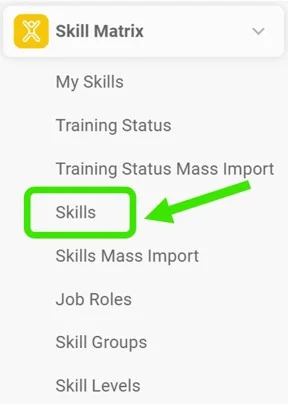
Open the skills. Go to Skills in the Skill Matrix submenu.
-
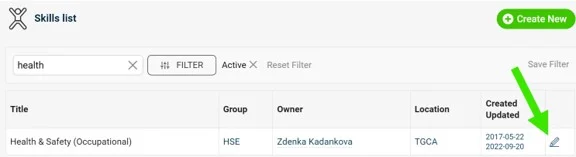
Edit the skill. To edit an existing skill, click the blue edit pencil to the right of the skill you want to add documents to. If you are adding a new skill, see how and where to add documents in How to create a new skill.
-
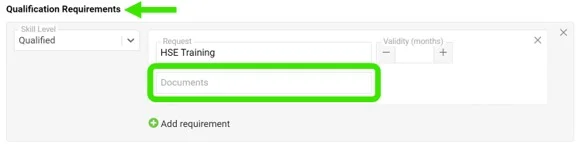
Add the documents to the requirements. Scroll down to Qualification Requirements. Here you can select internal TeamGuru documents, including those in the Documents module, for any instructions, SOPs or relevant qualification material. Multiple documents can be saved to each qualification requirement.
可以,按以下步骤附加文档:
-
打开技能列表。 进入 技能矩阵 子菜单中的 技能。
-
编辑技能。 要编辑现有技能,请点击该技能右侧的蓝色编辑铅笔图标。如果是新增技能,请参阅如何创建新技能,了解在何处以及如何添加文档。
-
在要求中添加文档。 向下滚动到 资格要求。您可以在此选择TeamGuru内部文档(包括文档模块中的文档),作为作业指导、SOP或相关资格资料。每项资格要求都可以保存多份文档。
还需要帮助吗?
请给我们留言。工作日我们通常会在一小时内回复。