Mass upload of new users
If you want to create several users at the same time, use the mass upload of new users.
-
Prepare the user data. Prepare an Excel sheet with the user details as shown below: name, surname, login, email and job title (optional).

-
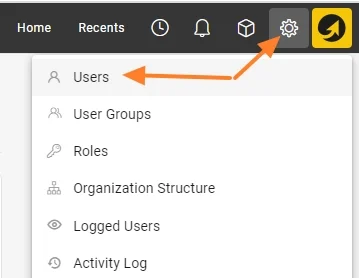
Open the user list. Go to the Settings menu and the Users submenu.
-
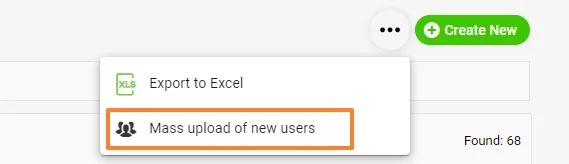
Start the mass upload. Click the three dots in the upper right corner, then the Mass upload of new users icon.
-
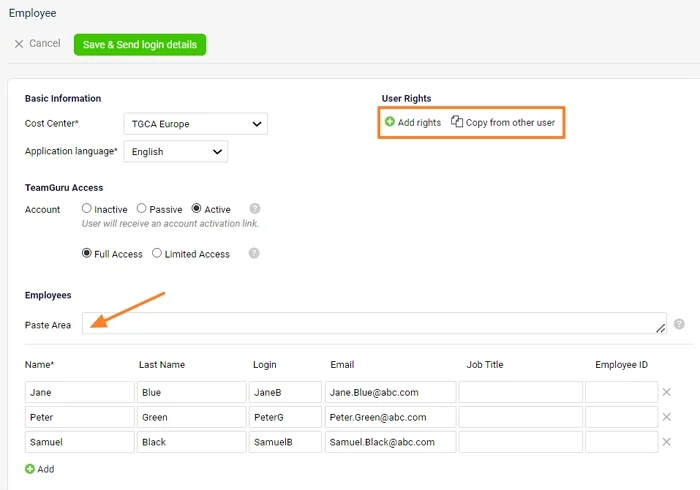
Paste the user data. Fill in the basic information and copy the data from your Excel sheet to the Paste Area. The new users’ details are uploaded.
-
Set up the user rights. If all new users should have the same user rights, you can set them up right now: either choose a specific folder they should have access to, or copy the access from an existing user. You can also set up the user rights individually once the users are created.
-
Save and send the login details. Click the green Save & Send login details button.
Still need help?
Write to us. We usually reply within an hour on business days.