Masowe dodawanie nowych użytkowników
Tłumaczenie maszynowe z angielskiego. Wyświetlany jest oryginał po angielsku.
If you want to create several users at the same time, use the mass upload of new users.
-
Prepare the user data. Prepare an Excel sheet with the user details as shown below: name, surname, login, email and job title (optional).

-
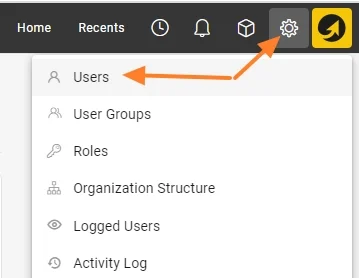
Open the user list. Go to the Settings menu and the Users submenu.
-
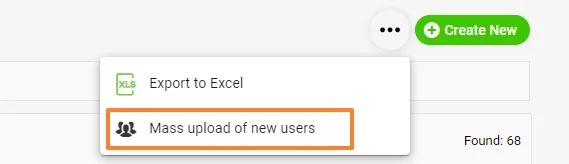
Start the mass upload. Click the three dots in the upper right corner, then the Mass upload of new users icon.
-
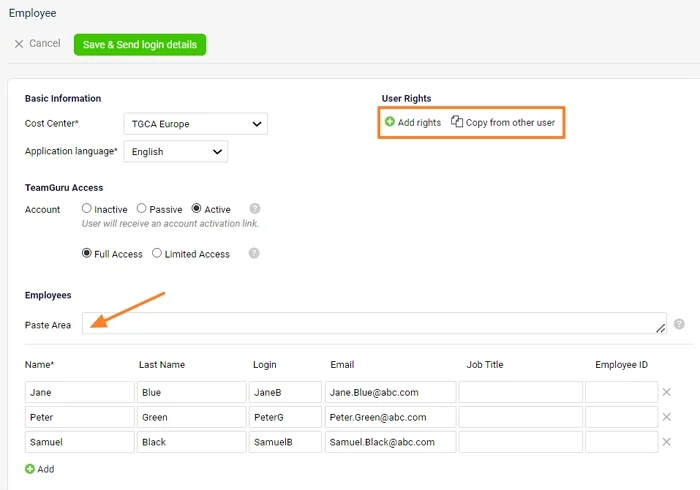
Paste the user data. Fill in the basic information and copy the data from your Excel sheet to the Paste Area. The new users’ details are uploaded.
-
Set up the user rights. If all new users should have the same user rights, you can set them up right now: either choose a specific folder they should have access to, or copy the access from an existing user. You can also set up the user rights individually once the users are created.
-
Save and send the login details. Click the green Save & Send login details button.
Jeśli chcesz utworzyć kilku użytkowników naraz, użyj masowego dodawania nowych użytkowników.
-
Przygotuj dane użytkowników. Przygotuj arkusz Excel z danymi użytkowników jak poniżej: imię, nazwisko, login, e-mail i stanowisko (opcjonalnie).
-
Otwórz listę użytkowników. Przejdź do menu Ustawienia i podmenu Użytkownicy.
-
Rozpocznij masowe dodawanie. Kliknij trzy kropki w prawym górnym rogu, a potem ikonę Masowe dodawanie nowych użytkowników.
-
Wklej dane użytkowników. Uzupełnij podstawowe informacje i skopiuj dane z arkusza Excel do Obszaru wklejania. Dane nowych użytkowników zostaną wczytane.
-
Ustaw uprawnienia. Jeśli wszyscy nowi użytkownicy mają mieć te same uprawnienia, możesz je ustawić od razu: wybierz konkretny folder, do którego mają mieć dostęp, albo skopiuj dostęp od istniejącego użytkownika. Uprawnienia możesz też ustawić każdemu osobno po utworzeniu użytkowników.
-
Zapisz i wyślij dane logowania. Kliknij zielony przycisk Zapisz i wyślij dane logowania.
Potrzebujesz dalszej pomocy?
Napisz do nas. W dni robocze zwykle odpowiadamy w ciągu godziny.