Hromadné nahratie nových používateľov
Strojový preklad z angličtiny. Zobrazený je anglický originál.
If you want to create several users at the same time, use the mass upload of new users.
-
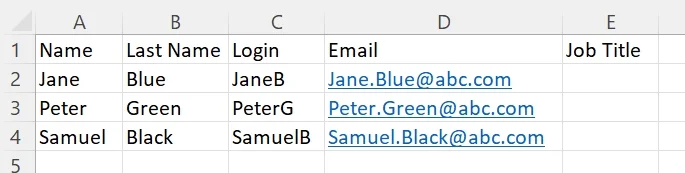
Prepare the user data. Prepare an Excel sheet with the user details as shown below: name, surname, login, email and job title (optional).
-
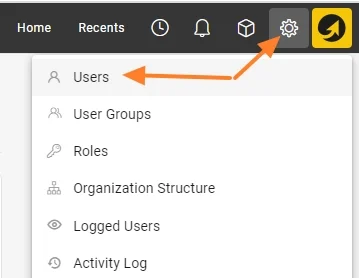
Open the user list. Go to the Settings menu and the Users submenu.
-
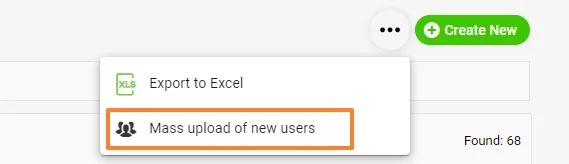
Start the mass upload. Click the three dots in the upper right corner, then the Mass upload of new users icon.
-
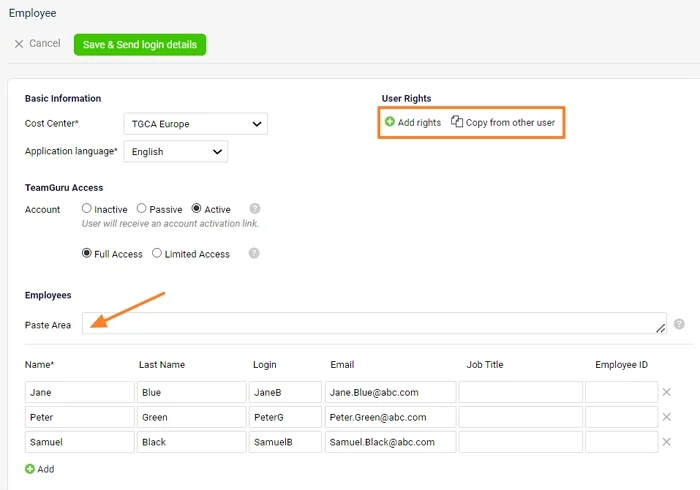
Paste the user data. Fill in the basic information and copy the data from your Excel sheet to the Paste Area. The new users’ details are uploaded.
-
Set up the user rights. If all new users should have the same user rights, you can set them up right now: either choose a specific folder they should have access to, or copy the access from an existing user. You can also set up the user rights individually once the users are created.
-
Save and send the login details. Click the green Save & Send login details button.
Ak chcete vytvoriť viacero používateľov naraz, použite hromadné nahratie nových používateľov.
-
Pripravte údaje používateľov. Pripravte hárok v Exceli s údajmi používateľov podľa obrázka nižšie: meno, priezvisko, prihlasovacie meno, e-mail a pracovná pozícia (voliteľné).
-
Otvorte zoznam používateľov. Prejdite do menu Nastavenia a podmenu Používatelia.
-
Spustite hromadné nahratie. Kliknite na tri bodky v pravom hornom rohu a potom na ikonu Hromadné nahratie nových používateľov.
-
Vložte údaje používateľov. Vyplňte základné údaje a skopírujte dáta z hárka v Exceli do Oblasti na vloženie. Údaje nových používateľov sa nahrajú.
-
Nastavte oprávnenia. Ak majú mať všetci noví používatelia rovnaké oprávnenia, môžete ich nastaviť hneď: zvoľte konkrétny priečinok, ku ktorému majú mať prístup, alebo skopírujte prístup od existujúceho používateľa. Oprávnenia môžete nastaviť aj jednotlivo, keď sú používatelia vytvorení.
-
Uložte a odošlite prihlasovacie údaje. Kliknite na zelené tlačidlo Uložiť a odoslať prihlasovacie údaje.
Potrebujete ďalšiu pomoc?
Napíšte nám. V pracovné dni zvyčajne odpovedáme do hodiny.