So legen Sie einen neuen Qualitäts-Alert an
Maschinelle Übersetzung aus dem Englischen. Englisches Original wird angezeigt.
The Quality Alerts module helps you keep all relevant people informed about a quality issue, its scope, impact and resolution status. You can easily launch a linked RPS (RCCA) or 8D Report for an in-depth root cause analysis and corrective actions.
-
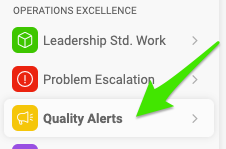
Create a new alert. Go to the Quality Alerts module and click the Create New button.

-
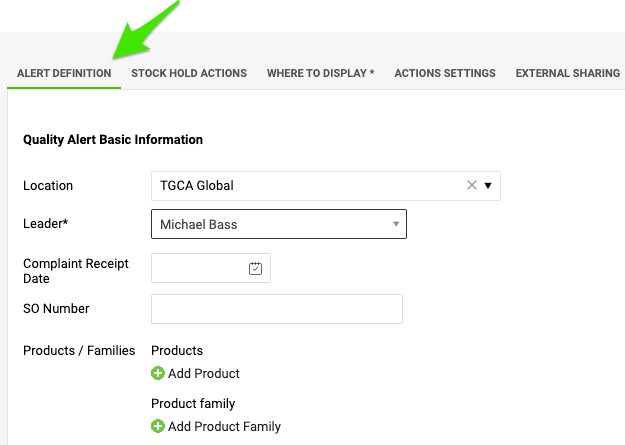
Define the alert. Fill in the title of the quality alert, select the location where the quality issue occurred, and add all available details about the product and the quantities.
-
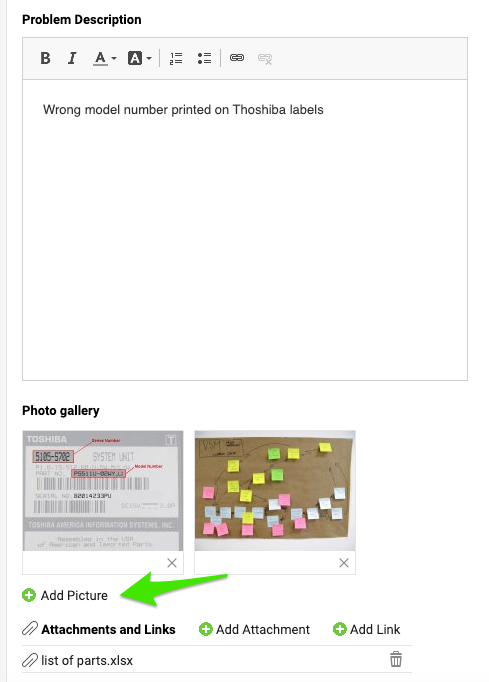
Describe the issue. Describe the quality issue and add pictures and attachments if needed.
-
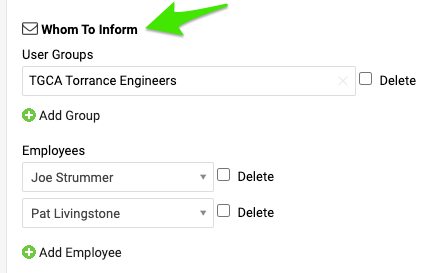
Choose whom to inform. Select the users or user groups that should be involved in this quality alert.
-
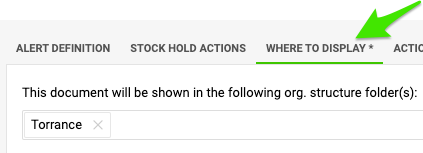
Choose where to display it. Before you save the document, open the Where to display tab and specify the organization unit that the document should be saved to.
-
Save the alert. Click Save & View.
Mit dem Modul Qualitäts-Alerts halten Sie alle Beteiligten über ein Qualitätsproblem, seinen Umfang, seine Auswirkungen und den Stand der Lösung auf dem Laufenden. Für eine gründliche Ursachenanalyse und Korrekturmaßnahmen starten Sie daraus einfach einen verknüpften RPS (RCCA) oder 8D-Report.
-
Legen Sie einen neuen Alert an. Öffnen Sie das Modul Qualitäts-Alerts und klicken Sie auf die Schaltfläche Neu erstellen.
-
Definieren Sie den Alert. Geben Sie den Titel des Qualitäts-Alerts ein, wählen Sie den Ort, an dem das Qualitätsproblem aufgetreten ist, und ergänzen Sie alle verfügbaren Angaben zu Produkt und Mengen.
-
Beschreiben Sie das Problem. Beschreiben Sie das Qualitätsproblem und fügen Sie bei Bedarf Bilder und Anhänge hinzu.
-
Legen Sie fest, wer informiert wird. Wählen Sie die Benutzer oder Benutzergruppen, die in diesen Qualitäts-Alert einbezogen werden sollen.
-
Legen Sie den Anzeigeort fest. Öffnen Sie vor dem Speichern die Registerkarte Anzeigeort und geben Sie die Organisationseinheit an, in der das Dokument gespeichert werden soll.
-
Speichern Sie den Alert. Klicken Sie auf Speichern und anzeigen.
Brauchen Sie weitere Hilfe?
Schreiben Sie uns. An Werktagen antworten wir meist innerhalb einer Stunde.