Gdzie zapisać rozdział kopii papierowych danej wersji
Tłumaczenie maszynowe z angielskiego. Wyświetlany jest oryginał po angielsku.
If a document has to be distributed in hard copies as well, you can make a note of the distribution for each document version.
-
Open the document.
-
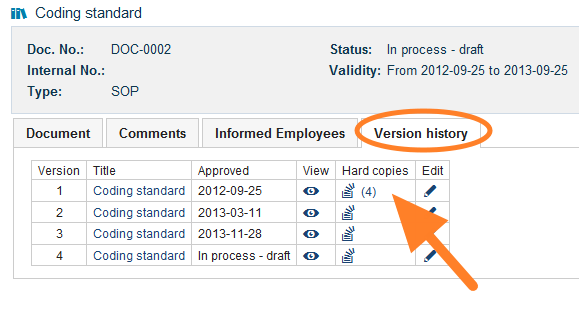
Go to the version history. Open the Version history tab.
-
Open the hard copies. Click the Hard copies icon.
-
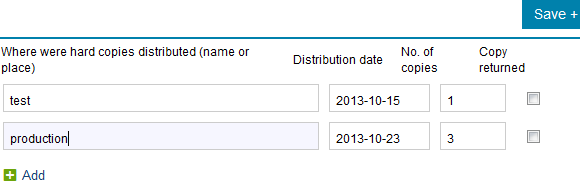
Record the distribution. Write the name or the place where the hard copies were distributed, and enter the date and the number of copies.
Jeśli dokument trzeba rozdać także w wersji papierowej, możesz zapisać rozdział kopii dla każdej wersji dokumentu.
-
Otwórz dokument.
-
Przejdź do historii wersji. Otwórz kartę Historia wersji.
-
Otwórz kopie papierowe. Kliknij ikonę Kopie papierowe.
-
Zapisz rozdział kopii. Wpisz nazwisko osoby lub miejsce, do którego trafiły kopie papierowe, oraz datę i liczbę kopii.
Potrzebujesz dalszej pomocy?
Napisz do nas. W dni robocze zwykle odpowiadamy w ciągu godziny.