在哪里记录某个版本纸质副本的分发情况
本文由英文机器翻译。 当前显示英文原文。
If a document has to be distributed in hard copies as well, you can make a note of the distribution for each document version.
-
Open the document.
-
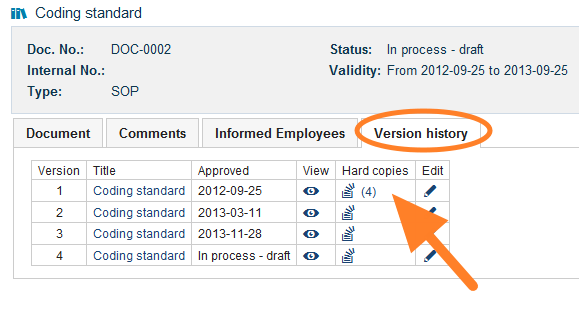
Go to the version history. Open the Version history tab.
-
Open the hard copies. Click the Hard copies icon.
-
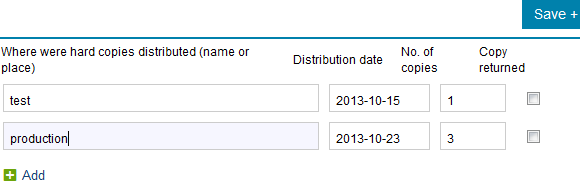
Record the distribution. Write the name or the place where the hard copies were distributed, and enter the date and the number of copies.
如果文档还需要以纸质副本形式分发,您可以为每个文档版本记录分发情况。
-
打开文档。
-
进入版本历史。 打开 版本历史 选项卡。
-
打开纸质副本。 点击 纸质副本 图标。
-
记录分发情况。 填写纸质副本分发对象的姓名或分发地点,并输入日期和份数。
还需要帮助吗?
请给我们留言。工作日我们通常会在一小时内回复。