Kde zaznamenať distribúciu tlačených kópií konkrétnej verzie
Strojový preklad z angličtiny. Zobrazený je anglický originál.
If a document has to be distributed in hard copies as well, you can make a note of the distribution for each document version.
-
Open the document.
-
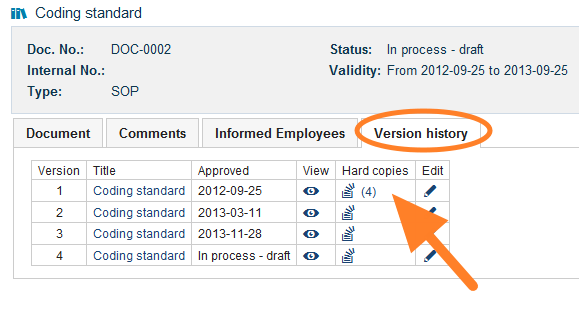
Go to the version history. Open the Version history tab.
-
Open the hard copies. Click the Hard copies icon.
-
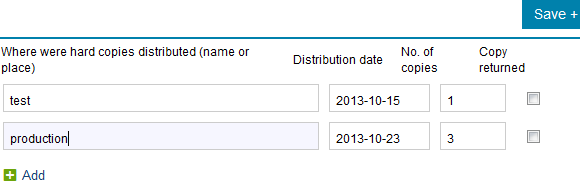
Record the distribution. Write the name or the place where the hard copies were distributed, and enter the date and the number of copies.
Ak sa dokument musí distribuovať aj v tlačenej podobe, distribúciu môžete zaznamenať pri každej verzii dokumentu.
-
Otvorte dokument.
-
Prejdite do histórie verzií. Otvorte kartu História verzií.
-
Otvorte tlačené kópie. Kliknite na ikonu Tlačené kópie.
-
Zaznamenajte distribúciu. Napíšte meno alebo miesto, kam boli tlačené kópie distribuované, a zadajte dátum a počet kópií.
Potrebujete ďalšiu pomoc?
Napíšte nám. V pracovné dni zvyčajne odpovedáme do hodiny.