Jak wyświetlić komentarze w wierszu
Tłumaczenie maszynowe z angielskiego. Wyświetlany jest oryginał po angielsku.
You can view all actions and comments right next to your dashboard. You can also view comments in a row next to your projects, org. units or partners per time period.
Watch the video guide, or follow the text instructions below.
View comments in a row
-
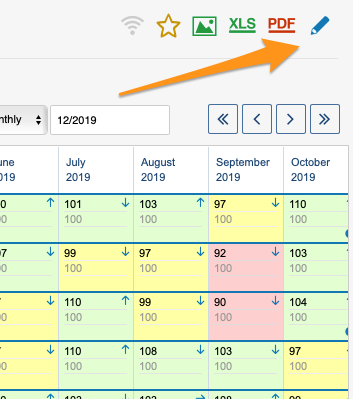
Open the dashboard settings. Go to the metric dashboard settings: click the edit pencil.
-
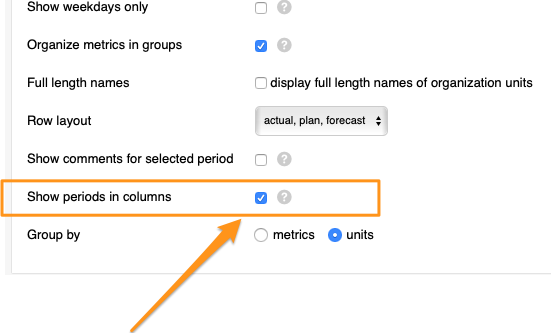
Show periods in columns. Tick the Show periods in columns box.
-
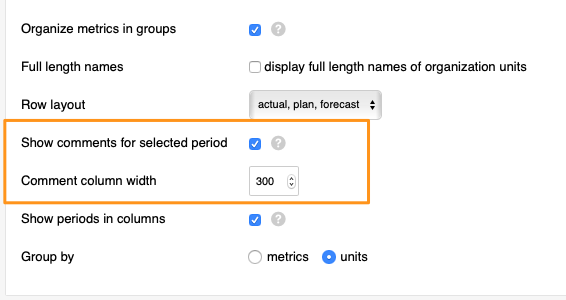
Show comments for the selected period. After you tick the box, tick another box above it, Show comments for selected period (you can also select the comment column width), and save your changes.
-
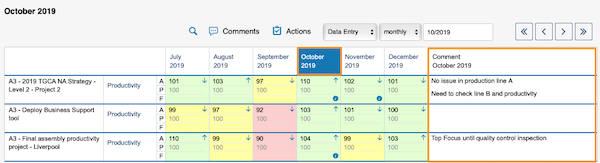
View the comments. Select a time period in your dashboard and view the comments.
Możesz wyświetlić wszystkie działania i komentarze tuż obok dashboardu. Komentarze możesz też wyświetlić w wierszu obok projektów, jednostek organizacyjnych lub partnerów dla danego okresu.
Obejrzyj samouczek wideo albo skorzystaj z instrukcji tekstowej poniżej.
Wyświetl komentarze w wierszu
-
Otwórz ustawienia dashboardu. Przejdź do ustawień dashboardu KPI: kliknij ołówek edycji.
-
Pokaż okresy w kolumnach. Zaznacz pole Pokaż okresy w kolumnach.
-
Pokaż komentarze dla wybranego okresu. Po zaznaczeniu tego pola zaznacz kolejne, nad nim: Pokaż komentarze dla wybranego okresu (możesz też wybrać szerokość kolumny komentarzy), i zapisz zmiany.
-
Wyświetl komentarze. Wybierz okres w dashboardzie i przejrzyj komentarze.
Potrzebujesz dalszej pomocy?
Napisz do nas. W dni robocze zwykle odpowiadamy w ciągu godziny.