O que acontece se eu arquivar uma tarefa não concluída? Posso reativá-la?
Tradução automática do inglês. Exibindo o original em inglês.
If you archive an incomplete task, the system closes it automatically. If needed, you can reactivate the archived task.
Archive a task
-
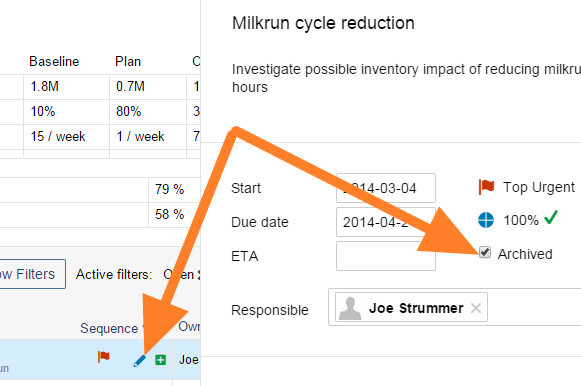
Open the task. Click the task’s Edit icon.
-
Archive it. Tick the Archived box.
Reactivate an archived task
-
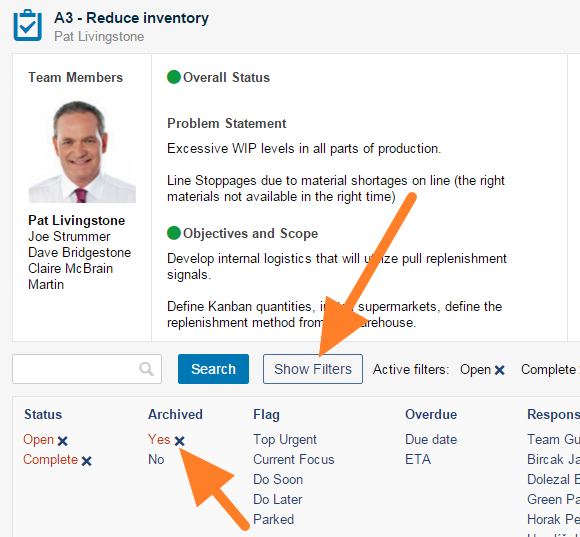
Filter the archived tasks. Click the Show filters button and check that Yes is selected in the Archived column.
-
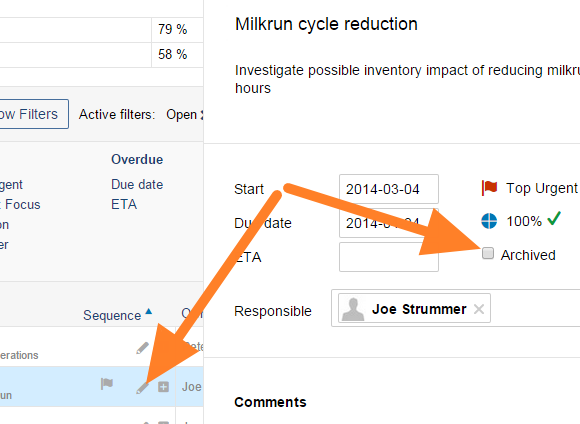
Open the task. Click the task’s Edit icon.
-
Un-archive it. Untick the Archived box.
-
Save. Save and close the task.
-
Check the result. The task is reactivated.
Se você arquivar uma tarefa não concluída, o sistema a encerra automaticamente. Se precisar, você pode reativar a tarefa arquivada.
Arquivar uma tarefa
-
Abra a tarefa. Clique no ícone Editar da tarefa.
-
Arquive a tarefa. Marque a caixa Arquivada.
Reativar uma tarefa arquivada
-
Filtre as tarefas arquivadas. Clique no botão Mostrar filtros e confira se Sim está selecionado na coluna Arquivada.
-
Abra a tarefa. Clique no ícone Editar da tarefa.
-
Desarquive a tarefa. Desmarque a caixa Arquivada.
-
Salve. Salve e feche a tarefa.
-
Confira o resultado. A tarefa foi reativada.
Precisa de mais ajuda?
Escreva para nós. Em dias úteis, costumamos responder em até uma hora.