归档未完成的任务会怎样?可以重新启用吗?
本文由英文机器翻译。 当前显示英文原文。
If you archive an incomplete task, the system closes it automatically. If needed, you can reactivate the archived task.
Archive a task
-
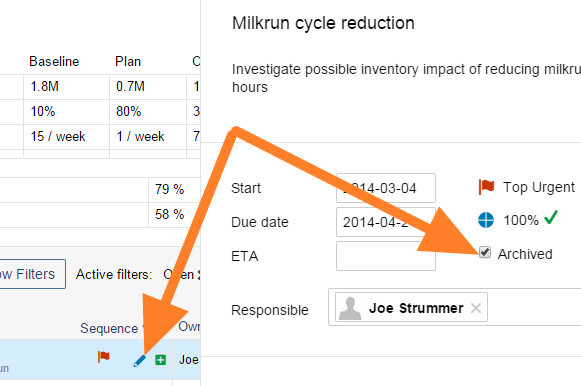
Open the task. Click the task’s Edit icon.
-
Archive it. Tick the Archived box.
Reactivate an archived task
-
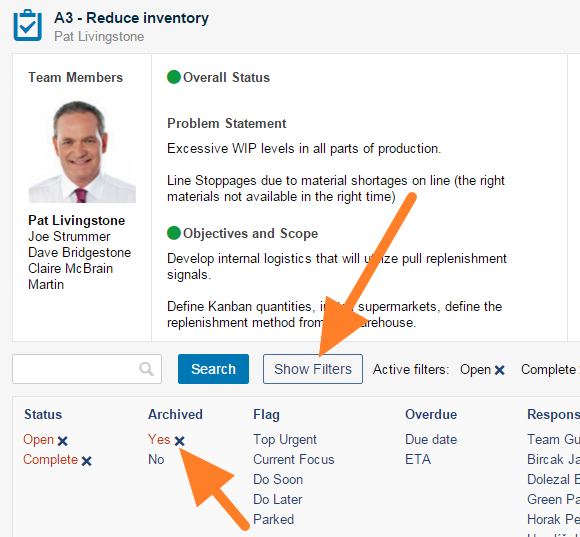
Filter the archived tasks. Click the Show filters button and check that Yes is selected in the Archived column.
-
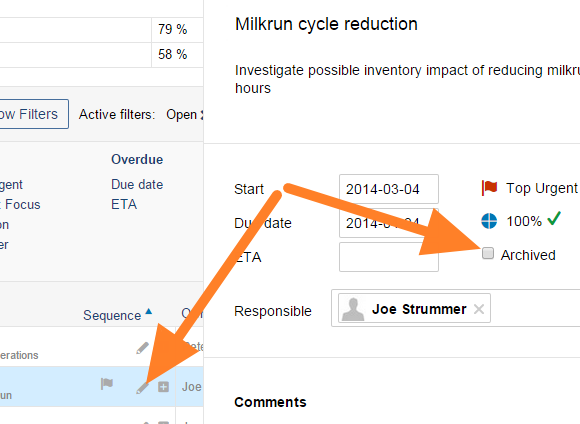
Open the task. Click the task’s Edit icon.
-
Un-archive it. Untick the Archived box.
-
Save. Save and close the task.
-
Check the result. The task is reactivated.
归档未完成的任务时,系统会自动将其关闭。如有需要,您可以重新启用已归档的任务。
归档任务
-
打开任务。 点击任务的 编辑 图标。
-
归档任务。 勾选 已归档 复选框。
重新启用已归档的任务
-
筛选已归档的任务。 点击 显示筛选 按钮,确认 已归档 列中选择的是 是。
-
打开任务。 点击任务的 编辑 图标。
-
取消归档。 取消勾选 已归档 复选框。
-
保存。 保存并关闭任务。
-
查看结果。 任务已重新启用。
还需要帮助吗?
请给我们留言。工作日我们通常会在一小时内回复。