Métricas calculadas e fórmulas avançadas
Tradução automática do inglês. Exibindo o original em inglês.
Formula examples
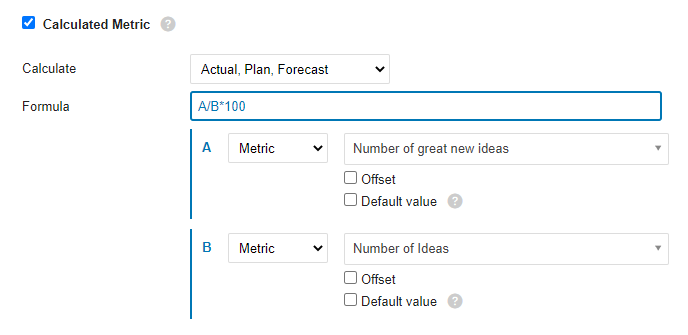
Ratio (percentage): A/B*100
Divide metric A by metric B and multiply by 100 to get a percentage.
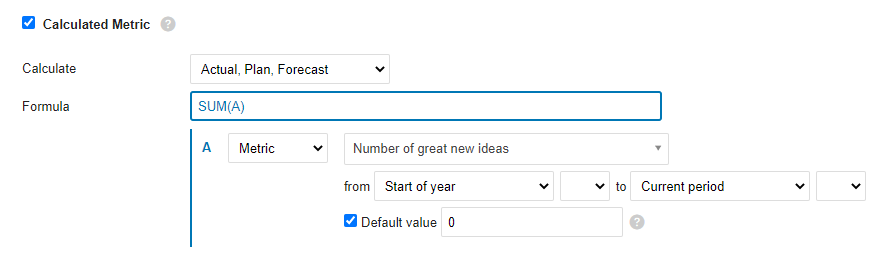
YTD
The YTD value is calculated as the sum of all values from the beginning of the year to the current period. If values are missing for any number of periods, use the Default value option to fill the gaps and make sure the formula is calculated.
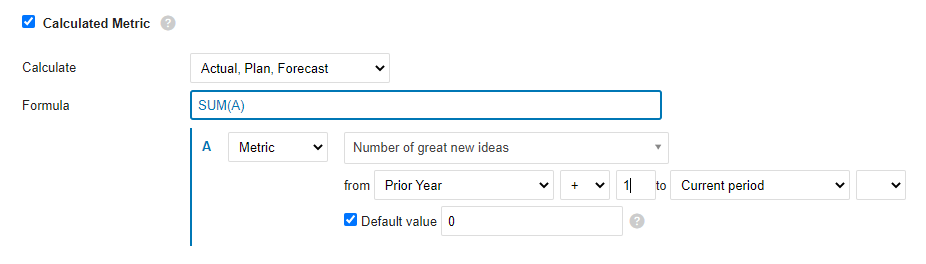
Rolling YTD
Similar to YTD: sums all the values from the prior-year period (+1, so that it starts with the next period of the prior year) to the current period.
Mathematical functions
ABS
Returns the absolute value of a number, which is the number without its sign.
ABS(number)The syntax of the ABS function has the following arguments:
- Number: Required argument. The real number whose absolute value you want to find out.
LOG10
Returns the base-10 logarithm of a number.
LOG10(number)The syntax of the LOG10 function has the following arguments:
- Number: Required argument. The positive real number whose base-10 logarithm you want to calculate.
MOD
Returns the signed remainder after one number is divided by another.
MOD(dividend, divisor)The syntax of the MOD function has the following arguments:
- Dividend: Required argument. The number divided by the divisor.
- Divisor: Required argument. The number by which the dividend is divided.
POWER
Returns a number raised to a power.
POWER(number, power)The syntax of the POWER function has the following arguments:
- Number: Required argument. The base of the exponentiation. It can be any real number.
- Power: Required argument. The exponent to which the base is raised.
ROUND
Rounds a number to the specified number of digits.
ROUND(number, digits)The syntax of the ROUND function has the following arguments:
- Number: Required argument. The number you want to round.
- Digits: Required argument. The number of digits to which you want to round the number.
ROUNDUP
Rounds a number up, away from zero.
ROUNDUP(number, digits)The syntax of the ROUNDUP function has the following arguments:
- Number: Required argument. Any real number you want to round up.
- Digits: Required argument. The number of decimal places to which the number is rounded.
ROUNDDOWN
Rounds a number down, toward zero.
ROUNDDOWN(number, digits)The syntax of the ROUNDDOWN function has the following arguments:
- Number: Required argument. Any real number you want to round down.
- Digits: Required argument. The number of decimal places to which the number is rounded.
SQRT
Returns the square root of a number.
SQRT(number)The syntax of the SQRT function has the following arguments:
- Number: Required argument. The number whose square root you want to know.
TRUNC
Truncates a number to an integer by removing its decimal (fractional) part.
TRUNC(number, [digits])The syntax of the TRUNC function has the following arguments:
- Number: Required argument. The number you want to truncate.
- Decimals: Optional argument. The number of decimal places of the truncated number. The default is 0 (zero).
Logic functions
AND
Returns TRUE if all arguments are TRUE.
AND(A, B)The syntax of the AND function has the following arguments:
- A: Required argument. Condition.
- B: Required argument. Condition.
OR
Returns TRUE if at least one argument is TRUE.
OR(A, B)The syntax of the OR function has the following arguments:
- A: Required argument. Condition.
- B: Required argument. Condition.
XOR
Returns the logical exclusive OR of all arguments.
XOR(A, B)The syntax of the XOR function has the following arguments:
- A: Required argument. Condition.
- B: Required argument. Condition.
NOT
Performs a logical negation of its argument.
NOT(A)The syntax of the NOT function has the following arguments:
- A: Required argument. Condition.
TRUE
Returns the logical value TRUE.
FALSE
Returns the logical value FALSE.
IF
The IF function, one of the most popular functions in TeamGuru, lets you logically compare a value with your expectations.
An IF statement can have two results. The first result is returned if the condition evaluates as true; otherwise, the second result is returned.
IF(condition, a, b)The syntax of the IF function has the following arguments:
- condition: Required argument. The condition to evaluate.
- a: Required argument. The result of the IF function if the condition is TRUE.
- b: Required argument. The result of the IF function if the condition is FALSE.
IFERROR
Returns the specified value if the formula evaluates to an error; otherwise, returns the result of the formula.
IFERROR(value, value_on_error)The syntax of the IFERROR function has the following arguments:
- value: Required argument. The argument tested for an error.
- value_on_error: Required argument. The value returned if the formula results in an error.
ISNULL
Returns TRUE if the result of the formula is an empty value.
ISNULL(value)The syntax of the ISNULL function has the following arguments:
- value: Required argument. The argument tested for an empty or null value.
Statistical functions (over several periods)
AVERAGE
Calculates the average (arithmetic mean) of the values.
AVERAGE(values_list)The syntax of the AVERAGE function has the following arguments:
- values_list: Required argument. A list of values, defined in TeamGuru as a range of periods.
SUM
Calculates the sum of all values.
SUM(values_list)The syntax of the SUM function has the following arguments:
- values_list: Required argument. A list of values, defined in TeamGuru as a range of periods.
COUNT
Returns the number of values in a list.
COUNT(values_list)The syntax of the COUNT function has the following arguments:
- values_list: Required argument. A list of values, defined in TeamGuru as a range of periods.
MAX
Returns the maximum value from a list of values.
MAX(values_list)The syntax of the MAX function has the following arguments:
- values_list: Required argument. A list of values, defined in TeamGuru as a range of periods.
MIN
Returns the minimum value from a list of values.
MIN(values_list)The syntax of the MIN function has the following arguments:
- values_list: Required argument. A list of values, defined in TeamGuru as a range of periods.
MEDIAN
Returns the median of the given numbers. The median is the number in the middle of a set of numbers.
MEDIAN(values_list)The syntax of the MEDIAN function has the following arguments:
- values_list: Required argument. A list of values, defined in TeamGuru as a range of periods.
STDEVP
Returns the standard deviation of a population (base set) determined from a random selection. The standard deviation expresses how much the values differ from the mean value.
STDEVP(values_list)The syntax of the STDEVP function has the following arguments:
- values_list: Required argument. A list of values, defined in TeamGuru as a range of periods.
STDEVA
Calculates the standard deviation of a sample (selection). The standard deviation is the degree to which the values vary from the mean value.
STDEVA(values_list)The syntax of the STDEVA function has the following arguments:
- values_list: Required argument. A list of values, defined in TeamGuru as a range of periods.
LAST
Returns the last value entered in the list of values. Empty and null values are ignored.
LAST(values_list)The syntax of the LAST function has the following arguments:
- values_list: Required argument. A list of values, defined in TeamGuru as a range of periods.
Exemplos de fórmulas
Razão (percentual): A/B*100
Divida a métrica A pela métrica B e multiplique por 100 para obter um percentual.
YTD
O valor YTD é a soma de todos os valores desde o início do ano até o período atual. Se faltarem valores em alguns períodos, use a opção Valor padrão para preencher as lacunas e garantir que a fórmula seja calculada.
YTD móvel
Semelhante ao YTD: soma todos os valores desde o período correspondente do ano anterior (+1, para começar no período seguinte do ano anterior) até o período atual.
Funções matemáticas
ABS
Retorna o valor absoluto de um número, ou seja, o número sem o sinal.
ABS(number)A sintaxe da função ABS tem os seguintes argumentos:
- Número: argumento obrigatório. O número real cujo valor absoluto você quer obter.
LOG10
Retorna o logaritmo de base 10 de um número.
LOG10(number)A sintaxe da função LOG10 tem os seguintes argumentos:
- Número: argumento obrigatório. O número real positivo cujo logaritmo de base 10 você quer calcular.
MOD
Retorna o resto, com sinal, da divisão de um número por outro.
MOD(dividend, divisor)A sintaxe da função MOD tem os seguintes argumentos:
- Dividendo: argumento obrigatório. O número dividido pelo divisor.
- Divisor: argumento obrigatório. O número pelo qual o dividendo é dividido.
POWER
Retorna um número elevado a uma potência.
POWER(number, power)A sintaxe da função POWER tem os seguintes argumentos:
- Número: argumento obrigatório. A base da potência. Pode ser qualquer número real.
- Potência: argumento obrigatório. O expoente ao qual a base é elevada.
ROUND
Arredonda um número para a quantidade de dígitos indicada.
ROUND(number, digits)A sintaxe da função ROUND tem os seguintes argumentos:
- Número: argumento obrigatório. O número que você quer arredondar.
- Dígitos: argumento obrigatório. A quantidade de dígitos para a qual você quer arredondar o número.
ROUNDUP
Arredonda um número para cima, afastando-o de zero.
ROUNDUP(number, digits)A sintaxe da função ROUNDUP tem os seguintes argumentos:
- Número: argumento obrigatório. Qualquer número real que você quer arredondar para cima.
- Dígitos: argumento obrigatório. A quantidade de casas decimais para a qual o número é arredondado.
ROUNDDOWN
Arredonda um número para baixo, aproximando-o de zero.
ROUNDDOWN(number, digits)A sintaxe da função ROUNDDOWN tem os seguintes argumentos:
- Número: argumento obrigatório. Qualquer número real que você quer arredondar para baixo.
- Dígitos: argumento obrigatório. A quantidade de casas decimais para a qual o número é arredondado.
SQRT
Retorna a raiz quadrada de um número.
SQRT(number)A sintaxe da função SQRT tem os seguintes argumentos:
- Número: argumento obrigatório. O número cuja raiz quadrada você quer saber.
TRUNC
Trunca um número para inteiro, removendo a parte decimal (fracionária).
TRUNC(number, [digits])A sintaxe da função TRUNC tem os seguintes argumentos:
- Número: argumento obrigatório. O número que você quer truncar.
- Decimais: argumento opcional. A quantidade de casas decimais do número truncado. O padrão é 0 (zero).
Funções lógicas
AND
Retorna TRUE se todos os argumentos forem TRUE.
AND(A, B)A sintaxe da função AND tem os seguintes argumentos:
- A: argumento obrigatório. Condição.
- B: argumento obrigatório. Condição.
OR
Retorna TRUE se pelo menos um argumento for TRUE.
OR(A, B)A sintaxe da função OR tem os seguintes argumentos:
- A: argumento obrigatório. Condição.
- B: argumento obrigatório. Condição.
XOR
Retorna o OU exclusivo lógico de todos os argumentos.
XOR(A, B)A sintaxe da função XOR tem os seguintes argumentos:
- A: argumento obrigatório. Condição.
- B: argumento obrigatório. Condição.
NOT
Inverte o valor lógico do argumento.
NOT(A)A sintaxe da função NOT tem os seguintes argumentos:
- A: argumento obrigatório. Condição.
TRUE
Retorna o valor lógico TRUE.
FALSE
Retorna o valor lógico FALSE.
IF
A função IF, uma das mais usadas no TeamGuru, permite comparar logicamente um valor com o que você espera.
Uma instrução IF pode ter dois resultados. O primeiro é retornado se a condição for verdadeira; caso contrário, é retornado o segundo.
IF(condition, a, b)A sintaxe da função IF tem os seguintes argumentos:
- condition: argumento obrigatório. A condição a avaliar.
- a: argumento obrigatório. O resultado da função IF se a condição for TRUE.
- b: argumento obrigatório. O resultado da função IF se a condição for FALSE.
IFERROR
Retorna o valor indicado se a fórmula resultar em erro; caso contrário, retorna o resultado da fórmula.
IFERROR(value, value_on_error)A sintaxe da função IFERROR tem os seguintes argumentos:
- value: argumento obrigatório. O argumento verificado quanto a erro.
- value_on_error: argumento obrigatório. O valor retornado se a fórmula resultar em erro.
ISNULL
Retorna TRUE se o resultado da fórmula for um valor vazio.
ISNULL(value)A sintaxe da função ISNULL tem os seguintes argumentos:
- value: argumento obrigatório. O argumento verificado quanto a valor vazio ou nulo.
Funções estatísticas (em vários períodos)
AVERAGE
Calcula a média (média aritmética) dos valores.
AVERAGE(values_list)A sintaxe da função AVERAGE tem os seguintes argumentos:
- values_list: argumento obrigatório. Uma lista de valores, definida no TeamGuru como um intervalo de períodos.
SUM
Calcula a soma de todos os valores.
SUM(values_list)A sintaxe da função SUM tem os seguintes argumentos:
- values_list: argumento obrigatório. Uma lista de valores, definida no TeamGuru como um intervalo de períodos.
COUNT
Retorna a quantidade de valores de uma lista.
COUNT(values_list)A sintaxe da função COUNT tem os seguintes argumentos:
- values_list: argumento obrigatório. Uma lista de valores, definida no TeamGuru como um intervalo de períodos.
MAX
Retorna o maior valor de uma lista de valores.
MAX(values_list)A sintaxe da função MAX tem os seguintes argumentos:
- values_list: argumento obrigatório. Uma lista de valores, definida no TeamGuru como um intervalo de períodos.
MIN
Retorna o menor valor de uma lista de valores.
MIN(values_list)A sintaxe da função MIN tem os seguintes argumentos:
- values_list: argumento obrigatório. Uma lista de valores, definida no TeamGuru como um intervalo de períodos.
MEDIAN
Retorna a mediana dos números informados. A mediana é o número central de um conjunto de números.
MEDIAN(values_list)A sintaxe da função MEDIAN tem os seguintes argumentos:
- values_list: argumento obrigatório. Uma lista de valores, definida no TeamGuru como um intervalo de períodos.
STDEVP
Retorna o desvio padrão de uma população (conjunto base) determinado a partir de uma seleção aleatória. O desvio padrão mostra o quanto os valores se afastam da média.
STDEVP(values_list)A sintaxe da função STDEVP tem os seguintes argumentos:
- values_list: argumento obrigatório. Uma lista de valores, definida no TeamGuru como um intervalo de períodos.
STDEVA
Calcula o desvio padrão de uma amostra (seleção). O desvio padrão é o grau em que os valores variam em relação à média.
STDEVA(values_list)A sintaxe da função STDEVA tem os seguintes argumentos:
- values_list: argumento obrigatório. Uma lista de valores, definida no TeamGuru como um intervalo de períodos.
LAST
Retorna o último valor informado na lista de valores. Valores vazios e nulos são ignorados.
LAST(values_list)A sintaxe da função LAST tem os seguintes argumentos:
- values_list: argumento obrigatório. Uma lista de valores, definida no TeamGuru como um intervalo de períodos.
Precisa de mais ajuda?
Escreva para nós. Em dias úteis, costumamos responder em até uma hora.