Wskaźniki wyliczane i zaawansowane formuły
Tłumaczenie maszynowe z angielskiego. Wyświetlany jest oryginał po angielsku.
Formula examples
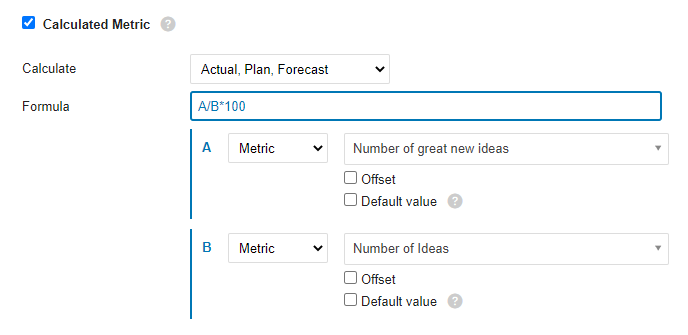
Ratio (percentage): A/B*100
Divide metric A by metric B and multiply by 100 to get a percentage.
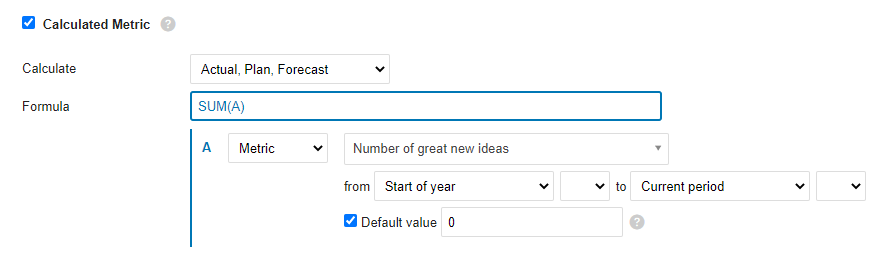
YTD
The YTD value is calculated as the sum of all values from the beginning of the year to the current period. If values are missing for any number of periods, use the Default value option to fill the gaps and make sure the formula is calculated.
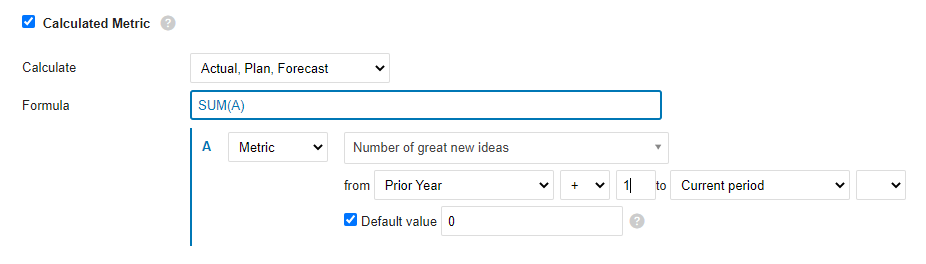
Rolling YTD
Similar to YTD: sums all the values from the prior-year period (+1, so that it starts with the next period of the prior year) to the current period.
Mathematical functions
ABS
Returns the absolute value of a number, which is the number without its sign.
ABS(number)The syntax of the ABS function has the following arguments:
- Number: Required argument. The real number whose absolute value you want to find out.
LOG10
Returns the base-10 logarithm of a number.
LOG10(number)The syntax of the LOG10 function has the following arguments:
- Number: Required argument. The positive real number whose base-10 logarithm you want to calculate.
MOD
Returns the signed remainder after one number is divided by another.
MOD(dividend, divisor)The syntax of the MOD function has the following arguments:
- Dividend: Required argument. The number divided by the divisor.
- Divisor: Required argument. The number by which the dividend is divided.
POWER
Returns a number raised to a power.
POWER(number, power)The syntax of the POWER function has the following arguments:
- Number: Required argument. The base of the exponentiation. It can be any real number.
- Power: Required argument. The exponent to which the base is raised.
ROUND
Rounds a number to the specified number of digits.
ROUND(number, digits)The syntax of the ROUND function has the following arguments:
- Number: Required argument. The number you want to round.
- Digits: Required argument. The number of digits to which you want to round the number.
ROUNDUP
Rounds a number up, away from zero.
ROUNDUP(number, digits)The syntax of the ROUNDUP function has the following arguments:
- Number: Required argument. Any real number you want to round up.
- Digits: Required argument. The number of decimal places to which the number is rounded.
ROUNDDOWN
Rounds a number down, toward zero.
ROUNDDOWN(number, digits)The syntax of the ROUNDDOWN function has the following arguments:
- Number: Required argument. Any real number you want to round down.
- Digits: Required argument. The number of decimal places to which the number is rounded.
SQRT
Returns the square root of a number.
SQRT(number)The syntax of the SQRT function has the following arguments:
- Number: Required argument. The number whose square root you want to know.
TRUNC
Truncates a number to an integer by removing its decimal (fractional) part.
TRUNC(number, [digits])The syntax of the TRUNC function has the following arguments:
- Number: Required argument. The number you want to truncate.
- Decimals: Optional argument. The number of decimal places of the truncated number. The default is 0 (zero).
Logic functions
AND
Returns TRUE if all arguments are TRUE.
AND(A, B)The syntax of the AND function has the following arguments:
- A: Required argument. Condition.
- B: Required argument. Condition.
OR
Returns TRUE if at least one argument is TRUE.
OR(A, B)The syntax of the OR function has the following arguments:
- A: Required argument. Condition.
- B: Required argument. Condition.
XOR
Returns the logical exclusive OR of all arguments.
XOR(A, B)The syntax of the XOR function has the following arguments:
- A: Required argument. Condition.
- B: Required argument. Condition.
NOT
Performs a logical negation of its argument.
NOT(A)The syntax of the NOT function has the following arguments:
- A: Required argument. Condition.
TRUE
Returns the logical value TRUE.
FALSE
Returns the logical value FALSE.
IF
The IF function, one of the most popular functions in TeamGuru, lets you logically compare a value with your expectations.
An IF statement can have two results. The first result is returned if the condition evaluates as true; otherwise, the second result is returned.
IF(condition, a, b)The syntax of the IF function has the following arguments:
- condition: Required argument. The condition to evaluate.
- a: Required argument. The result of the IF function if the condition is TRUE.
- b: Required argument. The result of the IF function if the condition is FALSE.
IFERROR
Returns the specified value if the formula evaluates to an error; otherwise, returns the result of the formula.
IFERROR(value, value_on_error)The syntax of the IFERROR function has the following arguments:
- value: Required argument. The argument tested for an error.
- value_on_error: Required argument. The value returned if the formula results in an error.
ISNULL
Returns TRUE if the result of the formula is an empty value.
ISNULL(value)The syntax of the ISNULL function has the following arguments:
- value: Required argument. The argument tested for an empty or null value.
Statistical functions (over several periods)
AVERAGE
Calculates the average (arithmetic mean) of the values.
AVERAGE(values_list)The syntax of the AVERAGE function has the following arguments:
- values_list: Required argument. A list of values, defined in TeamGuru as a range of periods.
SUM
Calculates the sum of all values.
SUM(values_list)The syntax of the SUM function has the following arguments:
- values_list: Required argument. A list of values, defined in TeamGuru as a range of periods.
COUNT
Returns the number of values in a list.
COUNT(values_list)The syntax of the COUNT function has the following arguments:
- values_list: Required argument. A list of values, defined in TeamGuru as a range of periods.
MAX
Returns the maximum value from a list of values.
MAX(values_list)The syntax of the MAX function has the following arguments:
- values_list: Required argument. A list of values, defined in TeamGuru as a range of periods.
MIN
Returns the minimum value from a list of values.
MIN(values_list)The syntax of the MIN function has the following arguments:
- values_list: Required argument. A list of values, defined in TeamGuru as a range of periods.
MEDIAN
Returns the median of the given numbers. The median is the number in the middle of a set of numbers.
MEDIAN(values_list)The syntax of the MEDIAN function has the following arguments:
- values_list: Required argument. A list of values, defined in TeamGuru as a range of periods.
STDEVP
Returns the standard deviation of a population (base set) determined from a random selection. The standard deviation expresses how much the values differ from the mean value.
STDEVP(values_list)The syntax of the STDEVP function has the following arguments:
- values_list: Required argument. A list of values, defined in TeamGuru as a range of periods.
STDEVA
Calculates the standard deviation of a sample (selection). The standard deviation is the degree to which the values vary from the mean value.
STDEVA(values_list)The syntax of the STDEVA function has the following arguments:
- values_list: Required argument. A list of values, defined in TeamGuru as a range of periods.
LAST
Returns the last value entered in the list of values. Empty and null values are ignored.
LAST(values_list)The syntax of the LAST function has the following arguments:
- values_list: Required argument. A list of values, defined in TeamGuru as a range of periods.
Przykłady formuł
Stosunek (procent): A/B*100
Podziel wskaźnik A przez wskaźnik B i pomnóż przez 100, aby otrzymać wartość procentową.
YTD
Wartość YTD to suma wszystkich wartości od początku roku do bieżącego okresu. Jeśli w którychś okresach brakuje wartości, użyj opcji Wartość domyślna, aby uzupełnić luki i mieć pewność, że formuła się przeliczy.
Rolling YTD
Działa podobnie jak YTD: sumuje wszystkie wartości od okresu sprzed roku (+1, czyli od następnego okresu poprzedniego roku) do bieżącego okresu.
Funkcje matematyczne
ABS
Zwraca wartość bezwzględną liczby, czyli liczbę bez znaku.
ABS(number)Argumenty funkcji ABS:
- Number: argument wymagany. Liczba rzeczywista, której wartość bezwzględną chcesz poznać.
LOG10
Zwraca logarytm dziesiętny liczby.
LOG10(number)Argumenty funkcji LOG10:
- Number: argument wymagany. Dodatnia liczba rzeczywista, której logarytm dziesiętny chcesz obliczyć.
MOD
Zwraca resztę z dzielenia jednej liczby przez drugą, ze znakiem.
MOD(dividend, divisor)Argumenty funkcji MOD:
- Dividend: argument wymagany. Liczba dzielona przez dzielnik (dzielna).
- Divisor: argument wymagany. Liczba, przez którą dzielisz dzielną (dzielnik).
POWER
Zwraca liczbę podniesioną do potęgi.
POWER(number, power)Argumenty funkcji POWER:
- Number: argument wymagany. Podstawa potęgi. Może to być dowolna liczba rzeczywista.
- Power: argument wymagany. Wykładnik, do którego podnosisz podstawę.
ROUND
Zaokrągla liczbę do podanej liczby cyfr.
ROUND(number, digits)Argumenty funkcji ROUND:
- Number: argument wymagany. Liczba, którą chcesz zaokrąglić.
- Digits: argument wymagany. Liczba cyfr, do której chcesz zaokrąglić liczbę.
ROUNDUP
Zaokrągla liczbę w górę, czyli od zera.
ROUNDUP(number, digits)Argumenty funkcji ROUNDUP:
- Number: argument wymagany. Dowolna liczba rzeczywista, którą chcesz zaokrąglić w górę.
- Digits: argument wymagany. Liczba miejsc po przecinku, do której zaokrąglasz liczbę.
ROUNDDOWN
Zaokrągla liczbę w dół, czyli w stronę zera.
ROUNDDOWN(number, digits)Argumenty funkcji ROUNDDOWN:
- Number: argument wymagany. Dowolna liczba rzeczywista, którą chcesz zaokrąglić w dół.
- Digits: argument wymagany. Liczba miejsc po przecinku, do której zaokrąglasz liczbę.
SQRT
Zwraca pierwiastek kwadratowy liczby.
SQRT(number)Argumenty funkcji SQRT:
- Number: argument wymagany. Liczba, której pierwiastek kwadratowy chcesz poznać.
TRUNC
Obcina liczbę do liczby całkowitej, usuwając jej część dziesiętną (ułamkową).
TRUNC(number, [digits])Argumenty funkcji TRUNC:
- Number: argument wymagany. Liczba, którą chcesz obciąć.
- Decimals: argument opcjonalny. Liczba miejsc po przecinku obciętej liczby. Domyślnie 0 (zero).
Funkcje logiczne
AND
Zwraca TRUE, jeśli wszystkie argumenty mają wartość TRUE.
AND(A, B)Argumenty funkcji AND:
- A: argument wymagany. Warunek.
- B: argument wymagany. Warunek.
OR
Zwraca TRUE, jeśli co najmniej jeden argument ma wartość TRUE.
OR(A, B)Argumenty funkcji OR:
- A: argument wymagany. Warunek.
- B: argument wymagany. Warunek.
XOR
Zwraca wynik logicznej alternatywy wykluczającej wszystkich argumentów.
XOR(A, B)Argumenty funkcji XOR:
- A: argument wymagany. Warunek.
- B: argument wymagany. Warunek.
NOT
Zwraca logiczną negację argumentu.
NOT(A)Argumenty funkcji NOT:
- A: argument wymagany. Warunek.
TRUE
Zwraca wartość logiczną TRUE.
FALSE
Zwraca wartość logiczną FALSE.
IF
Funkcja IF, jedna z najczęściej używanych w TeamGuru, pozwala logicznie porównać wartość z oczekiwaniami.
Instrukcja IF może dać dwa wyniki. Pierwszy zwraca, gdy warunek jest spełniony, a w przeciwnym razie drugi.
IF(condition, a, b)Argumenty funkcji IF:
- condition: argument wymagany. Warunek do sprawdzenia.
- a: argument wymagany. Wynik funkcji IF, gdy warunek ma wartość TRUE.
- b: argument wymagany. Wynik funkcji IF, gdy warunek ma wartość FALSE.
IFERROR
Zwraca podaną wartość, jeśli formuła daje błąd, a w przeciwnym razie wynik formuły.
IFERROR(value, value_on_error)Argumenty funkcji IFERROR:
- value: argument wymagany. Argument sprawdzany pod kątem błędu.
- value_on_error: argument wymagany. Wartość zwracana, gdy formuła daje błąd.
ISNULL
Zwraca TRUE, jeśli wynikiem formuły jest pusta wartość.
ISNULL(value)Argumenty funkcji ISNULL:
- value: argument wymagany. Argument sprawdzany pod kątem pustej wartości lub null.
Funkcje statystyczne (dla kilku okresów)
AVERAGE
Oblicza średnią (arytmetyczną) z wartości.
AVERAGE(values_list)Argumenty funkcji AVERAGE:
- values_list: argument wymagany. Lista wartości, w TeamGuru określana jako zakres okresów.
SUM
Oblicza sumę wszystkich wartości.
SUM(values_list)Argumenty funkcji SUM:
- values_list: argument wymagany. Lista wartości, w TeamGuru określana jako zakres okresów.
COUNT
Zwraca liczbę wartości na liście.
COUNT(values_list)Argumenty funkcji COUNT:
- values_list: argument wymagany. Lista wartości, w TeamGuru określana jako zakres okresów.
MAX
Zwraca największą wartość z listy wartości.
MAX(values_list)Argumenty funkcji MAX:
- values_list: argument wymagany. Lista wartości, w TeamGuru określana jako zakres okresów.
MIN
Zwraca najmniejszą wartość z listy wartości.
MIN(values_list)Argumenty funkcji MIN:
- values_list: argument wymagany. Lista wartości, w TeamGuru określana jako zakres okresów.
MEDIAN
Zwraca medianę podanych liczb. Mediana to liczba środkowa w zbiorze liczb.
MEDIAN(values_list)Argumenty funkcji MEDIAN:
- values_list: argument wymagany. Lista wartości, w TeamGuru określana jako zakres okresów.
STDEVP
Zwraca odchylenie standardowe populacji (zbioru podstawowego) wyznaczone z losowego wyboru. Odchylenie standardowe pokazuje, jak bardzo wartości odbiegają od średniej.
STDEVP(values_list)Argumenty funkcji STDEVP:
- values_list: argument wymagany. Lista wartości, w TeamGuru określana jako zakres okresów.
STDEVA
Oblicza odchylenie standardowe próby (wyboru). Odchylenie standardowe to miara tego, jak bardzo wartości odbiegają od średniej.
STDEVA(values_list)Argumenty funkcji STDEVA:
- values_list: argument wymagany. Lista wartości, w TeamGuru określana jako zakres okresów.
LAST
Zwraca ostatnią wpisaną wartość z listy wartości. Wartości puste i null są pomijane.
LAST(values_list)Argumenty funkcji LAST:
- values_list: argument wymagany. Lista wartości, w TeamGuru określana jako zakres okresów.
Potrzebujesz dalszej pomocy?
Napisz do nas. W dni robocze zwykle odpowiadamy w ciągu godziny.