Počítané metriky a pokročilé vzorce
Strojový preklad z angličtiny. Zobrazený je anglický originál.
Formula examples
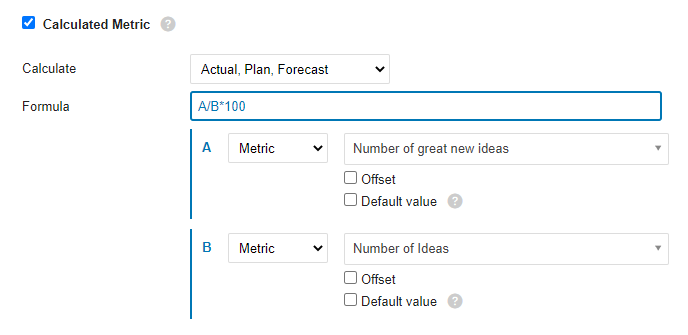
Ratio (percentage): A/B*100
Divide metric A by metric B and multiply by 100 to get a percentage.
YTD
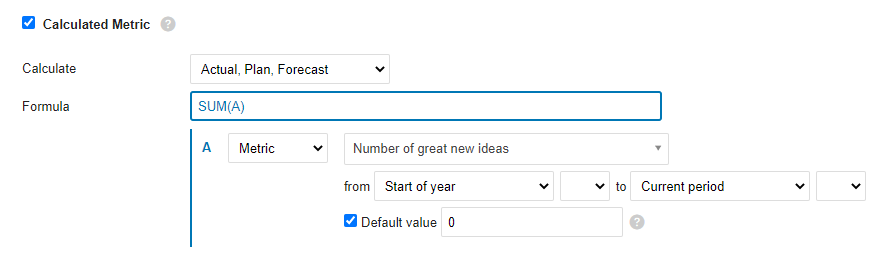
The YTD value is calculated as the sum of all values from the beginning of the year to the current period. If values are missing for any number of periods, use the Default value option to fill the gaps and make sure the formula is calculated.
Rolling YTD
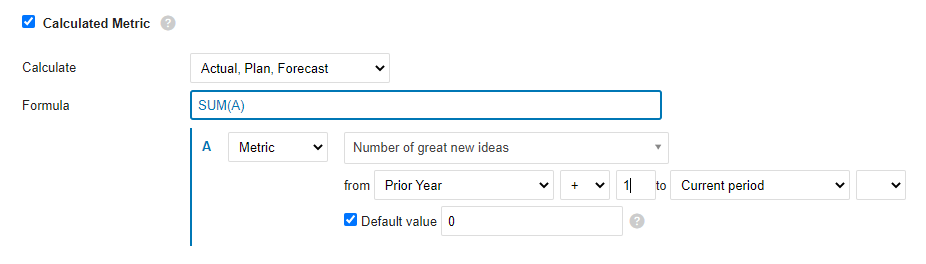
Similar to YTD: sums all the values from the prior-year period (+1, so that it starts with the next period of the prior year) to the current period.
Mathematical functions
ABS
Returns the absolute value of a number, which is the number without its sign.
ABS(number)The syntax of the ABS function has the following arguments:
- Number: Required argument. The real number whose absolute value you want to find out.
LOG10
Returns the base-10 logarithm of a number.
LOG10(number)The syntax of the LOG10 function has the following arguments:
- Number: Required argument. The positive real number whose base-10 logarithm you want to calculate.
MOD
Returns the signed remainder after one number is divided by another.
MOD(dividend, divisor)The syntax of the MOD function has the following arguments:
- Dividend: Required argument. The number divided by the divisor.
- Divisor: Required argument. The number by which the dividend is divided.
POWER
Returns a number raised to a power.
POWER(number, power)The syntax of the POWER function has the following arguments:
- Number: Required argument. The base of the exponentiation. It can be any real number.
- Power: Required argument. The exponent to which the base is raised.
ROUND
Rounds a number to the specified number of digits.
ROUND(number, digits)The syntax of the ROUND function has the following arguments:
- Number: Required argument. The number you want to round.
- Digits: Required argument. The number of digits to which you want to round the number.
ROUNDUP
Rounds a number up, away from zero.
ROUNDUP(number, digits)The syntax of the ROUNDUP function has the following arguments:
- Number: Required argument. Any real number you want to round up.
- Digits: Required argument. The number of decimal places to which the number is rounded.
ROUNDDOWN
Rounds a number down, toward zero.
ROUNDDOWN(number, digits)The syntax of the ROUNDDOWN function has the following arguments:
- Number: Required argument. Any real number you want to round down.
- Digits: Required argument. The number of decimal places to which the number is rounded.
SQRT
Returns the square root of a number.
SQRT(number)The syntax of the SQRT function has the following arguments:
- Number: Required argument. The number whose square root you want to know.
TRUNC
Truncates a number to an integer by removing its decimal (fractional) part.
TRUNC(number, [digits])The syntax of the TRUNC function has the following arguments:
- Number: Required argument. The number you want to truncate.
- Decimals: Optional argument. The number of decimal places of the truncated number. The default is 0 (zero).
Logic functions
AND
Returns TRUE if all arguments are TRUE.
AND(A, B)The syntax of the AND function has the following arguments:
- A: Required argument. Condition.
- B: Required argument. Condition.
OR
Returns TRUE if at least one argument is TRUE.
OR(A, B)The syntax of the OR function has the following arguments:
- A: Required argument. Condition.
- B: Required argument. Condition.
XOR
Returns the logical exclusive OR of all arguments.
XOR(A, B)The syntax of the XOR function has the following arguments:
- A: Required argument. Condition.
- B: Required argument. Condition.
NOT
Performs a logical negation of its argument.
NOT(A)The syntax of the NOT function has the following arguments:
- A: Required argument. Condition.
TRUE
Returns the logical value TRUE.
FALSE
Returns the logical value FALSE.
IF
The IF function, one of the most popular functions in TeamGuru, lets you logically compare a value with your expectations.
An IF statement can have two results. The first result is returned if the condition evaluates as true; otherwise, the second result is returned.
IF(condition, a, b)The syntax of the IF function has the following arguments:
- condition: Required argument. The condition to evaluate.
- a: Required argument. The result of the IF function if the condition is TRUE.
- b: Required argument. The result of the IF function if the condition is FALSE.
IFERROR
Returns the specified value if the formula evaluates to an error; otherwise, returns the result of the formula.
IFERROR(value, value_on_error)The syntax of the IFERROR function has the following arguments:
- value: Required argument. The argument tested for an error.
- value_on_error: Required argument. The value returned if the formula results in an error.
ISNULL
Returns TRUE if the result of the formula is an empty value.
ISNULL(value)The syntax of the ISNULL function has the following arguments:
- value: Required argument. The argument tested for an empty or null value.
Statistical functions (over several periods)
AVERAGE
Calculates the average (arithmetic mean) of the values.
AVERAGE(values_list)The syntax of the AVERAGE function has the following arguments:
- values_list: Required argument. A list of values, defined in TeamGuru as a range of periods.
SUM
Calculates the sum of all values.
SUM(values_list)The syntax of the SUM function has the following arguments:
- values_list: Required argument. A list of values, defined in TeamGuru as a range of periods.
COUNT
Returns the number of values in a list.
COUNT(values_list)The syntax of the COUNT function has the following arguments:
- values_list: Required argument. A list of values, defined in TeamGuru as a range of periods.
MAX
Returns the maximum value from a list of values.
MAX(values_list)The syntax of the MAX function has the following arguments:
- values_list: Required argument. A list of values, defined in TeamGuru as a range of periods.
MIN
Returns the minimum value from a list of values.
MIN(values_list)The syntax of the MIN function has the following arguments:
- values_list: Required argument. A list of values, defined in TeamGuru as a range of periods.
MEDIAN
Returns the median of the given numbers. The median is the number in the middle of a set of numbers.
MEDIAN(values_list)The syntax of the MEDIAN function has the following arguments:
- values_list: Required argument. A list of values, defined in TeamGuru as a range of periods.
STDEVP
Returns the standard deviation of a population (base set) determined from a random selection. The standard deviation expresses how much the values differ from the mean value.
STDEVP(values_list)The syntax of the STDEVP function has the following arguments:
- values_list: Required argument. A list of values, defined in TeamGuru as a range of periods.
STDEVA
Calculates the standard deviation of a sample (selection). The standard deviation is the degree to which the values vary from the mean value.
STDEVA(values_list)The syntax of the STDEVA function has the following arguments:
- values_list: Required argument. A list of values, defined in TeamGuru as a range of periods.
LAST
Returns the last value entered in the list of values. Empty and null values are ignored.
LAST(values_list)The syntax of the LAST function has the following arguments:
- values_list: Required argument. A list of values, defined in TeamGuru as a range of periods.
Príklady vzorcov
Podiel (percentá): A/B*100
Metriku A vydeľte metrikou B a vynásobte 100, tak dostanete percentá.
YTD
Hodnota YTD je súčet všetkých hodnôt od začiatku roka po aktuálne obdobie. Ak hodnoty za niektoré obdobia chýbajú, doplňte medzery voľbou Predvolená hodnota, aby sa vzorec určite vypočítal.
Kĺzavé YTD
Podobá sa YTD: sčíta všetky hodnoty od obdobia v predchádzajúcom roku (+1, aby sa začínalo nasledujúcim obdobím predchádzajúceho roka) po aktuálne obdobie.
Matematické funkcie
ABS
Vráti absolútnu hodnotu čísla, teda číslo bez znamienka.
ABS(number)Funkcia ABS má tieto argumenty:
- Number: Povinný argument. Reálne číslo, ktorého absolútnu hodnotu chcete zistiť.
LOG10
Vráti dekadický logaritmus čísla (so základom 10).
LOG10(number)Funkcia LOG10 má tieto argumenty:
- Number: Povinný argument. Kladné reálne číslo, ktorého dekadický logaritmus chcete vypočítať.
MOD
Vráti zvyšok po delení jedného čísla druhým, so znamienkom.
MOD(dividend, divisor)Funkcia MOD má tieto argumenty:
- Dividend: Povinný argument. Delenec, teda číslo, ktoré sa delí deliteľom.
- Divisor: Povinný argument. Deliteľ, teda číslo, ktorým sa delenec delí.
POWER
Vráti číslo umocnené na zadaný exponent.
POWER(number, power)Funkcia POWER má tieto argumenty:
- Number: Povinný argument. Základ mocniny. Môže to byť ľubovoľné reálne číslo.
- Power: Povinný argument. Exponent, na ktorý sa základ umocní.
ROUND
Zaokrúhli číslo na zadaný počet číslic.
ROUND(number, digits)Funkcia ROUND má tieto argumenty:
- Number: Povinný argument. Číslo, ktoré chcete zaokrúhliť.
- Digits: Povinný argument. Počet číslic, na ktorý chcete číslo zaokrúhliť.
ROUNDUP
Zaokrúhli číslo nahor, smerom od nuly.
ROUNDUP(number, digits)Funkcia ROUNDUP má tieto argumenty:
- Number: Povinný argument. Ľubovoľné reálne číslo, ktoré chcete zaokrúhliť nahor.
- Digits: Povinný argument. Počet desatinných miest, na ktorý sa číslo zaokrúhli.
ROUNDDOWN
Zaokrúhli číslo nadol, smerom k nule.
ROUNDDOWN(number, digits)Funkcia ROUNDDOWN má tieto argumenty:
- Number: Povinný argument. Ľubovoľné reálne číslo, ktoré chcete zaokrúhliť nadol.
- Digits: Povinný argument. Počet desatinných miest, na ktorý sa číslo zaokrúhli.
SQRT
Vráti druhú odmocninu čísla.
SQRT(number)Funkcia SQRT má tieto argumenty:
- Number: Povinný argument. Číslo, ktorého druhú odmocninu chcete zistiť.
TRUNC
Skráti číslo na celé číslo tak, že odstráni jeho desatinnú časť.
TRUNC(number, [digits])Funkcia TRUNC má tieto argumenty:
- Number: Povinný argument. Číslo, ktoré chcete skrátiť.
- Decimals: Nepovinný argument. Počet desatinných miest skráteného čísla. Predvolená hodnota je 0 (nula).
Logické funkcie
AND
Vráti TRUE, ak sú všetky argumenty TRUE.
AND(A, B)Funkcia AND má tieto argumenty:
- A: Povinný argument. Podmienka.
- B: Povinný argument. Podmienka.
OR
Vráti TRUE, ak je aspoň jeden argument TRUE.
OR(A, B)Funkcia OR má tieto argumenty:
- A: Povinný argument. Podmienka.
- B: Povinný argument. Podmienka.
XOR
Vráti logický výhradný súčet (exkluzívne OR) všetkých argumentov.
XOR(A, B)Funkcia XOR má tieto argumenty:
- A: Povinný argument. Podmienka.
- B: Povinný argument. Podmienka.
NOT
Vráti logickú negáciu argumentu.
NOT(A)Funkcia NOT má tieto argumenty:
- A: Povinný argument. Podmienka.
TRUE
Vráti logickú hodnotu TRUE.
FALSE
Vráti logickú hodnotu FALSE.
IF
Funkcia IF, jedna z najpoužívanejších funkcií v TeamGuru, logicky porovná hodnotu s tým, čo očakávate.
Príkaz IF môže mať dva výsledky. Ak je podmienka splnená, vráti prvý výsledok, inak vráti druhý.
IF(condition, a, b)Funkcia IF má tieto argumenty:
- condition: Povinný argument. Podmienka, ktorá sa vyhodnotí.
- a: Povinný argument. Výsledok funkcie IF, ak je podmienka TRUE.
- b: Povinný argument. Výsledok funkcie IF, ak je podmienka FALSE.
IFERROR
Ak výsledkom vzorca je chyba, vráti zadanú hodnotu, inak vráti výsledok vzorca.
IFERROR(value, value_on_error)Funkcia IFERROR má tieto argumenty:
- value: Povinný argument. Argument, ktorý sa testuje na chybu.
- value_on_error: Povinný argument. Hodnota, ktorá sa vráti, ak vzorec skončí chybou.
ISNULL
Vráti TRUE, ak je výsledkom vzorca prázdna hodnota.
ISNULL(value)Funkcia ISNULL má tieto argumenty:
- value: Povinný argument. Argument, ktorý sa testuje na prázdnu hodnotu alebo null.
Štatistické funkcie (za viac období)
AVERAGE
Vypočíta priemer (aritmetický priemer) hodnôt.
AVERAGE(values_list)Funkcia AVERAGE má tieto argumenty:
- values_list: Povinný argument. Zoznam hodnôt, ktorý sa v TeamGuru zadáva ako rozsah období.
SUM
Vypočíta súčet všetkých hodnôt.
SUM(values_list)Funkcia SUM má tieto argumenty:
- values_list: Povinný argument. Zoznam hodnôt, ktorý sa v TeamGuru zadáva ako rozsah období.
COUNT
Vráti počet hodnôt v zozname.
COUNT(values_list)Funkcia COUNT má tieto argumenty:
- values_list: Povinný argument. Zoznam hodnôt, ktorý sa v TeamGuru zadáva ako rozsah období.
MAX
Vráti najväčšiu hodnotu zo zoznamu hodnôt.
MAX(values_list)Funkcia MAX má tieto argumenty:
- values_list: Povinný argument. Zoznam hodnôt, ktorý sa v TeamGuru zadáva ako rozsah období.
MIN
Vráti najmenšiu hodnotu zo zoznamu hodnôt.
MIN(values_list)Funkcia MIN má tieto argumenty:
- values_list: Povinný argument. Zoznam hodnôt, ktorý sa v TeamGuru zadáva ako rozsah období.
MEDIAN
Vráti medián zadaných čísel. Medián je číslo v strede množiny čísel.
MEDIAN(values_list)Funkcia MEDIAN má tieto argumenty:
- values_list: Povinný argument. Zoznam hodnôt, ktorý sa v TeamGuru zadáva ako rozsah období.
STDEVP
Vráti smerodajnú odchýlku základného súboru (populácie) určenú z náhodného výberu. Smerodajná odchýlka vyjadruje, nakoľko sa hodnoty odlišujú od priemeru.
STDEVP(values_list)Funkcia STDEVP má tieto argumenty:
- values_list: Povinný argument. Zoznam hodnôt, ktorý sa v TeamGuru zadáva ako rozsah období.
STDEVA
Vypočíta smerodajnú odchýlku výberu. Smerodajná odchýlka udáva, nakoľko sa hodnoty odchyľujú od priemeru.
STDEVA(values_list)Funkcia STDEVA má tieto argumenty:
- values_list: Povinný argument. Zoznam hodnôt, ktorý sa v TeamGuru zadáva ako rozsah období.
LAST
Vráti poslednú zadanú hodnotu v zozname hodnôt. Prázdne hodnoty a hodnoty null ignoruje.
LAST(values_list)Funkcia LAST má tieto argumenty:
- values_list: Povinný argument. Zoznam hodnôt, ktorý sa v TeamGuru zadáva ako rozsah období.
Potrebujete ďalšiu pomoc?
Napíšte nám. V pracovné dni zvyčajne odpovedáme do hodiny.