Vypočítané metriky a pokročilé vzorce
Strojový překlad z angličtiny. Zobrazen anglický originál.
Formula examples
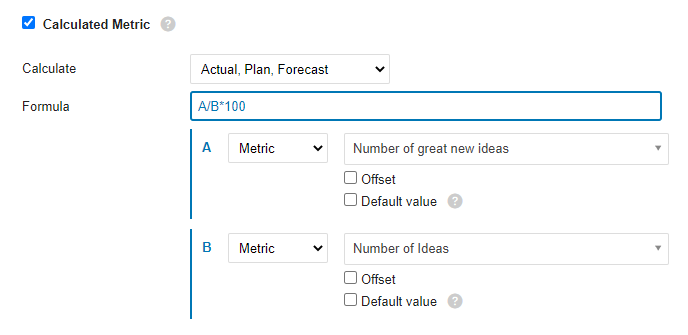
Ratio (percentage): A/B*100
Divide metric A by metric B and multiply by 100 to get a percentage.
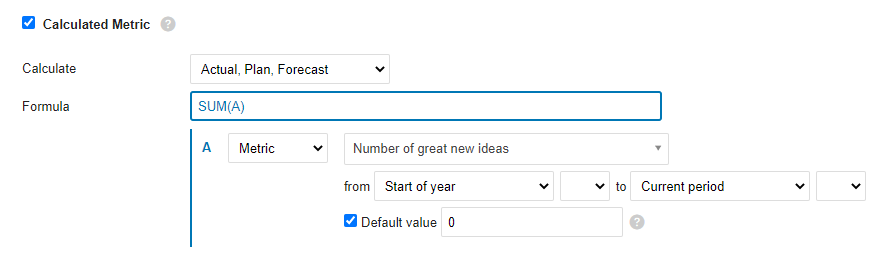
YTD
The YTD value is calculated as the sum of all values from the beginning of the year to the current period. If values are missing for any number of periods, use the Default value option to fill the gaps and make sure the formula is calculated.
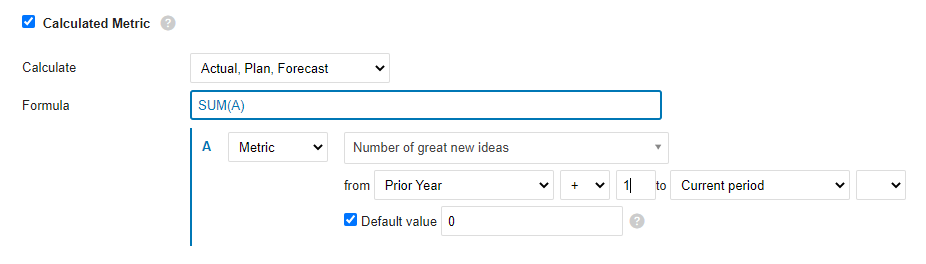
Rolling YTD
Similar to YTD: sums all the values from the prior-year period (+1, so that it starts with the next period of the prior year) to the current period.
Mathematical functions
ABS
Returns the absolute value of a number, which is the number without its sign.
ABS(number)The syntax of the ABS function has the following arguments:
- Number: Required argument. The real number whose absolute value you want to find out.
LOG10
Returns the base-10 logarithm of a number.
LOG10(number)The syntax of the LOG10 function has the following arguments:
- Number: Required argument. The positive real number whose base-10 logarithm you want to calculate.
MOD
Returns the signed remainder after one number is divided by another.
MOD(dividend, divisor)The syntax of the MOD function has the following arguments:
- Dividend: Required argument. The number divided by the divisor.
- Divisor: Required argument. The number by which the dividend is divided.
POWER
Returns a number raised to a power.
POWER(number, power)The syntax of the POWER function has the following arguments:
- Number: Required argument. The base of the exponentiation. It can be any real number.
- Power: Required argument. The exponent to which the base is raised.
ROUND
Rounds a number to the specified number of digits.
ROUND(number, digits)The syntax of the ROUND function has the following arguments:
- Number: Required argument. The number you want to round.
- Digits: Required argument. The number of digits to which you want to round the number.
ROUNDUP
Rounds a number up, away from zero.
ROUNDUP(number, digits)The syntax of the ROUNDUP function has the following arguments:
- Number: Required argument. Any real number you want to round up.
- Digits: Required argument. The number of decimal places to which the number is rounded.
ROUNDDOWN
Rounds a number down, toward zero.
ROUNDDOWN(number, digits)The syntax of the ROUNDDOWN function has the following arguments:
- Number: Required argument. Any real number you want to round down.
- Digits: Required argument. The number of decimal places to which the number is rounded.
SQRT
Returns the square root of a number.
SQRT(number)The syntax of the SQRT function has the following arguments:
- Number: Required argument. The number whose square root you want to know.
TRUNC
Truncates a number to an integer by removing its decimal (fractional) part.
TRUNC(number, [digits])The syntax of the TRUNC function has the following arguments:
- Number: Required argument. The number you want to truncate.
- Decimals: Optional argument. The number of decimal places of the truncated number. The default is 0 (zero).
Logic functions
AND
Returns TRUE if all arguments are TRUE.
AND(A, B)The syntax of the AND function has the following arguments:
- A: Required argument. Condition.
- B: Required argument. Condition.
OR
Returns TRUE if at least one argument is TRUE.
OR(A, B)The syntax of the OR function has the following arguments:
- A: Required argument. Condition.
- B: Required argument. Condition.
XOR
Returns the logical exclusive OR of all arguments.
XOR(A, B)The syntax of the XOR function has the following arguments:
- A: Required argument. Condition.
- B: Required argument. Condition.
NOT
Performs a logical negation of its argument.
NOT(A)The syntax of the NOT function has the following arguments:
- A: Required argument. Condition.
TRUE
Returns the logical value TRUE.
FALSE
Returns the logical value FALSE.
IF
The IF function, one of the most popular functions in TeamGuru, lets you logically compare a value with your expectations.
An IF statement can have two results. The first result is returned if the condition evaluates as true; otherwise, the second result is returned.
IF(condition, a, b)The syntax of the IF function has the following arguments:
- condition: Required argument. The condition to evaluate.
- a: Required argument. The result of the IF function if the condition is TRUE.
- b: Required argument. The result of the IF function if the condition is FALSE.
IFERROR
Returns the specified value if the formula evaluates to an error; otherwise, returns the result of the formula.
IFERROR(value, value_on_error)The syntax of the IFERROR function has the following arguments:
- value: Required argument. The argument tested for an error.
- value_on_error: Required argument. The value returned if the formula results in an error.
ISNULL
Returns TRUE if the result of the formula is an empty value.
ISNULL(value)The syntax of the ISNULL function has the following arguments:
- value: Required argument. The argument tested for an empty or null value.
Statistical functions (over several periods)
AVERAGE
Calculates the average (arithmetic mean) of the values.
AVERAGE(values_list)The syntax of the AVERAGE function has the following arguments:
- values_list: Required argument. A list of values, defined in TeamGuru as a range of periods.
SUM
Calculates the sum of all values.
SUM(values_list)The syntax of the SUM function has the following arguments:
- values_list: Required argument. A list of values, defined in TeamGuru as a range of periods.
COUNT
Returns the number of values in a list.
COUNT(values_list)The syntax of the COUNT function has the following arguments:
- values_list: Required argument. A list of values, defined in TeamGuru as a range of periods.
MAX
Returns the maximum value from a list of values.
MAX(values_list)The syntax of the MAX function has the following arguments:
- values_list: Required argument. A list of values, defined in TeamGuru as a range of periods.
MIN
Returns the minimum value from a list of values.
MIN(values_list)The syntax of the MIN function has the following arguments:
- values_list: Required argument. A list of values, defined in TeamGuru as a range of periods.
MEDIAN
Returns the median of the given numbers. The median is the number in the middle of a set of numbers.
MEDIAN(values_list)The syntax of the MEDIAN function has the following arguments:
- values_list: Required argument. A list of values, defined in TeamGuru as a range of periods.
STDEVP
Returns the standard deviation of a population (base set) determined from a random selection. The standard deviation expresses how much the values differ from the mean value.
STDEVP(values_list)The syntax of the STDEVP function has the following arguments:
- values_list: Required argument. A list of values, defined in TeamGuru as a range of periods.
STDEVA
Calculates the standard deviation of a sample (selection). The standard deviation is the degree to which the values vary from the mean value.
STDEVA(values_list)The syntax of the STDEVA function has the following arguments:
- values_list: Required argument. A list of values, defined in TeamGuru as a range of periods.
LAST
Returns the last value entered in the list of values. Empty and null values are ignored.
LAST(values_list)The syntax of the LAST function has the following arguments:
- values_list: Required argument. A list of values, defined in TeamGuru as a range of periods.
Příklady vzorců
Poměr (procenta): A/B*100
Vydělte metriku A metrikou B a vynásobte 100, tím získáte procenta.
YTD
Hodnota YTD je součet všech hodnot od začátku roku do aktuálního období. Pokud v libovolném počtu období chybí hodnoty, doplňte mezery volbou Výchozí hodnota, aby se vzorec vždy vypočítal.
Klouzavé YTD
Podobné jako YTD: sečte všechny hodnoty od stejného období předchozího roku (+1, aby výpočet začínal následujícím obdobím předchozího roku) po aktuální období.
Matematické funkce
ABS
Vrátí absolutní hodnotu čísla, tedy číslo bez znaménka.
ABS(number)Funkce ABS má tyto argumenty:
- Number: Povinný argument. Reálné číslo, jehož absolutní hodnotu chcete zjistit.
LOG10
Vrátí dekadický logaritmus čísla (o základu 10).
LOG10(number)Funkce LOG10 má tyto argumenty:
- Number: Povinný argument. Kladné reálné číslo, jehož dekadický logaritmus chcete vypočítat.
MOD
Vrátí zbytek po dělení jednoho čísla druhým, včetně znaménka.
MOD(dividend, divisor)Funkce MOD má tyto argumenty:
- Dividend: Povinný argument. Dělenec, tedy číslo, které se dělí dělitelem.
- Divisor: Povinný argument. Dělitel, tedy číslo, kterým se dělenec dělí.
POWER
Vrátí číslo umocněné na zadaný exponent.
POWER(number, power)Funkce POWER má tyto argumenty:
- Number: Povinný argument. Základ mocniny. Může to být libovolné reálné číslo.
- Power: Povinný argument. Exponent, na který se základ umocní.
ROUND
Zaokrouhlí číslo na zadaný počet číslic.
ROUND(number, digits)Funkce ROUND má tyto argumenty:
- Number: Povinný argument. Číslo, které chcete zaokrouhlit.
- Digits: Povinný argument. Počet číslic, na který chcete číslo zaokrouhlit.
ROUNDUP
Zaokrouhlí číslo nahoru, směrem od nuly.
ROUNDUP(number, digits)Funkce ROUNDUP má tyto argumenty:
- Number: Povinný argument. Libovolné reálné číslo, které chcete zaokrouhlit nahoru.
- Digits: Povinný argument. Počet desetinných míst, na který se číslo zaokrouhlí.
ROUNDDOWN
Zaokrouhlí číslo dolů, směrem k nule.
ROUNDDOWN(number, digits)Funkce ROUNDDOWN má tyto argumenty:
- Number: Povinný argument. Libovolné reálné číslo, které chcete zaokrouhlit dolů.
- Digits: Povinný argument. Počet desetinných míst, na který se číslo zaokrouhlí.
SQRT
Vrátí druhou odmocninu čísla.
SQRT(number)Funkce SQRT má tyto argumenty:
- Number: Povinný argument. Číslo, jehož druhou odmocninu chcete zjistit.
TRUNC
Zkrátí číslo na celé číslo tím, že odstraní jeho desetinnou část.
TRUNC(number, [digits])Funkce TRUNC má tyto argumenty:
- Number: Povinný argument. Číslo, které chcete zkrátit.
- Decimals: Nepovinný argument. Počet desetinných míst zkráceného čísla. Výchozí hodnota je 0 (nula).
Logické funkce
AND
Vrátí TRUE, pokud jsou všechny argumenty TRUE.
AND(A, B)Funkce AND má tyto argumenty:
- A: Povinný argument. Podmínka.
- B: Povinný argument. Podmínka.
OR
Vrátí TRUE, pokud je alespoň jeden argument TRUE.
OR(A, B)Funkce OR má tyto argumenty:
- A: Povinný argument. Podmínka.
- B: Povinný argument. Podmínka.
XOR
Vrátí logickou výlučnou disjunkci (exkluzivní OR) všech argumentů.
XOR(A, B)Funkce XOR má tyto argumenty:
- A: Povinný argument. Podmínka.
- B: Povinný argument. Podmínka.
NOT
Vrátí logickou negaci svého argumentu.
NOT(A)Funkce NOT má tyto argumenty:
- A: Povinný argument. Podmínka.
TRUE
Vrátí logickou hodnotu TRUE.
FALSE
Vrátí logickou hodnotu FALSE.
IF
Funkce IF, jedna z nejpoužívanějších funkcí v TeamGuru, umožňuje logicky porovnat hodnotu s tím, co očekáváte.
Funkce IF může mít dva výsledky. Pokud je podmínka splněna, vrátí první výsledek, jinak vrátí druhý.
IF(condition, a, b)Funkce IF má tyto argumenty:
- condition: Povinný argument. Podmínka, která se vyhodnocuje.
- a: Povinný argument. Výsledek funkce IF, pokud je podmínka TRUE.
- b: Povinný argument. Výsledek funkce IF, pokud je podmínka FALSE.
IFERROR
Pokud výsledkem vzorce je chyba, vrátí zadanou hodnotu, jinak vrátí výsledek vzorce.
IFERROR(value, value_on_error)Funkce IFERROR má tyto argumenty:
- value: Povinný argument. Argument, u kterého se kontroluje chyba.
- value_on_error: Povinný argument. Hodnota, která se vrátí, pokud vzorec skončí chybou.
ISNULL
Vrátí TRUE, pokud je výsledkem vzorce prázdná hodnota.
ISNULL(value)Funkce ISNULL má tyto argumenty:
- value: Povinný argument. Argument, u kterého se kontroluje prázdná hodnota nebo null.
Statistické funkce (za více období)
AVERAGE
Vypočítá průměr (aritmetický průměr) hodnot.
AVERAGE(values_list)Funkce AVERAGE má tyto argumenty:
- values_list: Povinný argument. Seznam hodnot, který se v TeamGuru zadává jako rozsah období.
SUM
Vypočítá součet všech hodnot.
SUM(values_list)Funkce SUM má tyto argumenty:
- values_list: Povinný argument. Seznam hodnot, který se v TeamGuru zadává jako rozsah období.
COUNT
Vrátí počet hodnot v seznamu.
COUNT(values_list)Funkce COUNT má tyto argumenty:
- values_list: Povinný argument. Seznam hodnot, který se v TeamGuru zadává jako rozsah období.
MAX
Vrátí nejvyšší hodnotu ze seznamu hodnot.
MAX(values_list)Funkce MAX má tyto argumenty:
- values_list: Povinný argument. Seznam hodnot, který se v TeamGuru zadává jako rozsah období.
MIN
Vrátí nejnižší hodnotu ze seznamu hodnot.
MIN(values_list)Funkce MIN má tyto argumenty:
- values_list: Povinný argument. Seznam hodnot, který se v TeamGuru zadává jako rozsah období.
MEDIAN
Vrátí medián zadaných čísel. Medián je číslo uprostřed souboru čísel.
MEDIAN(values_list)Funkce MEDIAN má tyto argumenty:
- values_list: Povinný argument. Seznam hodnot, který se v TeamGuru zadává jako rozsah období.
STDEVP
Vrátí směrodatnou odchylku základního souboru (populace) určenou z náhodného výběru. Směrodatná odchylka vyjadřuje, jak moc se hodnoty liší od průměru.
STDEVP(values_list)Funkce STDEVP má tyto argumenty:
- values_list: Povinný argument. Seznam hodnot, který se v TeamGuru zadává jako rozsah období.
STDEVA
Vypočítá směrodatnou odchylku výběru. Směrodatná odchylka udává, nakolik se hodnoty odchylují od průměru.
STDEVA(values_list)Funkce STDEVA má tyto argumenty:
- values_list: Povinný argument. Seznam hodnot, který se v TeamGuru zadává jako rozsah období.
LAST
Vrátí poslední zadanou hodnotu ze seznamu hodnot. Prázdné hodnoty a hodnoty null se ignorují.
LAST(values_list)Funkce LAST má tyto argumenty:
- values_list: Povinný argument. Seznam hodnot, který se v TeamGuru zadává jako rozsah období.
Potřebujete další pomoc?
Napište nám. V pracovní dny obvykle odpovídáme do hodiny.