Indicateurs calculés et formules avancées
Traduction automatique de l'anglais. Original en anglais affiché.
Formula examples
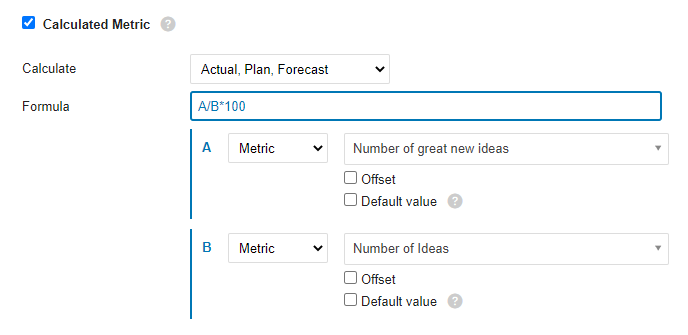
Ratio (percentage): A/B*100
Divide metric A by metric B and multiply by 100 to get a percentage.
YTD
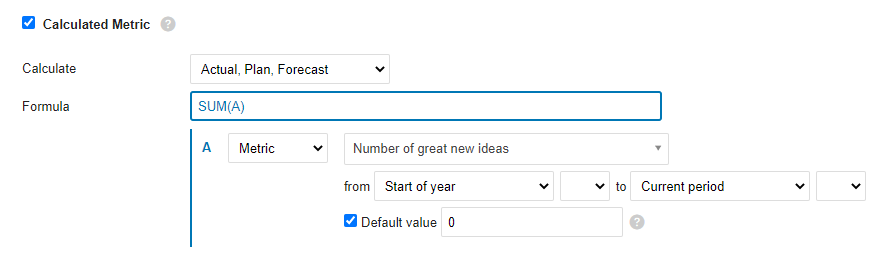
The YTD value is calculated as the sum of all values from the beginning of the year to the current period. If values are missing for any number of periods, use the Default value option to fill the gaps and make sure the formula is calculated.
Rolling YTD
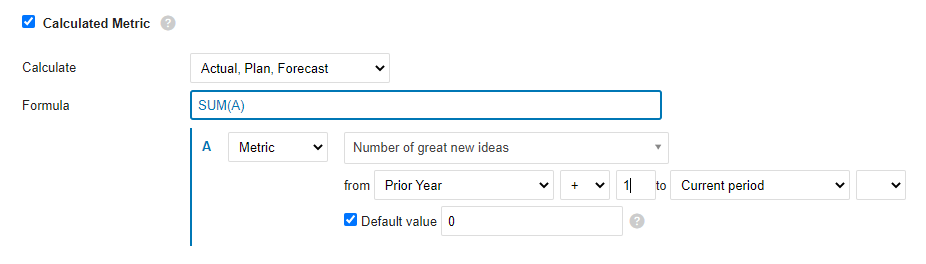
Similar to YTD: sums all the values from the prior-year period (+1, so that it starts with the next period of the prior year) to the current period.
Mathematical functions
ABS
Returns the absolute value of a number, which is the number without its sign.
ABS(number)The syntax of the ABS function has the following arguments:
- Number: Required argument. The real number whose absolute value you want to find out.
LOG10
Returns the base-10 logarithm of a number.
LOG10(number)The syntax of the LOG10 function has the following arguments:
- Number: Required argument. The positive real number whose base-10 logarithm you want to calculate.
MOD
Returns the signed remainder after one number is divided by another.
MOD(dividend, divisor)The syntax of the MOD function has the following arguments:
- Dividend: Required argument. The number divided by the divisor.
- Divisor: Required argument. The number by which the dividend is divided.
POWER
Returns a number raised to a power.
POWER(number, power)The syntax of the POWER function has the following arguments:
- Number: Required argument. The base of the exponentiation. It can be any real number.
- Power: Required argument. The exponent to which the base is raised.
ROUND
Rounds a number to the specified number of digits.
ROUND(number, digits)The syntax of the ROUND function has the following arguments:
- Number: Required argument. The number you want to round.
- Digits: Required argument. The number of digits to which you want to round the number.
ROUNDUP
Rounds a number up, away from zero.
ROUNDUP(number, digits)The syntax of the ROUNDUP function has the following arguments:
- Number: Required argument. Any real number you want to round up.
- Digits: Required argument. The number of decimal places to which the number is rounded.
ROUNDDOWN
Rounds a number down, toward zero.
ROUNDDOWN(number, digits)The syntax of the ROUNDDOWN function has the following arguments:
- Number: Required argument. Any real number you want to round down.
- Digits: Required argument. The number of decimal places to which the number is rounded.
SQRT
Returns the square root of a number.
SQRT(number)The syntax of the SQRT function has the following arguments:
- Number: Required argument. The number whose square root you want to know.
TRUNC
Truncates a number to an integer by removing its decimal (fractional) part.
TRUNC(number, [digits])The syntax of the TRUNC function has the following arguments:
- Number: Required argument. The number you want to truncate.
- Decimals: Optional argument. The number of decimal places of the truncated number. The default is 0 (zero).
Logic functions
AND
Returns TRUE if all arguments are TRUE.
AND(A, B)The syntax of the AND function has the following arguments:
- A: Required argument. Condition.
- B: Required argument. Condition.
OR
Returns TRUE if at least one argument is TRUE.
OR(A, B)The syntax of the OR function has the following arguments:
- A: Required argument. Condition.
- B: Required argument. Condition.
XOR
Returns the logical exclusive OR of all arguments.
XOR(A, B)The syntax of the XOR function has the following arguments:
- A: Required argument. Condition.
- B: Required argument. Condition.
NOT
Performs a logical negation of its argument.
NOT(A)The syntax of the NOT function has the following arguments:
- A: Required argument. Condition.
TRUE
Returns the logical value TRUE.
FALSE
Returns the logical value FALSE.
IF
The IF function, one of the most popular functions in TeamGuru, lets you logically compare a value with your expectations.
An IF statement can have two results. The first result is returned if the condition evaluates as true; otherwise, the second result is returned.
IF(condition, a, b)The syntax of the IF function has the following arguments:
- condition: Required argument. The condition to evaluate.
- a: Required argument. The result of the IF function if the condition is TRUE.
- b: Required argument. The result of the IF function if the condition is FALSE.
IFERROR
Returns the specified value if the formula evaluates to an error; otherwise, returns the result of the formula.
IFERROR(value, value_on_error)The syntax of the IFERROR function has the following arguments:
- value: Required argument. The argument tested for an error.
- value_on_error: Required argument. The value returned if the formula results in an error.
ISNULL
Returns TRUE if the result of the formula is an empty value.
ISNULL(value)The syntax of the ISNULL function has the following arguments:
- value: Required argument. The argument tested for an empty or null value.
Statistical functions (over several periods)
AVERAGE
Calculates the average (arithmetic mean) of the values.
AVERAGE(values_list)The syntax of the AVERAGE function has the following arguments:
- values_list: Required argument. A list of values, defined in TeamGuru as a range of periods.
SUM
Calculates the sum of all values.
SUM(values_list)The syntax of the SUM function has the following arguments:
- values_list: Required argument. A list of values, defined in TeamGuru as a range of periods.
COUNT
Returns the number of values in a list.
COUNT(values_list)The syntax of the COUNT function has the following arguments:
- values_list: Required argument. A list of values, defined in TeamGuru as a range of periods.
MAX
Returns the maximum value from a list of values.
MAX(values_list)The syntax of the MAX function has the following arguments:
- values_list: Required argument. A list of values, defined in TeamGuru as a range of periods.
MIN
Returns the minimum value from a list of values.
MIN(values_list)The syntax of the MIN function has the following arguments:
- values_list: Required argument. A list of values, defined in TeamGuru as a range of periods.
MEDIAN
Returns the median of the given numbers. The median is the number in the middle of a set of numbers.
MEDIAN(values_list)The syntax of the MEDIAN function has the following arguments:
- values_list: Required argument. A list of values, defined in TeamGuru as a range of periods.
STDEVP
Returns the standard deviation of a population (base set) determined from a random selection. The standard deviation expresses how much the values differ from the mean value.
STDEVP(values_list)The syntax of the STDEVP function has the following arguments:
- values_list: Required argument. A list of values, defined in TeamGuru as a range of periods.
STDEVA
Calculates the standard deviation of a sample (selection). The standard deviation is the degree to which the values vary from the mean value.
STDEVA(values_list)The syntax of the STDEVA function has the following arguments:
- values_list: Required argument. A list of values, defined in TeamGuru as a range of periods.
LAST
Returns the last value entered in the list of values. Empty and null values are ignored.
LAST(values_list)The syntax of the LAST function has the following arguments:
- values_list: Required argument. A list of values, defined in TeamGuru as a range of periods.
Exemples de formules
Ratio (pourcentage) : A/B*100
Divisez l’indicateur A par l’indicateur B et multipliez par 100 pour obtenir un pourcentage.
YTD
La valeur YTD (cumul depuis le début de l’année) est la somme de toutes les valeurs depuis le début de l’année jusqu’à la période en cours. S’il manque des valeurs pour une ou plusieurs périodes, utilisez l’option Valeur par défaut pour combler les trous et garantir le calcul de la formule.
YTD glissant
Fonctionne comme le YTD : additionne toutes les valeurs depuis la même période de l’année précédente (+1, pour commencer à la période suivante de l’année précédente) jusqu’à la période en cours.
Fonctions mathématiques
ABS
Renvoie la valeur absolue d’un nombre, c’est-à-dire le nombre sans son signe.
ABS(number)La fonction ABS accepte les arguments suivants :
- Number : argument obligatoire. Nombre réel dont vous voulez obtenir la valeur absolue.
LOG10
Renvoie le logarithme en base 10 d’un nombre.
LOG10(number)La fonction LOG10 accepte les arguments suivants :
- Number : argument obligatoire. Nombre réel positif dont vous voulez calculer le logarithme en base 10.
MOD
Renvoie le reste signé de la division d’un nombre par un autre.
MOD(dividend, divisor)La fonction MOD accepte les arguments suivants :
- Dividend : argument obligatoire. Nombre à diviser par le diviseur.
- Divisor : argument obligatoire. Nombre par lequel le dividende est divisé.
POWER
Renvoie un nombre élevé à une puissance.
POWER(number, power)La fonction POWER accepte les arguments suivants :
- Number : argument obligatoire. Base de la puissance. Il peut s’agir de n’importe quel nombre réel.
- Power : argument obligatoire. Exposant auquel la base est élevée.
ROUND
Arrondit un nombre au nombre de chiffres indiqué.
ROUND(number, digits)La fonction ROUND accepte les arguments suivants :
- Number : argument obligatoire. Nombre à arrondir.
- Digits : argument obligatoire. Nombre de chiffres auquel arrondir le nombre.
ROUNDUP
Arrondit un nombre à la valeur supérieure, en s’éloignant de zéro.
ROUNDUP(number, digits)La fonction ROUNDUP accepte les arguments suivants :
- Number : argument obligatoire. Nombre réel à arrondir à la valeur supérieure.
- Digits : argument obligatoire. Nombre de décimales auquel le nombre est arrondi.
ROUNDDOWN
Arrondit un nombre à la valeur inférieure, en se rapprochant de zéro.
ROUNDDOWN(number, digits)La fonction ROUNDDOWN accepte les arguments suivants :
- Number : argument obligatoire. Nombre réel à arrondir à la valeur inférieure.
- Digits : argument obligatoire. Nombre de décimales auquel le nombre est arrondi.
SQRT
Renvoie la racine carrée d’un nombre.
SQRT(number)La fonction SQRT accepte les arguments suivants :
- Number : argument obligatoire. Nombre dont vous voulez obtenir la racine carrée.
TRUNC
Tronque un nombre en un entier en supprimant sa partie décimale (fractionnaire).
TRUNC(number, [digits])La fonction TRUNC accepte les arguments suivants :
- Number : argument obligatoire. Nombre à tronquer.
- Decimals : argument facultatif. Nombre de décimales du nombre tronqué. La valeur par défaut est 0 (zéro).
Fonctions logiques
AND
Renvoie TRUE si tous les arguments sont TRUE.
AND(A, B)La fonction AND accepte les arguments suivants :
- A : argument obligatoire. Condition.
- B : argument obligatoire. Condition.
OR
Renvoie TRUE si au moins un argument est TRUE.
OR(A, B)La fonction OR accepte les arguments suivants :
- A : argument obligatoire. Condition.
- B : argument obligatoire. Condition.
XOR
Renvoie le OU exclusif logique de tous les arguments.
XOR(A, B)La fonction XOR accepte les arguments suivants :
- A : argument obligatoire. Condition.
- B : argument obligatoire. Condition.
NOT
Inverse la valeur logique de son argument.
NOT(A)La fonction NOT accepte les arguments suivants :
- A : argument obligatoire. Condition.
TRUE
Renvoie la valeur logique TRUE (vrai).
FALSE
Renvoie la valeur logique FALSE (faux).
IF
La fonction IF, l’une des plus utilisées dans TeamGuru, permet de comparer logiquement une valeur à ce que vous attendez.
Une instruction IF peut donner deux résultats. Le premier est renvoyé si la condition est vraie, sinon c’est le second.
IF(condition, a, b)La fonction IF accepte les arguments suivants :
- condition : argument obligatoire. Condition à évaluer.
- a : argument obligatoire. Résultat de la fonction IF si la condition est TRUE.
- b : argument obligatoire. Résultat de la fonction IF si la condition est FALSE.
IFERROR
Renvoie la valeur indiquée si la formule génère une erreur, sinon renvoie le résultat de la formule.
IFERROR(value, value_on_error)La fonction IFERROR accepte les arguments suivants :
- value : argument obligatoire. Argument dont on vérifie s’il génère une erreur.
- value_on_error : argument obligatoire. Valeur renvoyée si la formule génère une erreur.
ISNULL
Renvoie TRUE si le résultat de la formule est une valeur vide.
ISNULL(value)La fonction ISNULL accepte les arguments suivants :
- value : argument obligatoire. Argument dont on vérifie s’il est vide ou nul.
Fonctions statistiques (sur plusieurs périodes)
AVERAGE
Calcule la moyenne (arithmétique) des valeurs.
AVERAGE(values_list)La fonction AVERAGE accepte les arguments suivants :
- values_list : argument obligatoire. Liste de valeurs, définie dans TeamGuru comme une plage de périodes.
SUM
Calcule la somme de toutes les valeurs.
SUM(values_list)La fonction SUM accepte les arguments suivants :
- values_list : argument obligatoire. Liste de valeurs, définie dans TeamGuru comme une plage de périodes.
COUNT
Renvoie le nombre de valeurs d’une liste.
COUNT(values_list)La fonction COUNT accepte les arguments suivants :
- values_list : argument obligatoire. Liste de valeurs, définie dans TeamGuru comme une plage de périodes.
MAX
Renvoie la valeur maximale d’une liste de valeurs.
MAX(values_list)La fonction MAX accepte les arguments suivants :
- values_list : argument obligatoire. Liste de valeurs, définie dans TeamGuru comme une plage de périodes.
MIN
Renvoie la valeur minimale d’une liste de valeurs.
MIN(values_list)La fonction MIN accepte les arguments suivants :
- values_list : argument obligatoire. Liste de valeurs, définie dans TeamGuru comme une plage de périodes.
MEDIAN
Renvoie la médiane des nombres indiqués. La médiane est la valeur centrale d’une série de nombres.
MEDIAN(values_list)La fonction MEDIAN accepte les arguments suivants :
- values_list : argument obligatoire. Liste de valeurs, définie dans TeamGuru comme une plage de périodes.
STDEVP
Renvoie l’écart type d’une population (ensemble de base) déterminé à partir d’une sélection aléatoire. L’écart type indique dans quelle mesure les valeurs s’écartent de la moyenne.
STDEVP(values_list)La fonction STDEVP accepte les arguments suivants :
- values_list : argument obligatoire. Liste de valeurs, définie dans TeamGuru comme une plage de périodes.
STDEVA
Calcule l’écart type d’un échantillon. L’écart type mesure la dispersion des valeurs autour de la moyenne.
STDEVA(values_list)La fonction STDEVA accepte les arguments suivants :
- values_list : argument obligatoire. Liste de valeurs, définie dans TeamGuru comme une plage de périodes.
LAST
Renvoie la dernière valeur saisie dans la liste de valeurs. Les valeurs vides et nulles sont ignorées.
LAST(values_list)La fonction LAST accepte les arguments suivants :
- values_list : argument obligatoire. Liste de valeurs, définie dans TeamGuru comme une plage de périodes.
Besoin d'aide supplémentaire ?
Écrivez-nous. Les jours ouvrés, nous répondons en général en moins d'une heure.