Métricas calculadas y fórmulas avanzadas
Traducción automática del inglés. Se muestra el original en inglés.
Formula examples
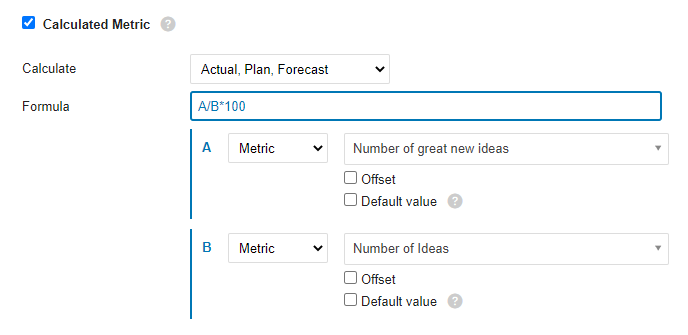
Ratio (percentage): A/B*100
Divide metric A by metric B and multiply by 100 to get a percentage.
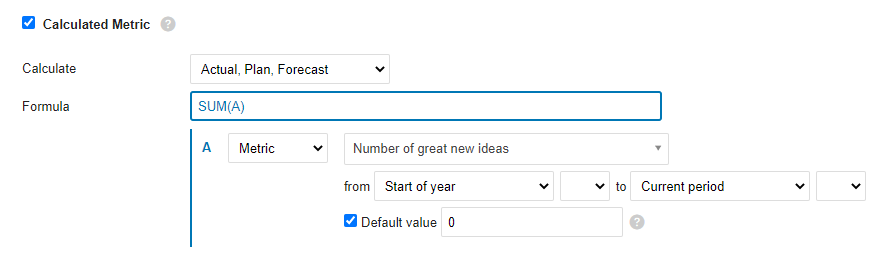
YTD
The YTD value is calculated as the sum of all values from the beginning of the year to the current period. If values are missing for any number of periods, use the Default value option to fill the gaps and make sure the formula is calculated.
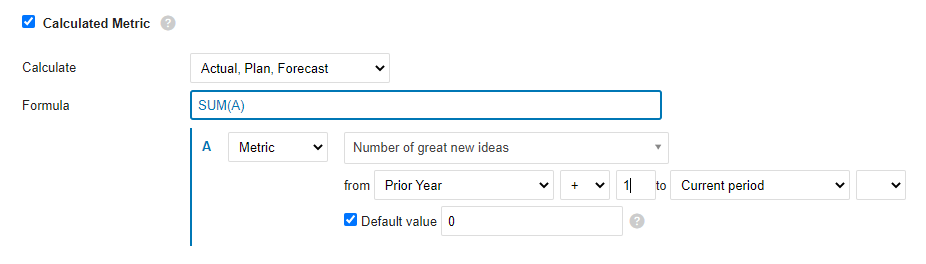
Rolling YTD
Similar to YTD: sums all the values from the prior-year period (+1, so that it starts with the next period of the prior year) to the current period.
Mathematical functions
ABS
Returns the absolute value of a number, which is the number without its sign.
ABS(number)The syntax of the ABS function has the following arguments:
- Number: Required argument. The real number whose absolute value you want to find out.
LOG10
Returns the base-10 logarithm of a number.
LOG10(number)The syntax of the LOG10 function has the following arguments:
- Number: Required argument. The positive real number whose base-10 logarithm you want to calculate.
MOD
Returns the signed remainder after one number is divided by another.
MOD(dividend, divisor)The syntax of the MOD function has the following arguments:
- Dividend: Required argument. The number divided by the divisor.
- Divisor: Required argument. The number by which the dividend is divided.
POWER
Returns a number raised to a power.
POWER(number, power)The syntax of the POWER function has the following arguments:
- Number: Required argument. The base of the exponentiation. It can be any real number.
- Power: Required argument. The exponent to which the base is raised.
ROUND
Rounds a number to the specified number of digits.
ROUND(number, digits)The syntax of the ROUND function has the following arguments:
- Number: Required argument. The number you want to round.
- Digits: Required argument. The number of digits to which you want to round the number.
ROUNDUP
Rounds a number up, away from zero.
ROUNDUP(number, digits)The syntax of the ROUNDUP function has the following arguments:
- Number: Required argument. Any real number you want to round up.
- Digits: Required argument. The number of decimal places to which the number is rounded.
ROUNDDOWN
Rounds a number down, toward zero.
ROUNDDOWN(number, digits)The syntax of the ROUNDDOWN function has the following arguments:
- Number: Required argument. Any real number you want to round down.
- Digits: Required argument. The number of decimal places to which the number is rounded.
SQRT
Returns the square root of a number.
SQRT(number)The syntax of the SQRT function has the following arguments:
- Number: Required argument. The number whose square root you want to know.
TRUNC
Truncates a number to an integer by removing its decimal (fractional) part.
TRUNC(number, [digits])The syntax of the TRUNC function has the following arguments:
- Number: Required argument. The number you want to truncate.
- Decimals: Optional argument. The number of decimal places of the truncated number. The default is 0 (zero).
Logic functions
AND
Returns TRUE if all arguments are TRUE.
AND(A, B)The syntax of the AND function has the following arguments:
- A: Required argument. Condition.
- B: Required argument. Condition.
OR
Returns TRUE if at least one argument is TRUE.
OR(A, B)The syntax of the OR function has the following arguments:
- A: Required argument. Condition.
- B: Required argument. Condition.
XOR
Returns the logical exclusive OR of all arguments.
XOR(A, B)The syntax of the XOR function has the following arguments:
- A: Required argument. Condition.
- B: Required argument. Condition.
NOT
Performs a logical negation of its argument.
NOT(A)The syntax of the NOT function has the following arguments:
- A: Required argument. Condition.
TRUE
Returns the logical value TRUE.
FALSE
Returns the logical value FALSE.
IF
The IF function, one of the most popular functions in TeamGuru, lets you logically compare a value with your expectations.
An IF statement can have two results. The first result is returned if the condition evaluates as true; otherwise, the second result is returned.
IF(condition, a, b)The syntax of the IF function has the following arguments:
- condition: Required argument. The condition to evaluate.
- a: Required argument. The result of the IF function if the condition is TRUE.
- b: Required argument. The result of the IF function if the condition is FALSE.
IFERROR
Returns the specified value if the formula evaluates to an error; otherwise, returns the result of the formula.
IFERROR(value, value_on_error)The syntax of the IFERROR function has the following arguments:
- value: Required argument. The argument tested for an error.
- value_on_error: Required argument. The value returned if the formula results in an error.
ISNULL
Returns TRUE if the result of the formula is an empty value.
ISNULL(value)The syntax of the ISNULL function has the following arguments:
- value: Required argument. The argument tested for an empty or null value.
Statistical functions (over several periods)
AVERAGE
Calculates the average (arithmetic mean) of the values.
AVERAGE(values_list)The syntax of the AVERAGE function has the following arguments:
- values_list: Required argument. A list of values, defined in TeamGuru as a range of periods.
SUM
Calculates the sum of all values.
SUM(values_list)The syntax of the SUM function has the following arguments:
- values_list: Required argument. A list of values, defined in TeamGuru as a range of periods.
COUNT
Returns the number of values in a list.
COUNT(values_list)The syntax of the COUNT function has the following arguments:
- values_list: Required argument. A list of values, defined in TeamGuru as a range of periods.
MAX
Returns the maximum value from a list of values.
MAX(values_list)The syntax of the MAX function has the following arguments:
- values_list: Required argument. A list of values, defined in TeamGuru as a range of periods.
MIN
Returns the minimum value from a list of values.
MIN(values_list)The syntax of the MIN function has the following arguments:
- values_list: Required argument. A list of values, defined in TeamGuru as a range of periods.
MEDIAN
Returns the median of the given numbers. The median is the number in the middle of a set of numbers.
MEDIAN(values_list)The syntax of the MEDIAN function has the following arguments:
- values_list: Required argument. A list of values, defined in TeamGuru as a range of periods.
STDEVP
Returns the standard deviation of a population (base set) determined from a random selection. The standard deviation expresses how much the values differ from the mean value.
STDEVP(values_list)The syntax of the STDEVP function has the following arguments:
- values_list: Required argument. A list of values, defined in TeamGuru as a range of periods.
STDEVA
Calculates the standard deviation of a sample (selection). The standard deviation is the degree to which the values vary from the mean value.
STDEVA(values_list)The syntax of the STDEVA function has the following arguments:
- values_list: Required argument. A list of values, defined in TeamGuru as a range of periods.
LAST
Returns the last value entered in the list of values. Empty and null values are ignored.
LAST(values_list)The syntax of the LAST function has the following arguments:
- values_list: Required argument. A list of values, defined in TeamGuru as a range of periods.
Ejemplos de fórmulas
Proporción (porcentaje): A/B*100
Divida la métrica A entre la métrica B y multiplique por 100 para obtener un porcentaje.
YTD
El valor YTD (acumulado del año) es la suma de todos los valores desde el inicio del año hasta el periodo actual. Si faltan valores en algunos periodos, use la opción Valor predeterminado para rellenar los huecos y asegurarse de que la fórmula se calcule.
YTD móvil
Similar a YTD: suma todos los valores desde el periodo del año anterior (+1, para que empiece en el periodo siguiente del año anterior) hasta el periodo actual.
Funciones matemáticas
ABS
Devuelve el valor absoluto de un número, es decir, el número sin su signo.
ABS(number)La función ABS tiene los siguientes argumentos:
- Número: argumento obligatorio. El número real cuyo valor absoluto quiere obtener.
LOG10
Devuelve el logaritmo en base 10 de un número.
LOG10(number)La función LOG10 tiene los siguientes argumentos:
- Número: argumento obligatorio. El número real positivo cuyo logaritmo en base 10 quiere calcular.
MOD
Devuelve el resto, con signo, de dividir un número entre otro.
MOD(dividend, divisor)La función MOD tiene los siguientes argumentos:
- Dividendo: argumento obligatorio. El número que se divide entre el divisor.
- Divisor: argumento obligatorio. El número entre el que se divide el dividendo.
POWER
Devuelve un número elevado a una potencia.
POWER(number, power)La función POWER tiene los siguientes argumentos:
- Número: argumento obligatorio. La base de la potencia. Puede ser cualquier número real.
- Potencia: argumento obligatorio. El exponente al que se eleva la base.
ROUND
Redondea un número al número de dígitos indicado.
ROUND(number, digits)La función ROUND tiene los siguientes argumentos:
- Número: argumento obligatorio. El número que quiere redondear.
- Dígitos: argumento obligatorio. El número de dígitos al que quiere redondear el número.
ROUNDUP
Redondea un número hacia arriba, alejándolo de cero.
ROUNDUP(number, digits)La función ROUNDUP tiene los siguientes argumentos:
- Número: argumento obligatorio. Cualquier número real que quiera redondear hacia arriba.
- Dígitos: argumento obligatorio. El número de decimales al que se redondea el número.
ROUNDDOWN
Redondea un número hacia abajo, hacia cero.
ROUNDDOWN(number, digits)La función ROUNDDOWN tiene los siguientes argumentos:
- Número: argumento obligatorio. Cualquier número real que quiera redondear hacia abajo.
- Dígitos: argumento obligatorio. El número de decimales al que se redondea el número.
SQRT
Devuelve la raíz cuadrada de un número.
SQRT(number)La función SQRT tiene los siguientes argumentos:
- Número: argumento obligatorio. El número cuya raíz cuadrada quiere conocer.
TRUNC
Trunca un número a un entero eliminando su parte decimal (fraccionaria).
TRUNC(number, [digits])La función TRUNC tiene los siguientes argumentos:
- Número: argumento obligatorio. El número que quiere truncar.
- Decimales: argumento opcional. El número de decimales del número truncado. El valor predeterminado es 0 (cero).
Funciones lógicas
AND
Devuelve TRUE si todos los argumentos son TRUE.
AND(A, B)La función AND tiene los siguientes argumentos:
- A: argumento obligatorio. Condición.
- B: argumento obligatorio. Condición.
OR
Devuelve TRUE si al menos un argumento es TRUE.
OR(A, B)La función OR tiene los siguientes argumentos:
- A: argumento obligatorio. Condición.
- B: argumento obligatorio. Condición.
XOR
Devuelve el O exclusivo lógico de todos los argumentos.
XOR(A, B)La función XOR tiene los siguientes argumentos:
- A: argumento obligatorio. Condición.
- B: argumento obligatorio. Condición.
NOT
Invierte el valor lógico de su argumento.
NOT(A)La función NOT tiene los siguientes argumentos:
- A: argumento obligatorio. Condición.
TRUE
Devuelve el valor lógico TRUE.
FALSE
Devuelve el valor lógico FALSE.
IF
La función IF, una de las más usadas en TeamGuru, le permite comparar lógicamente un valor con lo que espera.
Una instrucción IF puede tener dos resultados. Si la condición es verdadera, devuelve el primer resultado; si no, devuelve el segundo.
IF(condition, a, b)La función IF tiene los siguientes argumentos:
- condition: argumento obligatorio. La condición que se evalúa.
- a: argumento obligatorio. El resultado de la función IF si la condición es TRUE.
- b: argumento obligatorio. El resultado de la función IF si la condición es FALSE.
IFERROR
Devuelve el valor indicado si la fórmula da un error; si no, devuelve el resultado de la fórmula.
IFERROR(value, value_on_error)La función IFERROR tiene los siguientes argumentos:
- value: argumento obligatorio. El argumento que se comprueba para detectar un error.
- value_on_error: argumento obligatorio. El valor que se devuelve si la fórmula da un error.
ISNULL
Devuelve TRUE si el resultado de la fórmula es un valor vacío.
ISNULL(value)La función ISNULL tiene los siguientes argumentos:
- value: argumento obligatorio. El argumento que se comprueba para detectar un valor vacío o nulo.
Funciones estadísticas (sobre varios periodos)
AVERAGE
Calcula el promedio (media aritmética) de los valores.
AVERAGE(values_list)La función AVERAGE tiene los siguientes argumentos:
- values_list: argumento obligatorio. Una lista de valores, que en TeamGuru se define como un rango de periodos.
SUM
Calcula la suma de todos los valores.
SUM(values_list)La función SUM tiene los siguientes argumentos:
- values_list: argumento obligatorio. Una lista de valores, que en TeamGuru se define como un rango de periodos.
COUNT
Devuelve la cantidad de valores de una lista.
COUNT(values_list)La función COUNT tiene los siguientes argumentos:
- values_list: argumento obligatorio. Una lista de valores, que en TeamGuru se define como un rango de periodos.
MAX
Devuelve el valor máximo de una lista de valores.
MAX(values_list)La función MAX tiene los siguientes argumentos:
- values_list: argumento obligatorio. Una lista de valores, que en TeamGuru se define como un rango de periodos.
MIN
Devuelve el valor mínimo de una lista de valores.
MIN(values_list)La función MIN tiene los siguientes argumentos:
- values_list: argumento obligatorio. Una lista de valores, que en TeamGuru se define como un rango de periodos.
MEDIAN
Devuelve la mediana de los números indicados. La mediana es el número que queda en el centro de un conjunto de números.
MEDIAN(values_list)La función MEDIAN tiene los siguientes argumentos:
- values_list: argumento obligatorio. Una lista de valores, que en TeamGuru se define como un rango de periodos.
STDEVP
Devuelve la desviación estándar de una población (conjunto base) determinada a partir de una selección aleatoria. La desviación estándar indica cuánto se alejan los valores del valor medio.
STDEVP(values_list)La función STDEVP tiene los siguientes argumentos:
- values_list: argumento obligatorio. Una lista de valores, que en TeamGuru se define como un rango de periodos.
STDEVA
Calcula la desviación estándar de una muestra (selección). La desviación estándar es el grado en que los valores varían respecto al valor medio.
STDEVA(values_list)La función STDEVA tiene los siguientes argumentos:
- values_list: argumento obligatorio. Una lista de valores, que en TeamGuru se define como un rango de periodos.
LAST
Devuelve el último valor introducido en la lista de valores. Los valores vacíos y nulos se ignoran.
LAST(values_list)La función LAST tiene los siguientes argumentos:
- values_list: argumento obligatorio. Una lista de valores, que en TeamGuru se define como un rango de periodos.
¿Necesita más ayuda?
Escríbanos. En días laborables solemos responder en menos de una hora.