Training Status in the Skill Matrix
TeamGuru’s Training Status helps you manage, plan and monitor the existing and desired skills of your employees in a consolidated view across all locations or skill matrices.
You can easily review the status using various filters, such as expired skills, skills in progress, skills by matrix owner, your own skills and much more.
Open the training status
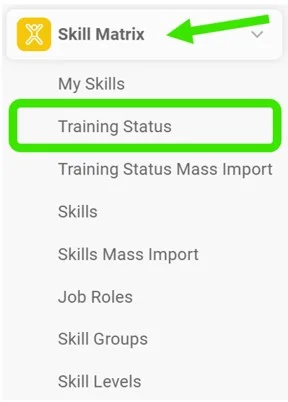
Go to the Skill Matrix module and choose Training Status in the submenu.
Select the filters
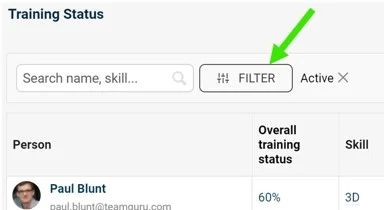
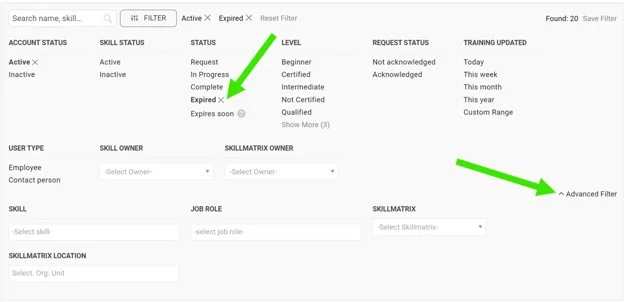
Select the filters you need: click the Filter button and choose from the available options. More options are available under the advanced filter.
Review the employees
You can then review the list of employees matching your filter selection.

Take further actions
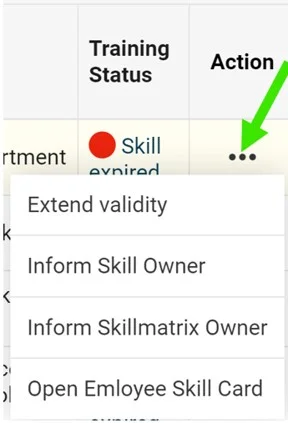
Depending on your selection, you can take additional actions by clicking the three dots next to the employee.
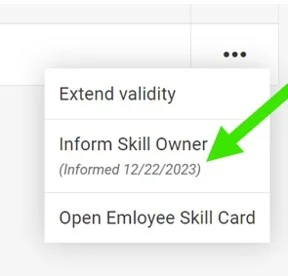
For example, when you select expired skills, you can choose to Extend validity, inform the skill owner or the skill matrix owner, or open the employee’s training card.
Inform the owner
If you select the inform option, the skill owner or the skill matrix owner receives an email notification.
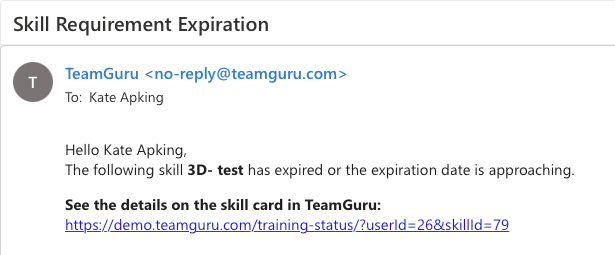
See the notification mark
Once the notification is sent, it is also marked next to the action taken.
Still need help?
Write to us. We usually reply within an hour on business days.