Estado de formación en la Matriz de habilidades
Traducción automática del inglés. Se muestra el original en inglés.
TeamGuru’s Training Status helps you manage, plan and monitor the existing and desired skills of your employees in a consolidated view across all locations or skill matrices.
You can easily review the status using various filters, such as expired skills, skills in progress, skills by matrix owner, your own skills and much more.
Open the training status
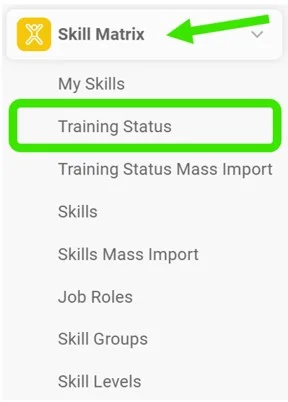
Go to the Skill Matrix module and choose Training Status in the submenu.
Select the filters
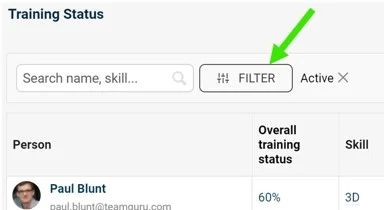
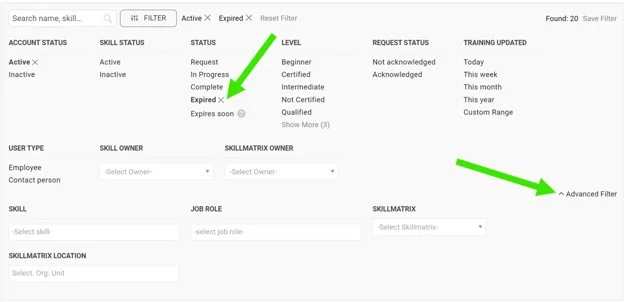
Select the filters you need: click the Filter button and choose from the available options. More options are available under the advanced filter.
Review the employees
You can then review the list of employees matching your filter selection.

Take further actions
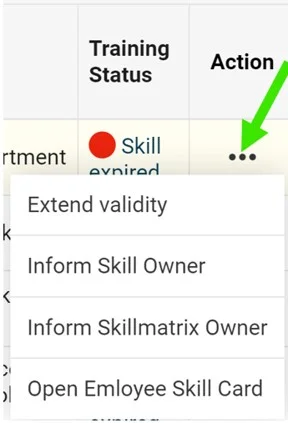
Depending on your selection, you can take additional actions by clicking the three dots next to the employee.
For example, when you select expired skills, you can choose to Extend validity, inform the skill owner or the skill matrix owner, or open the employee’s training card.
Inform the owner
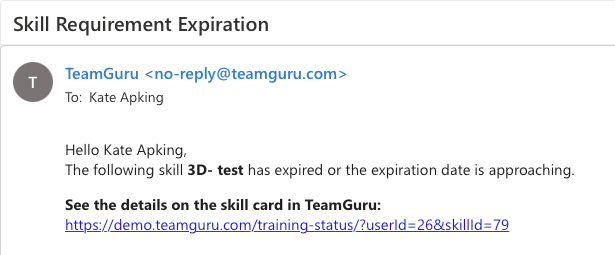
If you select the inform option, the skill owner or the skill matrix owner receives an email notification.
See the notification mark
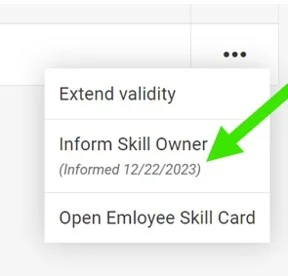
Once the notification is sent, it is also marked next to the action taken.
El Estado de formación de TeamGuru le permite gestionar, planificar y supervisar las habilidades actuales y deseadas de sus empleados en una vista consolidada de todas las ubicaciones o matrices de habilidades.
Puede revisar el estado fácilmente con distintos filtros: habilidades vencidas, habilidades en curso, habilidades por responsable de la matriz, sus propias habilidades y muchos más.
Abrir el estado de formación
Vaya al módulo Matriz de habilidades y elija Estado de formación en el submenú.
Seleccionar los filtros
Seleccione los filtros que necesite: haga clic en el botón Filtro y elija entre las opciones disponibles. El filtro avanzado ofrece más opciones.
Revisar los empleados
A continuación, puede revisar la lista de empleados que coinciden con los filtros seleccionados.
Realizar otras acciones
Según su selección, puede realizar otras acciones haciendo clic en los tres puntos junto al empleado.
Por ejemplo, si selecciona las habilidades vencidas, puede elegir Ampliar validez, avisar al responsable de la habilidad o al responsable de la matriz, o abrir la ficha de formación del empleado.
Avisar al responsable
Si elige la opción de avisar, el responsable de la habilidad o el responsable de la matriz recibe una notificación por correo electrónico.
Ver la marca de notificación
Una vez enviada la notificación, queda marcada también junto a la acción realizada.
¿Necesita más ayuda?
Escríbanos. En días laborables solemos responder en menos de una hora.