技能矩阵中的培训状态
本文由英文机器翻译。 当前显示英文原文。
TeamGuru’s Training Status helps you manage, plan and monitor the existing and desired skills of your employees in a consolidated view across all locations or skill matrices.
You can easily review the status using various filters, such as expired skills, skills in progress, skills by matrix owner, your own skills and much more.
Open the training status
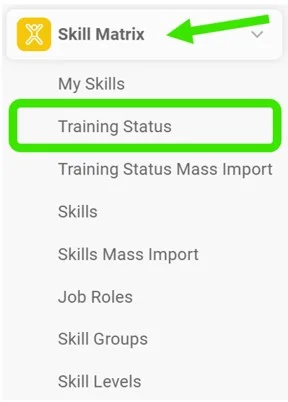
Go to the Skill Matrix module and choose Training Status in the submenu.
Select the filters
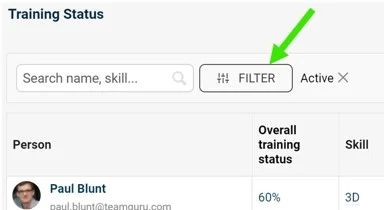
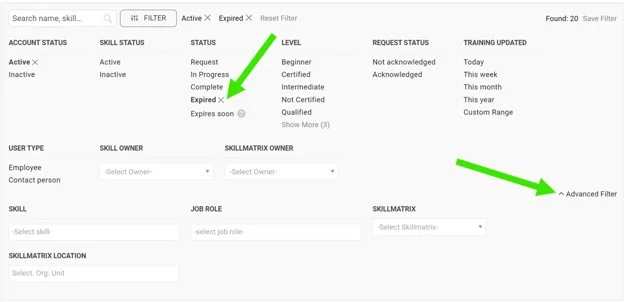
Select the filters you need: click the Filter button and choose from the available options. More options are available under the advanced filter.
Review the employees
You can then review the list of employees matching your filter selection.

Take further actions
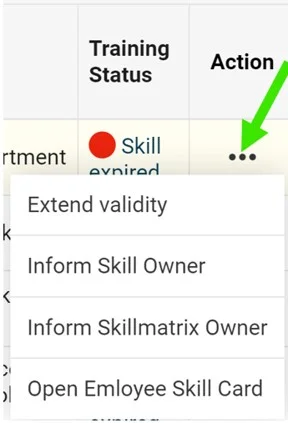
Depending on your selection, you can take additional actions by clicking the three dots next to the employee.
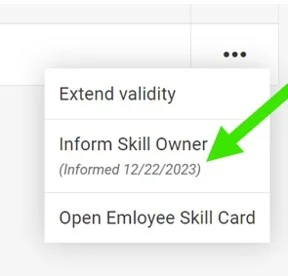
For example, when you select expired skills, you can choose to Extend validity, inform the skill owner or the skill matrix owner, or open the employee’s training card.
Inform the owner
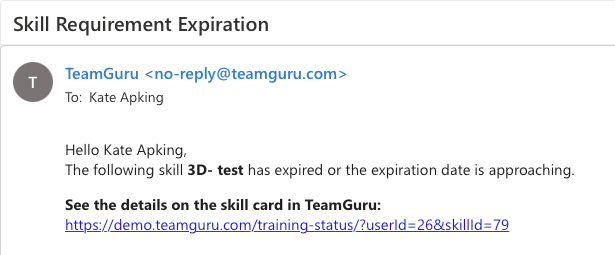
If you select the inform option, the skill owner or the skill matrix owner receives an email notification.
See the notification mark
Once the notification is sent, it is also marked next to the action taken.
TeamGuru的培训状态可帮助您在一个汇总视图中管理、规划和监控员工的现有技能和目标技能,涵盖所有地点或技能矩阵。
您可以通过各种筛选条件轻松查看状态,例如已过期的技能、进行中的技能、按矩阵负责人分类的技能、您自己的技能等。
打开培训状态
进入技能矩阵模块,在子菜单中选择培训状态。
选择筛选条件
选择所需的筛选条件:点击筛选按钮,从可用选项中选择。高级筛选中还有更多选项。
查看员工
随后即可查看符合筛选条件的员工列表。
执行后续操作
根据所选内容,点击员工旁边的三个点,即可执行其他操作。
例如,选择已过期的技能后,您可以选择延长有效期、通知技能负责人或技能矩阵负责人,或者打开该员工的培训卡。
通知负责人
选择通知选项后,技能负责人或技能矩阵负责人会收到电子邮件通知。
查看通知标记
通知发送后,所执行的操作旁边也会显示标记。
还需要帮助吗?
请给我们留言。工作日我们通常会在一小时内回复。