Stav školení v Matici dovedností
Strojový překlad z angličtiny. Zobrazen anglický originál.
TeamGuru’s Training Status helps you manage, plan and monitor the existing and desired skills of your employees in a consolidated view across all locations or skill matrices.
You can easily review the status using various filters, such as expired skills, skills in progress, skills by matrix owner, your own skills and much more.
Open the training status
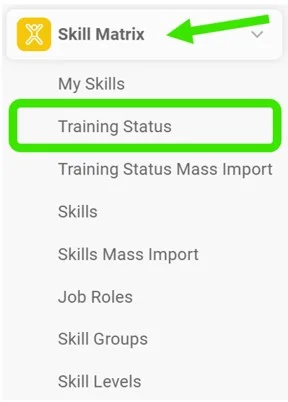
Go to the Skill Matrix module and choose Training Status in the submenu.
Select the filters
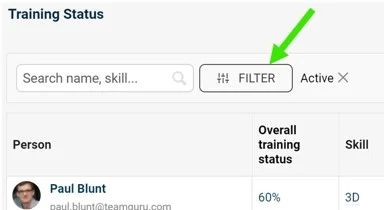
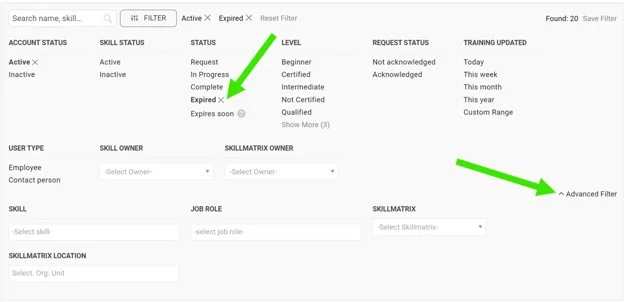
Select the filters you need: click the Filter button and choose from the available options. More options are available under the advanced filter.
Review the employees
You can then review the list of employees matching your filter selection.

Take further actions
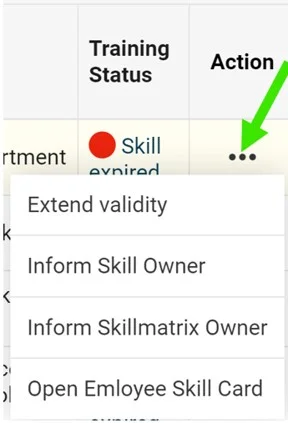
Depending on your selection, you can take additional actions by clicking the three dots next to the employee.
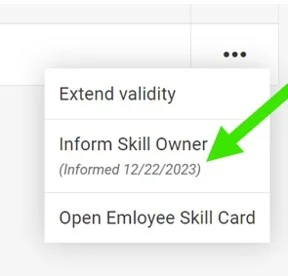
For example, when you select expired skills, you can choose to Extend validity, inform the skill owner or the skill matrix owner, or open the employee’s training card.
Inform the owner
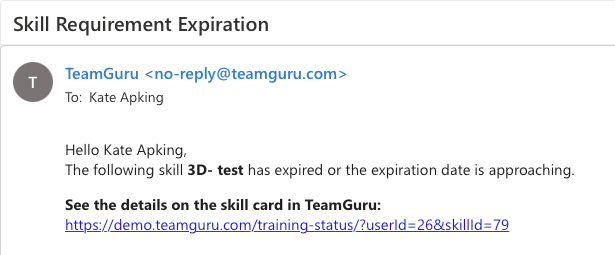
If you select the inform option, the skill owner or the skill matrix owner receives an email notification.
See the notification mark
Once the notification is sent, it is also marked next to the action taken.
Stav školení v TeamGuru vám pomáhá řídit, plánovat a sledovat stávající i požadované dovednosti zaměstnanců v jednom přehledu napříč všemi lokalitami nebo maticemi dovedností.
Stav snadno zkontrolujete pomocí různých filtrů, například prošlé dovednosti, dovednosti v procesu, dovednosti podle správce matice, vaše vlastní dovednosti a mnoho dalších.
Otevřete stav školení
Přejděte do modulu Matice dovedností a v podmenu zvolte Stav školení.
Vyberte filtry
Vyberte potřebné filtry: klikněte na tlačítko Filtr a zvolte z nabízených možností. Další možnosti najdete v rozšířeném filtru.
Projděte zaměstnance
Poté se zobrazí seznam zaměstnanců, kteří odpovídají zvoleným filtrům.
Proveďte další kroky
Podle výběru můžete provést další kroky přes tři tečky vedle zaměstnance.
Když například vyberete prošlé dovednosti, můžete zvolit Prodloužit platnost, informovat správce dovednosti nebo správce matice dovedností, případně otevřít kartu školení zaměstnance.
Informujte správce
Pokud zvolíte možnost informovat, správce dovednosti nebo správce matice dovedností dostane upozornění e-mailem.
Sledujte značku upozornění
Odeslané upozornění se zároveň označí vedle provedeného kroku.
Potřebujete další pomoc?
Napište nám. V pracovní dny obvykle odpovídáme do hodiny.