为项目添加里程碑
本文由英文机器翻译。 当前显示英文原文。
Set up milestones to easily visualize your project’s development.
See milestones in your project
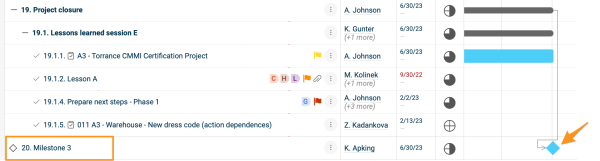
Add a milestone action
-
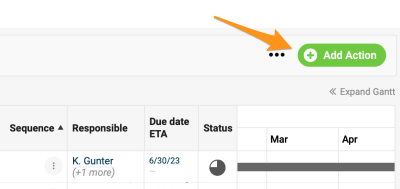
Open the action. Create a new action or open the settings of an existing one. Please note that a main action with sub-actions can’t be set up as a milestone.
-
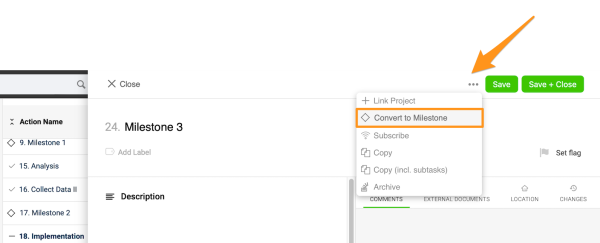
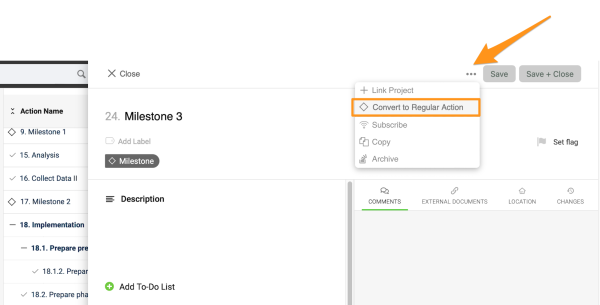
Convert it to a milestone. Click the three dots in the action settings and select Convert to Milestone. You can enter other details, such as the title, due date, etc.
-
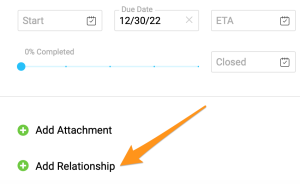
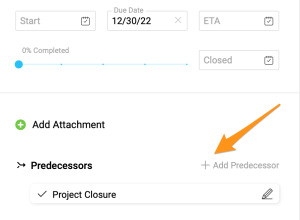
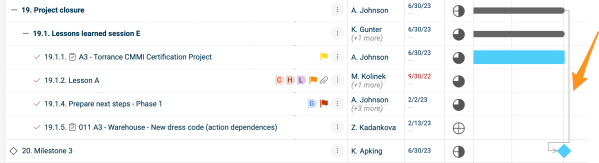
Connect predecessors. To connect the milestone with predecessors, click + Add Relationship, then + Add Predecessor, and choose the action(s). The connection is displayed in your Gantt chart. Please note that the latest due date of the predecessors automatically becomes the due date of the milestone action.
-
Convert it back if needed. To turn the milestone back into a regular action, click the three dots again and select Convert to Regular Action.
Spot overdue milestones
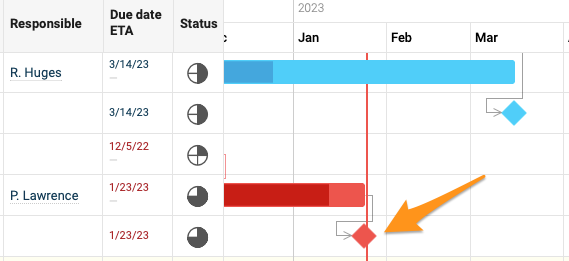
If a milestone action becomes overdue, it turns red.
设置里程碑,直观呈现项目进展。
查看项目中的里程碑
添加里程碑行动
-
打开行动。 新建一个行动,或打开现有行动的设置。请注意,包含子行动的主行动不能设为里程碑。
-
转换为里程碑。 点击行动设置中的三个点,选择转换为里程碑。您还可以输入其他详细信息,例如标题、截止日期等。
-
关联前置任务。 要将里程碑与前置任务关联,请点击 + 添加关系,然后点击 + 添加前置任务,并选择相应行动。关联关系会显示在甘特图中。请注意,前置任务中最晚的截止日期会自动成为里程碑行动的截止日期。
-
按需转换回来。 要将里程碑改回普通行动,请再次点击三个点,选择转换为普通行动。
识别逾期里程碑
里程碑行动逾期后会变为红色。
还需要帮助吗?
请给我们留言。工作日我们通常会在一小时内回复。