如何创建汇总指标
本文由英文机器翻译。 当前显示英文原文。
Summary metrics group (summarize) the data from the data collection objects and display their sum or average at a higher level.
Objects you can summarize
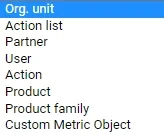
Summary metrics can be created for an Org. unit, Action list and Partner, and now also for a User, Action, Product and Product family.
Create a summary metric
-
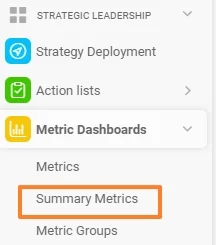
Open the summary metrics. Go to the Metric Dashboards module and select Summary Metrics in the submenu.
-
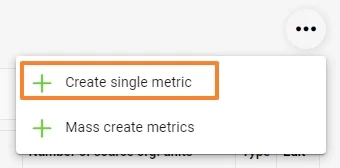
Create a single metric. Click the three dots in the upper right corner and choose Create single metric.
-
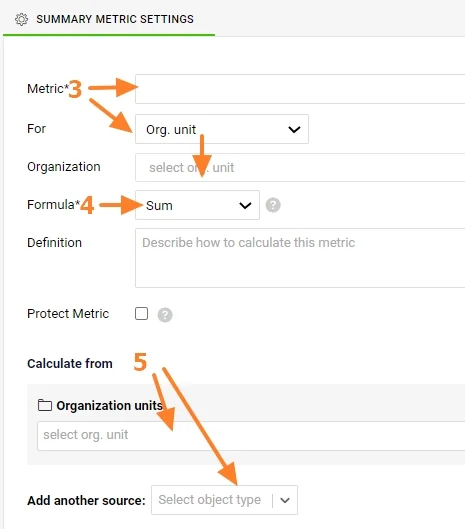
Select the metric and the object. Select a Metric and For which data collection object to summarize the data (Org. unit, Action list, Partner, Action, User, Product, Product family).
-
Select the formula. Select a Formula for the summary metric (Sum or Average, Minimum or Maximum, Multiple).
-
Select the source objects. Select From which data collection objects (or their combination) the sum or average should be calculated.
Protect and describe the metric
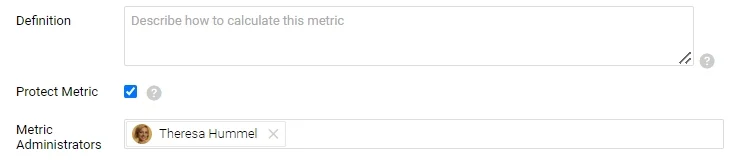
The summary metric can also be a Protected Metric and described in the Definition field.
To roll up a calculated metric (e.g. OTTR, PPM), you have to create summary metrics for the source values from which the calculated metric is calculated. For more information on calculated metrics, see Metrics driven by other metrics (calculated metrics).
Video guide: How to create summary metrics
汇总指标将数据收集对象中的数据分组(汇总),并在更高层级显示其总和或平均值。
可汇总的对象
可以为组织单元、行动清单和合作伙伴创建汇总指标,现在还可以为用户、行动、产品和产品系列创建。
创建汇总指标
-
打开汇总指标。 进入指标仪表板模块,在子菜单中选择汇总指标。
-
创建单个指标。 点击右上角的三个点,选择创建单个指标。
-
选择指标和对象。 选择指标,并在针对中选择要为哪种数据收集对象汇总数据(组织单元、行动清单、合作伙伴、行动、用户、产品、产品系列)。
-
选择公式。 为汇总指标选择公式(求和或平均值、最小值或最大值、乘积)。
-
选择来源对象。 在来自中选择用于计算总和或平均值的数据收集对象(或其组合)。
保护并描述指标
汇总指标也可以设为受保护的指标,并在定义字段中加以描述。
要累计汇总计算指标(例如OTTR、PPM),必须为计算该指标所用的来源值创建汇总指标。有关计算指标的更多信息,请参阅由其他指标驱动的指标(计算指标)。
视频教程:如何创建汇总指标
还需要帮助吗?
请给我们留言。工作日我们通常会在一小时内回复。