Ako vytvoriť súhrnné metriky
Strojový preklad z angličtiny. Zobrazený je anglický originál.
Summary metrics group (summarize) the data from the data collection objects and display their sum or average at a higher level.
Objects you can summarize
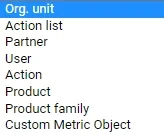
Summary metrics can be created for an Org. unit, Action list and Partner, and now also for a User, Action, Product and Product family.
Create a summary metric
-
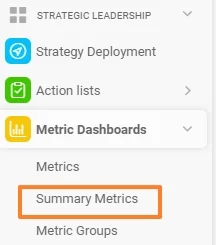
Open the summary metrics. Go to the Metric Dashboards module and select Summary Metrics in the submenu.
-
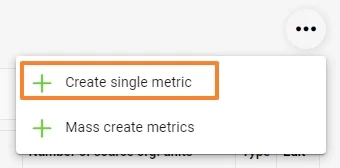
Create a single metric. Click the three dots in the upper right corner and choose Create single metric.
-
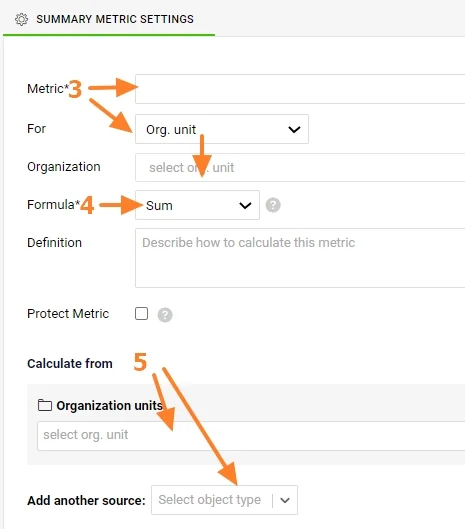
Select the metric and the object. Select a Metric and For which data collection object to summarize the data (Org. unit, Action list, Partner, Action, User, Product, Product family).
-
Select the formula. Select a Formula for the summary metric (Sum or Average, Minimum or Maximum, Multiple).
-
Select the source objects. Select From which data collection objects (or their combination) the sum or average should be calculated.
Protect and describe the metric
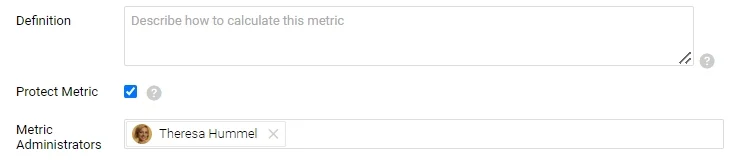
The summary metric can also be a Protected Metric and described in the Definition field.
To roll up a calculated metric (e.g. OTTR, PPM), you have to create summary metrics for the source values from which the calculated metric is calculated. For more information on calculated metrics, see Metrics driven by other metrics (calculated metrics).
Video guide: How to create summary metrics
Súhrnné metriky zoskupujú (sumarizujú) dáta z objektov zberu dát a na vyššej úrovni zobrazujú ich súčet alebo priemer.
Objekty, ktoré môžete sumarizovať
Súhrnné metriky môžete vytvoriť pre Org. jednotku, Akčný zoznam a Partnera a teraz aj pre Používateľa, Akciu, Výrobok a Skupinu výrobkov.
Vytvorenie súhrnnej metriky
-
Otvorte súhrnné metriky. Prejdite do modulu KPI dashboardy a v podmenu vyberte Súhrnné metriky.
-
Vytvorte jednu metriku. Kliknite na tri bodky v pravom hornom rohu a zvoľte Vytvoriť jednu metriku.
-
Vyberte metriku a objekt. Vyberte Metriku a v poli Pre objekt zberu dát, za ktorý sa majú dáta sumarizovať (Org. jednotka, Akčný zoznam, Partner, Akcia, Používateľ, Výrobok, Skupina výrobkov).
-
Vyberte vzorec. Vyberte Vzorec súhrnnej metriky (Súčet alebo Priemer, Minimum alebo Maximum, Násobok).
-
Vyberte zdrojové objekty. V poli Z vyberte objekty zberu dát (alebo ich kombináciu), z ktorých sa má súčet alebo priemer vypočítať.
Chráňte a popíšte metriku
Súhrnná metrika môže byť aj Chránená metrika a môžete ju popísať v poli Definícia.
Ak chcete agregovať počítanú metriku (napr. OTTR, PPM), musíte vytvoriť súhrnné metriky pre zdrojové hodnoty, z ktorých sa počítaná metrika počíta. Viac o počítaných metrikách nájdete v článku Metriky odvodené od iných metrík (počítané metriky).
Video návod: Ako vytvoriť súhrnné metriky
Potrebujete ďalšiu pomoc?
Napíšte nám. V pracovné dni zvyčajne odpovedáme do hodiny.