如何按行查看评论
本文由英文机器翻译。 当前显示英文原文。
You can view all actions and comments right next to your dashboard. You can also view comments in a row next to your projects, org. units or partners per time period.
Watch the video guide, or follow the text instructions below.
View comments in a row
-
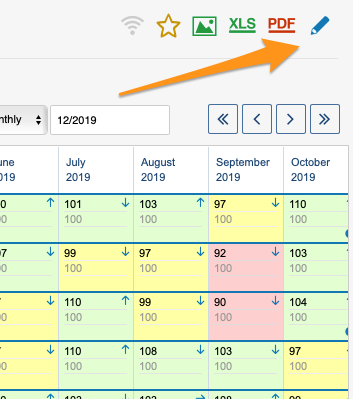
Open the dashboard settings. Go to the metric dashboard settings: click the edit pencil.
-
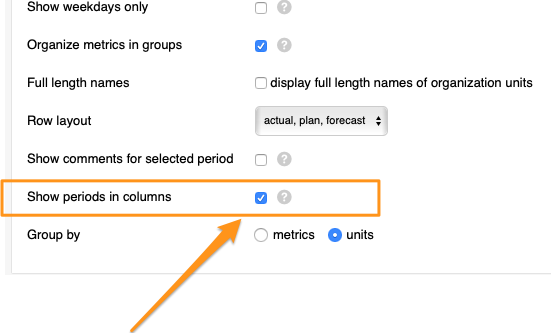
Show periods in columns. Tick the Show periods in columns box.
-
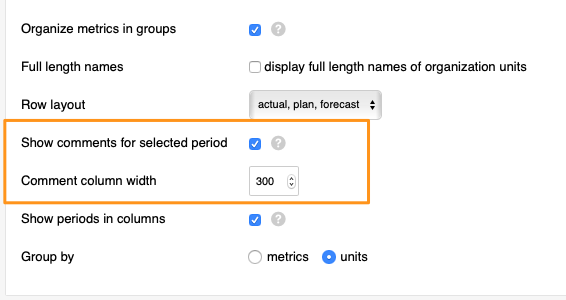
Show comments for the selected period. After you tick the box, tick another box above it, Show comments for selected period (you can also select the comment column width), and save your changes.
-
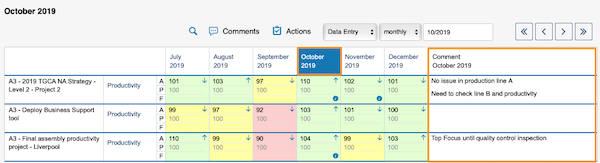
View the comments. Select a time period in your dashboard and view the comments.
您可以在仪表板旁直接查看所有行动和评论,也可以按时间周期,在项目、组织单元或合作伙伴旁按行查看评论。
观看视频指南,或按照下方的文字说明操作。
按行查看评论
-
打开仪表板设置。 进入指标仪表板设置:点击 编辑铅笔。
-
按列显示周期。 勾选 按列显示周期 复选框。
-
显示所选周期的评论。 勾选该复选框后,再勾选其上方的 显示所选周期的评论 复选框(还可以设置评论列的宽度),然后保存更改。
-
查看评论。 在仪表板中选择时间周期,即可查看评论。
还需要帮助吗?
请给我们留言。工作日我们通常会在一小时内回复。