So richten Sie Objektgruppen ein
Maschinelle Übersetzung aus dem Englischen. Englisches Original wird angezeigt.
Object groups help you create your metric dashboards faster and more easily. You can predefine a group of objects composed of your organizational units, partners, actions and others, or their combination. Then you can add this object group (a list of org. units) to your dashboard with one click, instead of adding each unit separately.
Please note that at the moment, an object group does not behave as a live group: if you modify your object group, the change is not automatically applied to your dashboards. We plan to add this functionality in the future.
To create a new object group, your account needs to be set up with a sufficient role.
Create an object group
-
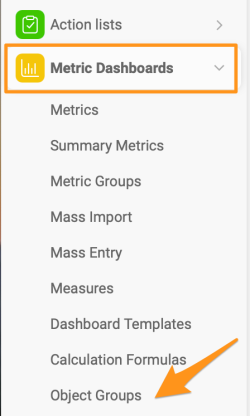
Open the object groups. Click the Metric Dashboards module and select Object Groups from the submenu.
-
Add a new object group. Click the green plus icon in the upper right corner.

-
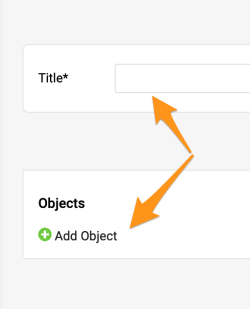
Enter the title and add objects. Fill in the Title and click the green plus button to Add Object.
-
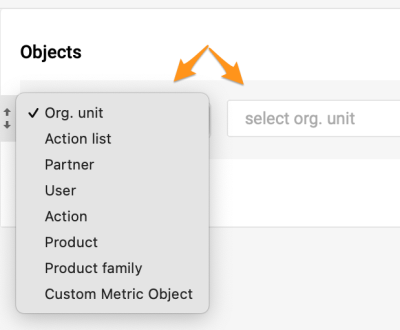
Select the objects. Select the objects and their locations.
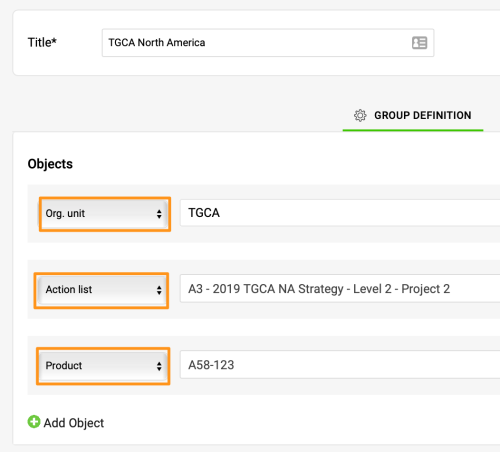
This is an example of a combined object group including an org. unit, an action list and a product.
Add the group to a dashboard
-
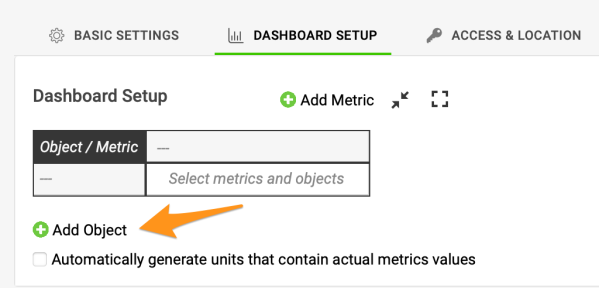
Add an object to the dashboard. Once the group is created, you can use it in a dashboard. Click the green plus button to Add Object to your dashboard.
-
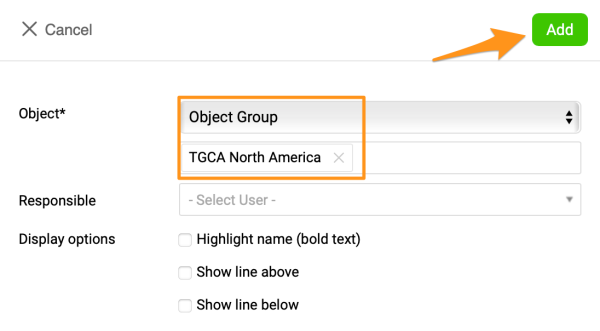
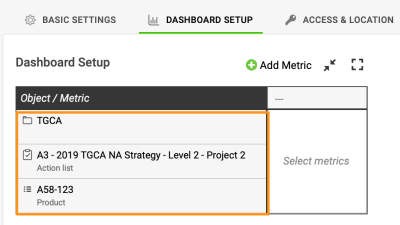
Select the object group. Select Object and the specific group in the submenus. Click Add, and your objects are added to your dashboard.
-
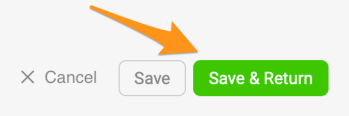
Save the dashboard. Save your dashboard’s settings.
Mit Objektgruppen erstellen Sie Ihre KPI-Dashboards schneller und einfacher. Sie legen vorab eine Gruppe von Objekten aus Organisationseinheiten, Partnern, Maßnahmen und anderen Objekten oder einer Kombination davon an. Diese Objektgruppe (eine Liste von Organisationseinheiten) fügen Sie dann mit einem Klick Ihrem Dashboard hinzu, statt jede Einheit einzeln hinzuzufügen.
Hinweis: Eine Objektgruppe verhält sich derzeit nicht wie eine Live-Gruppe. Wenn Sie Ihre Objektgruppe ändern, wird die Änderung nicht automatisch in Ihre Dashboards übernommen. Wir planen, diese Funktion künftig zu ergänzen.
Um eine neue Objektgruppe anzulegen, braucht Ihr Konto eine ausreichende Rolle.
Eine Objektgruppe anlegen
-
Öffnen Sie die Objektgruppen. Klicken Sie auf das Modul KPI-Dashboards und wählen Sie im Untermenü Objektgruppen.
-
Fügen Sie eine neue Objektgruppe hinzu. Klicken Sie oben rechts auf das grüne Plus-Symbol.
-
Geben Sie den Titel ein und fügen Sie Objekte hinzu. Füllen Sie den Titel aus und klicken Sie auf die grüne Plus-Schaltfläche Objekt hinzufügen.
-
Wählen Sie die Objekte. Wählen Sie die Objekte und ihre Orte.
Hier ein Beispiel einer kombinierten Objektgruppe mit einer Organisationseinheit, einer Maßnahmenliste und einem Produkt.
Die Gruppe einem Dashboard hinzufügen
-
Fügen Sie dem Dashboard ein Objekt hinzu. Sobald die Gruppe angelegt ist, können Sie sie in einem Dashboard verwenden. Klicken Sie auf die grüne Plus-Schaltfläche Objekt hinzufügen, um sie Ihrem Dashboard hinzuzufügen.
-
Wählen Sie die Objektgruppe. Wählen Sie in den Untermenüs Objekt und die gewünschte Gruppe. Klicken Sie auf Hinzufügen; Ihre Objekte werden dem Dashboard hinzugefügt.
-
Speichern Sie das Dashboard. Speichern Sie die Einstellungen Ihres Dashboards.
Brauchen Sie weitere Hilfe?
Schreiben Sie uns. An Werktagen antworten wir meist innerhalb einer Stunde.