如何设置对象组
本文由英文机器翻译。 当前显示英文原文。
Object groups help you create your metric dashboards faster and more easily. You can predefine a group of objects composed of your organizational units, partners, actions and others, or their combination. Then you can add this object group (a list of org. units) to your dashboard with one click, instead of adding each unit separately.
Please note that at the moment, an object group does not behave as a live group: if you modify your object group, the change is not automatically applied to your dashboards. We plan to add this functionality in the future.
To create a new object group, your account needs to be set up with a sufficient role.
Create an object group
-
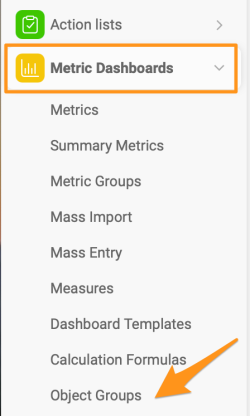
Open the object groups. Click the Metric Dashboards module and select Object Groups from the submenu.
-
Add a new object group. Click the green plus icon in the upper right corner.

-
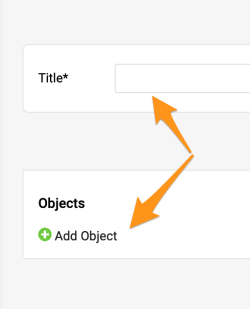
Enter the title and add objects. Fill in the Title and click the green plus button to Add Object.
-
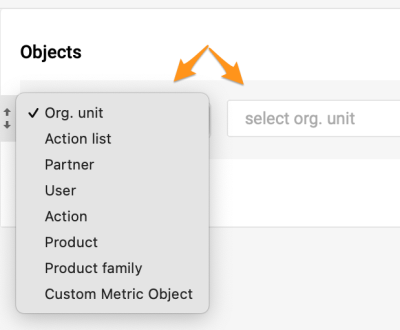
Select the objects. Select the objects and their locations.
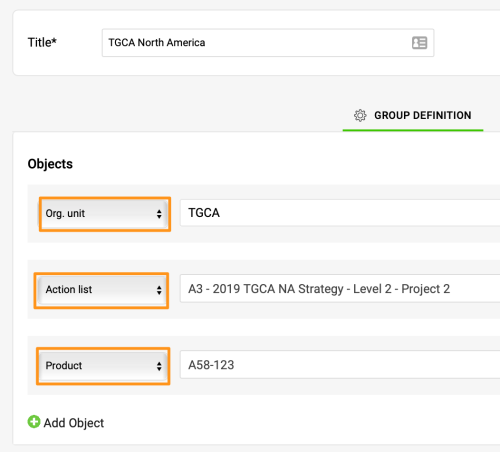
This is an example of a combined object group including an org. unit, an action list and a product.
Add the group to a dashboard
-
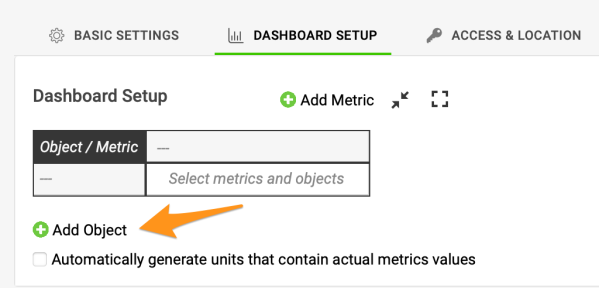
Add an object to the dashboard. Once the group is created, you can use it in a dashboard. Click the green plus button to Add Object to your dashboard.
-
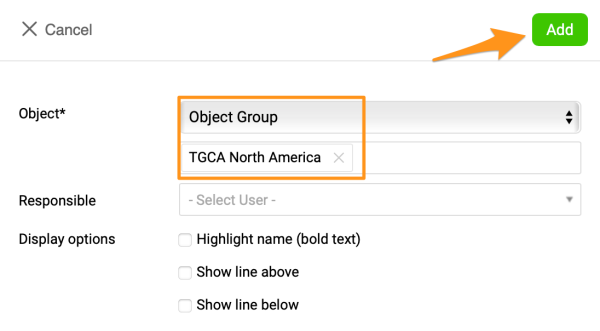
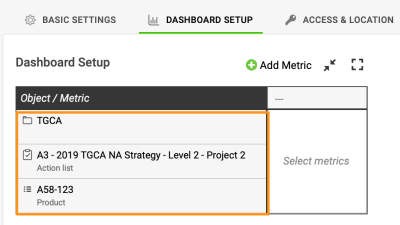
Select the object group. Select Object and the specific group in the submenus. Click Add, and your objects are added to your dashboard.
-
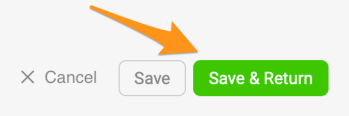
Save the dashboard. Save your dashboard’s settings.
对象组可以帮助您更快、更轻松地创建指标仪表板。您可以预先定义一个对象组,由组织单元、合作伙伴、行动等或其组合构成。之后只需一键即可将该对象组(组织单元列表)添加到仪表板,无需逐个添加单元。
请注意,目前对象组还不是动态组:修改对象组后,更改不会自动应用到仪表板。我们计划在今后加入此功能。
要创建新的对象组,您的账户需要具备相应的角色。
创建对象组
-
打开对象组。 点击 指标仪表板 模块,从子菜单中选择 对象组。
-
添加新对象组。 点击右上角的绿色加号图标。
-
输入标题并添加对象。 填写 标题,然后点击绿色加号按钮 添加对象。
-
选择对象。 选择对象及其位置。
以下是一个组合对象组的示例,其中包含一个组织单元、一个行动清单和一个产品。
将对象组添加到仪表板
-
向仪表板添加对象。 对象组创建后,即可在仪表板中使用。点击绿色加号按钮 添加对象,将其添加到仪表板。
-
选择对象组。 在子菜单中选择 对象 和具体的对象组。点击 添加,对象即会添加到仪表板中。
-
保存仪表板。 保存仪表板设置。
还需要帮助吗?
请给我们留言。工作日我们通常会在一小时内回复。