Cómo configurar grupos de objetos
Traducción automática del inglés. Se muestra el original en inglés.
Object groups help you create your metric dashboards faster and more easily. You can predefine a group of objects composed of your organizational units, partners, actions and others, or their combination. Then you can add this object group (a list of org. units) to your dashboard with one click, instead of adding each unit separately.
Please note that at the moment, an object group does not behave as a live group: if you modify your object group, the change is not automatically applied to your dashboards. We plan to add this functionality in the future.
To create a new object group, your account needs to be set up with a sufficient role.
Create an object group
-
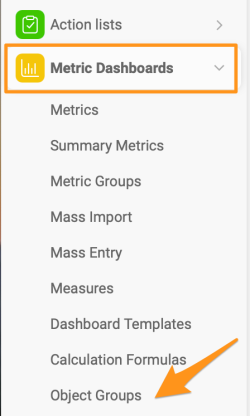
Open the object groups. Click the Metric Dashboards module and select Object Groups from the submenu.
-
Add a new object group. Click the green plus icon in the upper right corner.

-
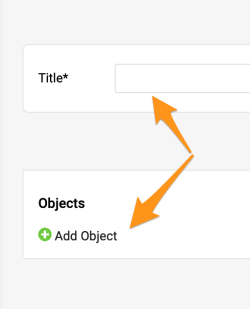
Enter the title and add objects. Fill in the Title and click the green plus button to Add Object.
-
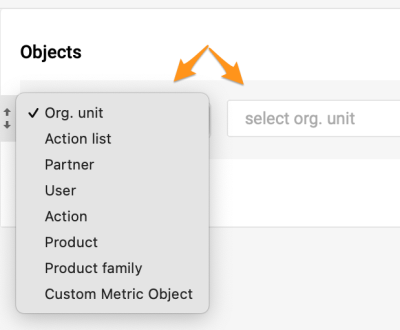
Select the objects. Select the objects and their locations.
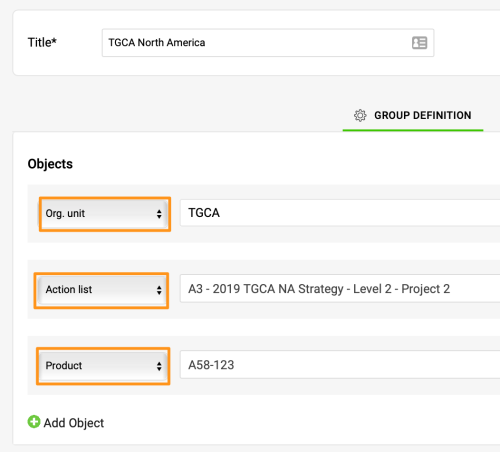
This is an example of a combined object group including an org. unit, an action list and a product.
Add the group to a dashboard
-
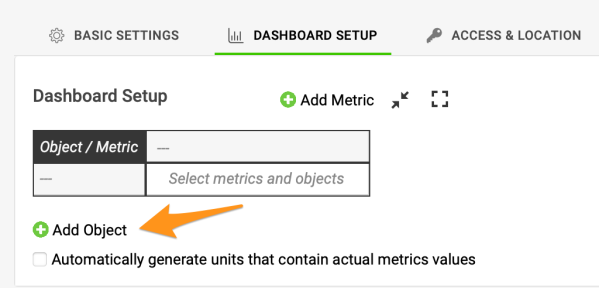
Add an object to the dashboard. Once the group is created, you can use it in a dashboard. Click the green plus button to Add Object to your dashboard.
-
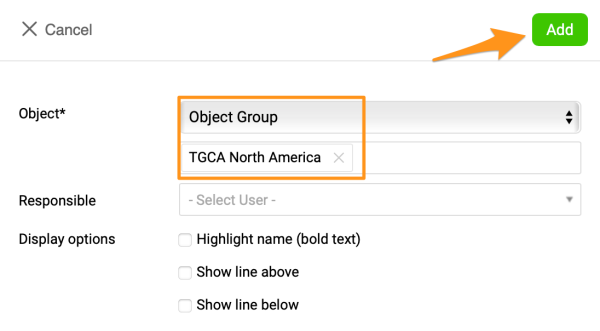
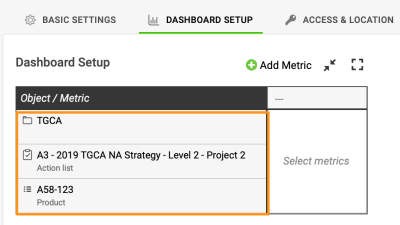
Select the object group. Select Object and the specific group in the submenus. Click Add, and your objects are added to your dashboard.
-
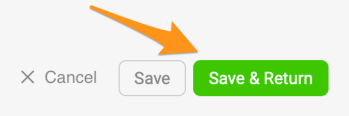
Save the dashboard. Save your dashboard’s settings.
Los grupos de objetos le ayudan a crear sus dashboards de KPI de forma más rápida y sencilla. Puede predefinir un grupo de objetos formado por unidades organizativas, partners, acciones y otros, o por una combinación de ellos. Después puede agregar ese grupo de objetos (una lista de unidades organizativas) a su dashboard con un clic, en lugar de agregar cada unidad por separado.
Tenga en cuenta que, por ahora, un grupo de objetos no funciona como un grupo dinámico: si modifica el grupo de objetos, el cambio no se aplica automáticamente a sus dashboards. Tenemos previsto agregar esta función en el futuro.
Para crear un grupo de objetos, su cuenta debe tener asignado un rol con permisos suficientes.
Crear un grupo de objetos
-
Abra los grupos de objetos. Haga clic en el módulo Dashboards de KPI y seleccione Grupos de objetos en el submenú.
-
Agregue un grupo de objetos. Haga clic en el icono verde con el signo más en la esquina superior derecha.
-
Escriba el título y agregue objetos. Complete el Título y haga clic en el botón verde con el signo más para Agregar objeto.
-
Seleccione los objetos. Seleccione los objetos y sus ubicaciones.
Este es un ejemplo de un grupo de objetos combinado que incluye una unidad organizativa, un plan de acción y un producto.
Agregar el grupo a un dashboard
-
Agregue un objeto al dashboard. Una vez creado el grupo, puede usarlo en un dashboard. Haga clic en el botón verde con el signo más para Agregar objeto a su dashboard.
-
Seleccione el grupo de objetos. Seleccione Objeto y el grupo concreto en los submenús. Haga clic en Agregar y sus objetos se agregan al dashboard.
-
Guarde el dashboard. Guarde la configuración del dashboard.
¿Necesita más ayuda?
Escríbanos. En días laborables solemos responder en menos de una hora.