Jak dodać link zewnętrzny do dokumentu TeamGuru
Tłumaczenie maszynowe z angielskiego. Wyświetlany jest oryginał po angielsku.
TeamGuru enables you to add a link to an external document or website.
Please note: to link documents within TeamGuru, see How to link TeamGuru documents.
-
Open the document edit screen. Click the Edit icon.

-
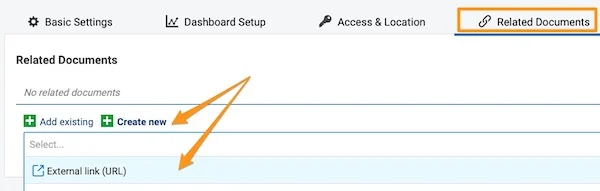
Go to the Related Documents tab. Open the Related Documents tab.
-
Add the external link. Click the green plus button Create new, select External Link and fill in the field.
-
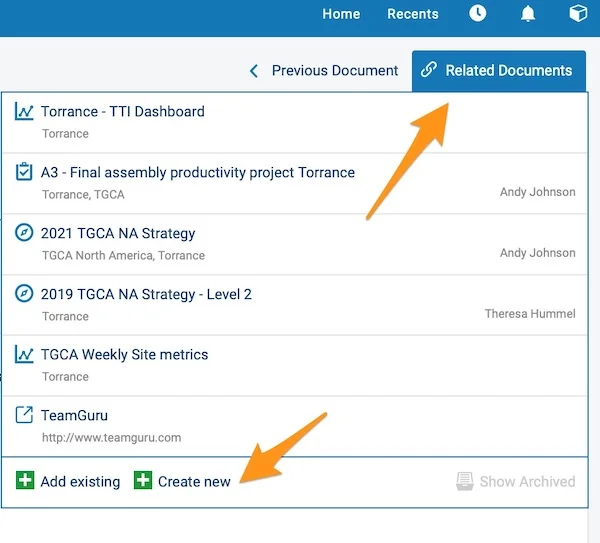
View your external links. Your external links are shown in the Related Documents section in the upper right corner above your document. You can also add an external link from here by following the same steps.
W TeamGuru możesz dodać link do zewnętrznego dokumentu lub strony internetowej.
Uwaga: jak łączyć dokumenty w obrębie TeamGuru, opisujemy w artykule Jak powiązać dokumenty TeamGuru.
-
Otwórz ekran edycji dokumentu. Kliknij ikonę Edytuj.
-
Przejdź do karty Powiązane dokumenty. Otwórz kartę Powiązane dokumenty.
-
Dodaj link zewnętrzny. Kliknij zielony plus Utwórz nowy, wybierz Link zewnętrzny i wypełnij pole.
-
Zobacz swoje linki zewnętrzne. Linki zewnętrzne są widoczne w sekcji Powiązane dokumenty w prawym górnym rogu nad dokumentem. Tam też możesz dodać link zewnętrzny w ten sam sposób.
Potrzebujesz dalszej pomocy?
Napisz do nas. W dni robocze zwykle odpowiadamy w ciągu godziny.