Ako pridať externý odkaz do dokumentu TeamGuru
Strojový preklad z angličtiny. Zobrazený je anglický originál.
TeamGuru enables you to add a link to an external document or website.
Please note: to link documents within TeamGuru, see How to link TeamGuru documents.
-
Open the document edit screen. Click the Edit icon.

-
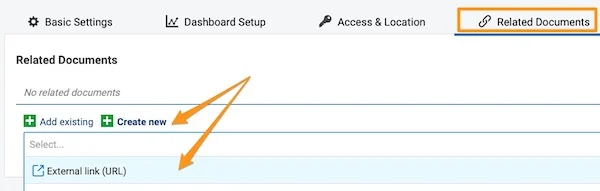
Go to the Related Documents tab. Open the Related Documents tab.
-
Add the external link. Click the green plus button Create new, select External Link and fill in the field.
-
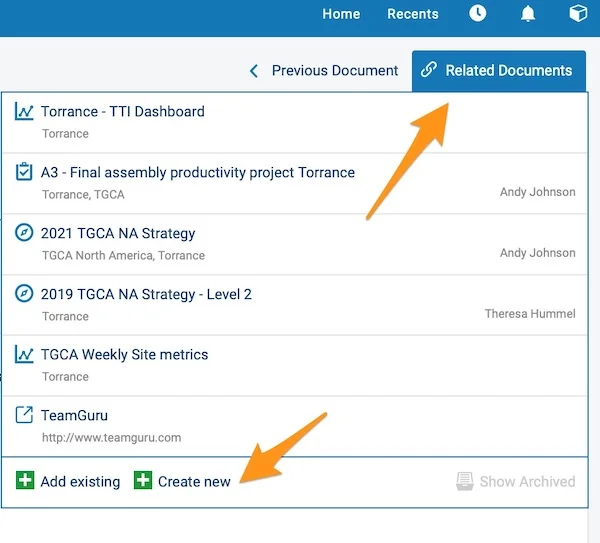
View your external links. Your external links are shown in the Related Documents section in the upper right corner above your document. You can also add an external link from here by following the same steps.
TeamGuru vám umožňuje pridať odkaz na externý dokument alebo webovú stránku.
Upozornenie: ako prepojiť dokumenty v rámci TeamGuru, nájdete v návode Ako prepojiť dokumenty TeamGuru.
-
Otvorte obrazovku úprav dokumentu. Kliknite na ikonu Upraviť.
-
Prejdite na kartu Súvisiace dokumenty. Otvorte kartu Súvisiace dokumenty.
-
Pridajte externý odkaz. Kliknite na zelené tlačidlo plus Vytvoriť nový, zvoľte Externý odkaz a vyplňte pole.
-
Pozrite si externé odkazy. Externé odkazy sa zobrazujú v sekcii Súvisiace dokumenty v pravom hornom rohu nad dokumentom. Rovnakým postupom môžete externý odkaz pridať aj odtiaľto.
Potrebujete ďalšiu pomoc?
Napíšte nám. V pracovné dni zvyčajne odpovedáme do hodiny.