如何为TeamGuru文档添加外部链接
本文由英文机器翻译。 当前显示英文原文。
TeamGuru enables you to add a link to an external document or website.
Please note: to link documents within TeamGuru, see How to link TeamGuru documents.
-
Open the document edit screen. Click the Edit icon.

-
Go to the Related Documents tab. Open the Related Documents tab.
-
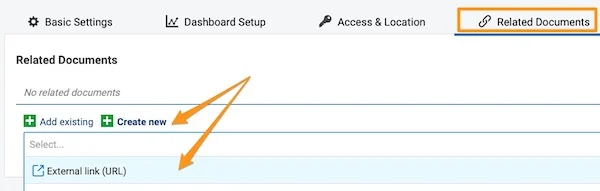
Add the external link. Click the green plus button Create new, select External Link and fill in the field.
-
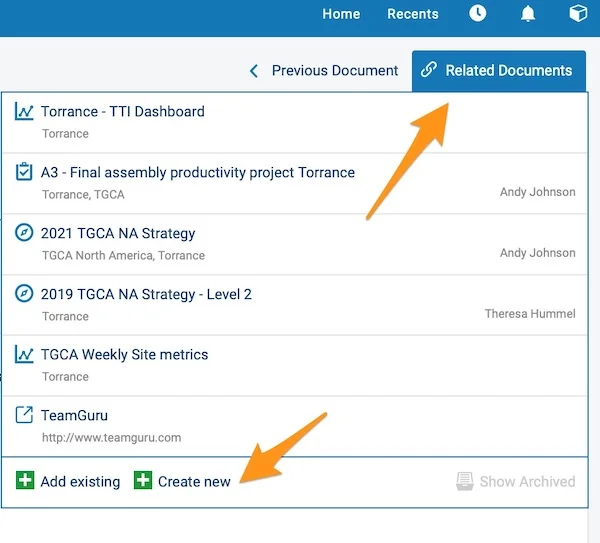
View your external links. Your external links are shown in the Related Documents section in the upper right corner above your document. You can also add an external link from here by following the same steps.
在TeamGuru中,您可以添加指向外部文档或网站的链接。
请注意: 如需关联TeamGuru内部的文档,请参阅如何关联TeamGuru文档。
-
打开文档编辑界面。 点击 编辑 图标。
-
进入相关文档选项卡。 打开 相关文档 选项卡。
-
添加外部链接。 点击绿色加号按钮 新建,选择 外部链接 并填写字段。
-
查看外部链接。 外部链接会显示在文档上方右上角的 相关文档 部分。您也可以按相同步骤在此处添加外部链接。
还需要帮助吗?
请给我们留言。工作日我们通常会在一小时内回复。