Jak wyeksportować kilka dokumentów do pliku zip (PDF, XLS, PPT lub PNG)
Tłumaczenie maszynowe z angielskiego. Wyświetlany jest oryginał po angielsku.
Create a list of documents and export them all to a single zip file. This is recommended for users who need to export several documents on a regular basis.
Open your sets of documents
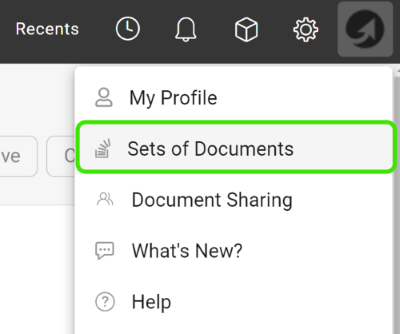
Click your profile and select Sets of Documents from the submenu.
Add a new set
Click the green plus icon to add a set.

Choose the documents and export types
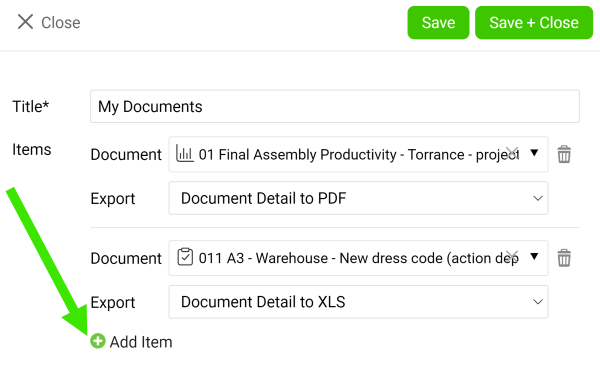
Enter a title, then choose a document and its export type (PDF, XLS, PPT or PNG). Add as many documents as you need with the green plus icon Add item. Once you are done, click the Save & Close button.
Download the zip file
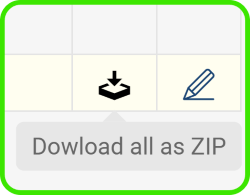
Click the Download all as Zip file icon.
You can also download attachments from your dashboard to a zip file.
Utwórz listę dokumentów i wyeksportuj je wszystkie do jednego pliku zip. To dobre rozwiązanie dla użytkowników, którzy regularnie eksportują kilka dokumentów.
Otwórz zestawy dokumentów
Kliknij swój profil i wybierz z podmenu Zestawy dokumentów.
Dodaj nowy zestaw
Kliknij zieloną ikonę plusa, aby dodać zestaw.
Wybierz dokumenty i typy eksportu
Wpisz nazwę, a potem wybierz dokument i typ eksportu (PDF, XLS, PPT lub PNG). Dodaj tyle dokumentów, ile potrzebujesz, zieloną ikoną plusa Dodaj element. Na koniec kliknij przycisk Zapisz i zamknij.
Pobierz plik zip
Kliknij ikonę Pobierz wszystko jako plik zip.
Możesz też pobrać załączniki z dashboardu do pliku zip.
Potrzebujesz dalszej pomocy?
Napisz do nas. W dni robocze zwykle odpowiadamy w ciągu godziny.