如何将多个文档导出为一个zip文件(PDF、XLS、PPT或PNG)
本文由英文机器翻译。 当前显示英文原文。
Create a list of documents and export them all to a single zip file. This is recommended for users who need to export several documents on a regular basis.
Open your sets of documents
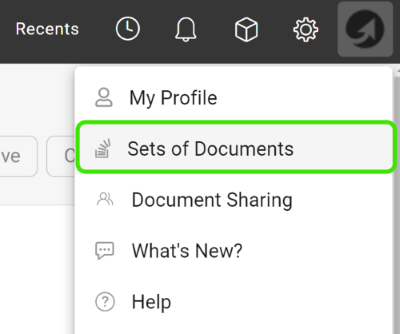
Click your profile and select Sets of Documents from the submenu.
Add a new set
Click the green plus icon to add a set.

Choose the documents and export types
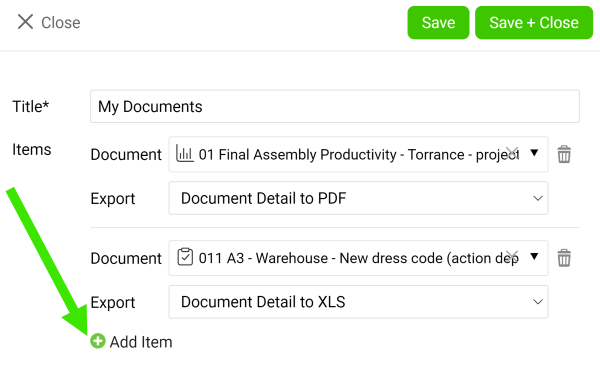
Enter a title, then choose a document and its export type (PDF, XLS, PPT or PNG). Add as many documents as you need with the green plus icon Add item. Once you are done, click the Save & Close button.
Download the zip file
Click the Download all as Zip file icon.
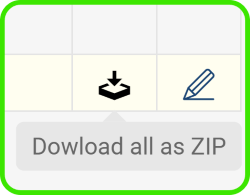
You can also download attachments from your dashboard to a zip file.
创建一个文档列表,将其中所有文档导出为一个zip文件。建议需要定期导出多个文档的用户使用此功能。
打开文档集
点击您的个人资料,从子菜单中选择文档集。
添加新文档集
点击绿色加号图标添加文档集。
选择文档和导出类型
输入标题,然后选择文档及其导出类型(PDF、XLS、PPT或PNG)。使用绿色加号图标添加项目,可以添加任意数量的文档。完成后,点击保存并关闭按钮。
下载zip文件
点击全部下载为zip文件图标。
您还可以将仪表板中的附件下载为zip文件。
还需要帮助吗?
请给我们留言。工作日我们通常会在一小时内回复。