Ako exportovať viac dokumentov do súboru ZIP (PDF, XLS, PPT alebo PNG)
Strojový preklad z angličtiny. Zobrazený je anglický originál.
Create a list of documents and export them all to a single zip file. This is recommended for users who need to export several documents on a regular basis.
Open your sets of documents
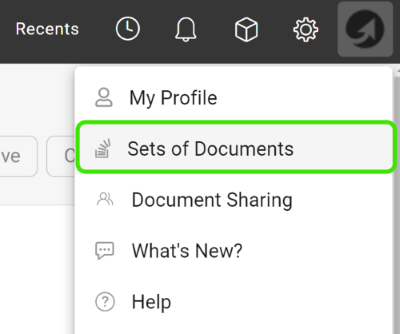
Click your profile and select Sets of Documents from the submenu.
Add a new set
Click the green plus icon to add a set.

Choose the documents and export types
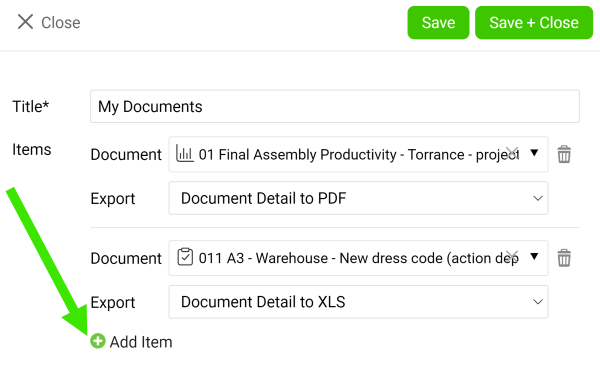
Enter a title, then choose a document and its export type (PDF, XLS, PPT or PNG). Add as many documents as you need with the green plus icon Add item. Once you are done, click the Save & Close button.
Download the zip file
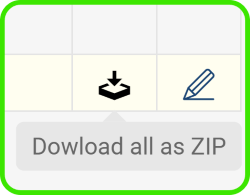
Click the Download all as Zip file icon.
You can also download attachments from your dashboard to a zip file.
Vytvorte si zoznam dokumentov a exportujte ich všetky do jedného súboru ZIP. Hodí sa to používateľom, ktorí pravidelne exportujú viacero dokumentov.
Otvorte sady dokumentov
Kliknite na svoj profil a v podmenu vyberte Sady dokumentov.
Pridajte novú sadu
Sadu pridáte kliknutím na zelenú ikonu plus.
Vyberte dokumenty a typy exportu
Zadajte názov a potom vyberte dokument a jeho typ exportu (PDF, XLS, PPT alebo PNG). Zelenou ikonou plus Pridať položku pridajte toľko dokumentov, koľko potrebujete. Nakoniec kliknite na tlačidlo Uložiť a zavrieť.
Stiahnite súbor ZIP
Kliknite na ikonu Stiahnuť všetko ako ZIP.
Môžete tiež stiahnuť prílohy z dashboardu do súboru ZIP.
Potrebujete ďalšiu pomoc?
Napíšte nám. V pracovné dni zvyčajne odpovedáme do hodiny.