Jak wyświetlić w dashboardzie wartości z poprzedniego roku
Tłumaczenie maszynowe z angielskiego. Wyświetlany jest oryginał po angielsku.
Besides actual, plan and forecast values, you can view prior year data and the percentage change of the actual values from the prior year.
Video guide
The text instructions follow below the video.
View prior year values and the change from the prior year
-
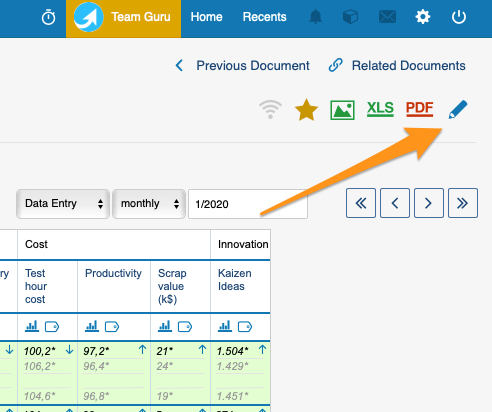
Open the dashboard settings. Go to your dashboard settings.
-
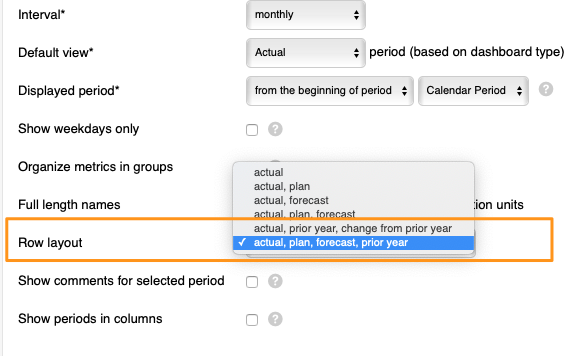
Choose the row layout. Scroll down to Row layout and select either Actual, plan, forecast, prior year or Actual, prior year, change from prior year from the menu.
-
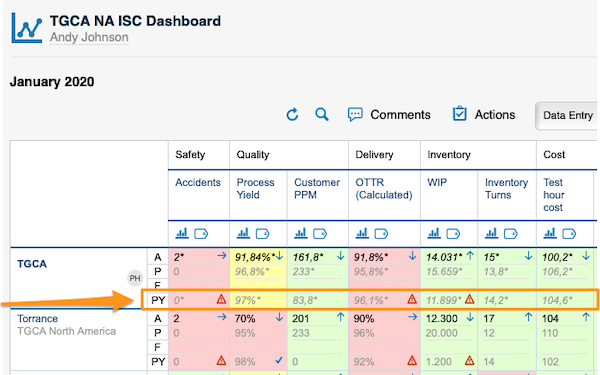
View the values. Your dashboard displays the values based on your selection. PY stands for prior year values:
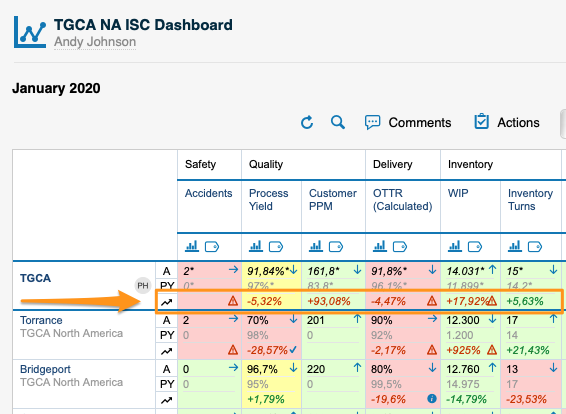
The change from prior year values:
PY values are filled in automatically by the system with the actual values of the prior year. To see PY values, you have to upload the actual values for the previous year into the system.
Oprócz wartości rzeczywistych, planowanych i prognozowanych możesz wyświetlić dane z poprzedniego roku oraz procentową zmianę wartości rzeczywistych względem poprzedniego roku.
Samouczek wideo
Instrukcja tekstowa znajduje się pod filmem.
Wyświetl wartości z poprzedniego roku i zmianę względem poprzedniego roku
-
Otwórz ustawienia dashboardu. Przejdź do ustawień dashboardu.
-
Wybierz układ wierszy. Przewiń w dół do pola Układ wierszy i wybierz z menu Rzeczywiste, plan, prognoza, poprzedni rok albo Rzeczywiste, poprzedni rok, zmiana względem poprzedniego roku.
-
Przejrzyj wartości. Dashboard wyświetla wartości zgodnie z wybraną opcją. PY oznacza wartości z poprzedniego roku:
Zmiana względem poprzedniego roku:
System automatycznie uzupełnia wartości PY wartościami rzeczywistymi z poprzedniego roku. Aby zobaczyć wartości PY, musisz wczytać do systemu wartości rzeczywiste za poprzedni rok.
Potrzebujesz dalszej pomocy?
Napisz do nas. W dni robocze zwykle odpowiadamy w ciągu godziny.