如何在仪表板中显示上年值
本文由英文机器翻译。 当前显示英文原文。
Besides actual, plan and forecast values, you can view prior year data and the percentage change of the actual values from the prior year.
Video guide
The text instructions follow below the video.
View prior year values and the change from the prior year
-
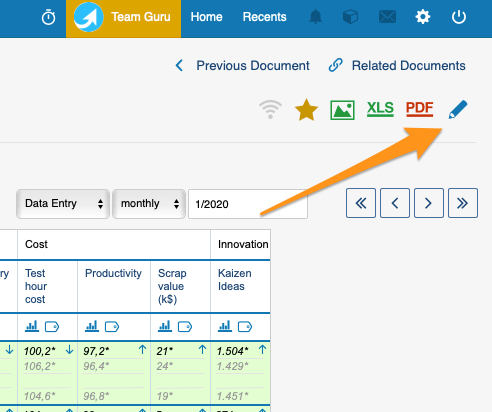
Open the dashboard settings. Go to your dashboard settings.
-
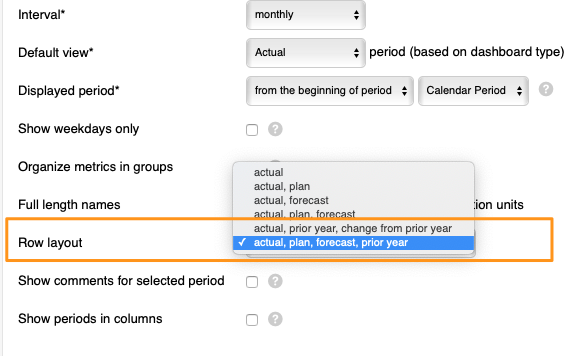
Choose the row layout. Scroll down to Row layout and select either Actual, plan, forecast, prior year or Actual, prior year, change from prior year from the menu.
-
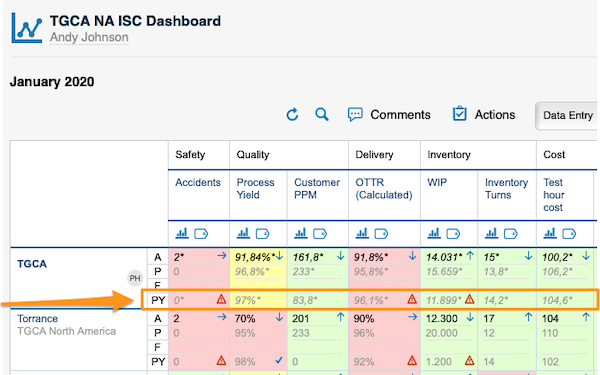
View the values. Your dashboard displays the values based on your selection. PY stands for prior year values:
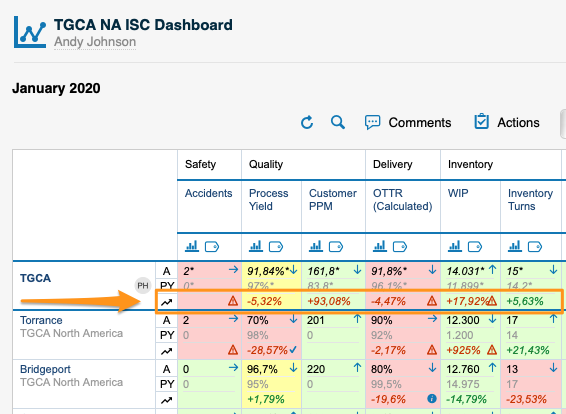
The change from prior year values:
PY values are filled in automatically by the system with the actual values of the prior year. To see PY values, you have to upload the actual values for the previous year into the system.
除了实际值、计划值和预测值,您还可以查看上年数据,以及实际值较上年的变化百分比。
视频指南
文字说明见视频下方。
查看上年值及较上年的变化
-
打开仪表板设置。 进入仪表板设置。
-
选择行布局。 向下滚动到 行布局,从菜单中选择 实际值、计划值、预测值、上年值 或 实际值、上年值、较上年变化。
-
查看数值。 仪表板会根据您的选择显示数值。PY表示上年值:
较上年的变化值:
PY值由系统自动填入上一年的实际值。要查看PY值,必须先将上一年的实际值上传到系统中。
还需要帮助吗?
请给我们留言。工作日我们通常会在一小时内回复。