Jak utworzyć nowy szablon raportu
Tłumaczenie maszynowe z angielskiego. Wyświetlany jest oryginał po angielsku.
Report templates help you predefine the slide layout of your report.
-
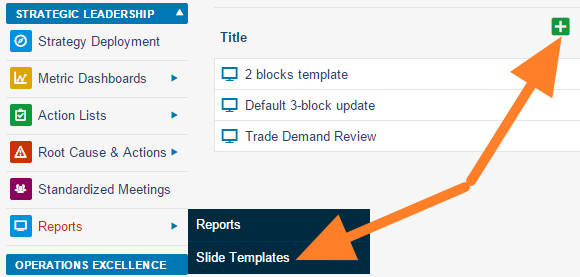
Add a slide template. Go to the Reports module menu, select the Slide Templates submenu and click the Add icon.
-
Name the template and add a box. Fill in the template name and the responsible person, and click the Add box icon.
-
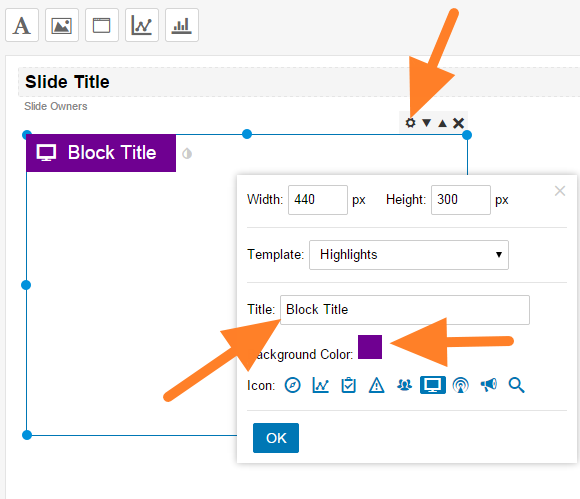
Customize the box. Click the Box Settings icon and customize the box title, color and icon.
-
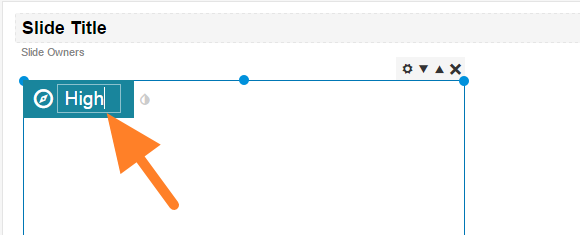
Rename the box. You can overwrite the box title directly after clicking it.
-
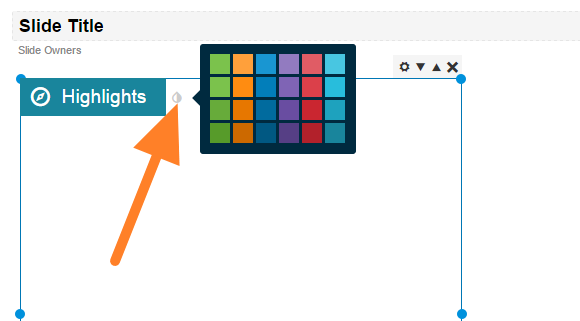
Change the box color. Change the color by clicking the small drop icon next to the box title.
-
Add more boxes and save. Add as many boxes as you need and save the template.
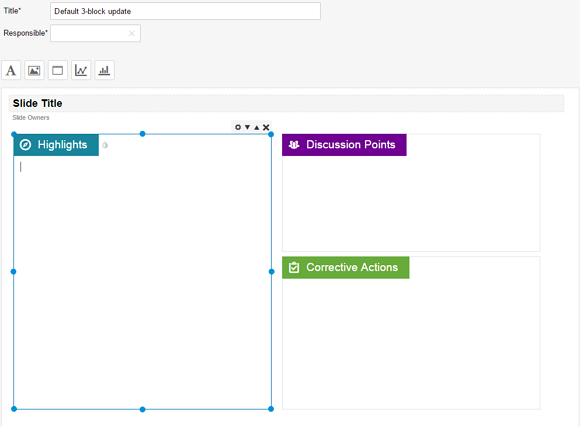
Szablon raportu pozwala z góry ustalić układ slajdów w raporcie.
-
Dodaj szablon slajdu. W menu modułu Raporty otwórz podmenu Szablony slajdów i kliknij ikonę Dodaj.
-
Nazwij szablon i dodaj pole. Wpisz nazwę szablonu i osobę odpowiedzialną, a następnie kliknij ikonę Dodaj pole.
-
Dostosuj pole. Kliknij ikonę Ustawienia pola i ustaw tytuł, kolor oraz ikonę pola.
-
Zmień nazwę pola. Kliknij tytuł pola i wpisz nowy bezpośrednio w jego miejsce.
-
Zmień kolor pola. Kliknij małą ikonę kropli obok tytułu pola i wybierz kolor.
-
Dodaj kolejne pola i zapisz. Dodaj tyle pól, ile potrzebujesz, i zapisz szablon.
Potrzebujesz dalszej pomocy?
Napisz do nas. W dni robocze zwykle odpowiadamy w ciągu godziny.