Cómo crear una plantilla de informe
Traducción automática del inglés. Se muestra el original en inglés.
Report templates help you predefine the slide layout of your report.
-
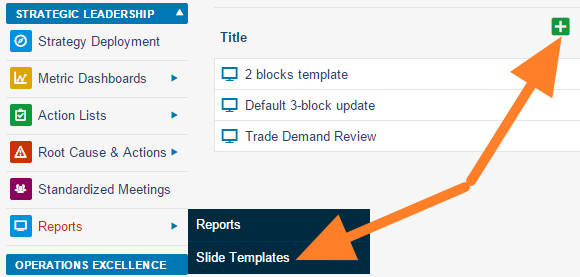
Add a slide template. Go to the Reports module menu, select the Slide Templates submenu and click the Add icon.
-
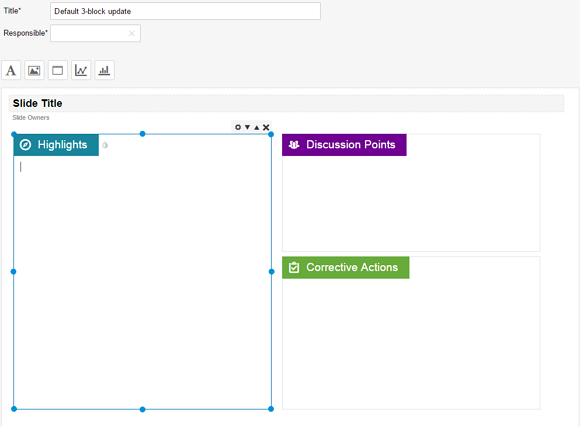
Name the template and add a box. Fill in the template name and the responsible person, and click the Add box icon.
-
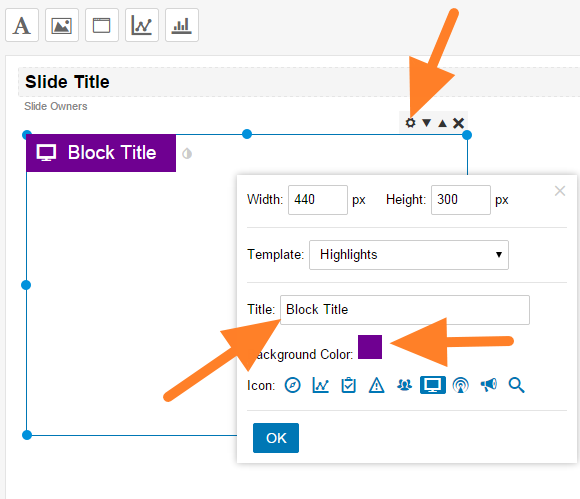
Customize the box. Click the Box Settings icon and customize the box title, color and icon.
-
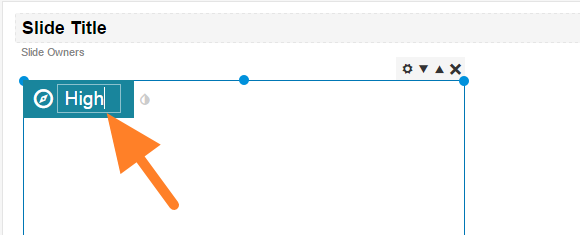
Rename the box. You can overwrite the box title directly after clicking it.
-
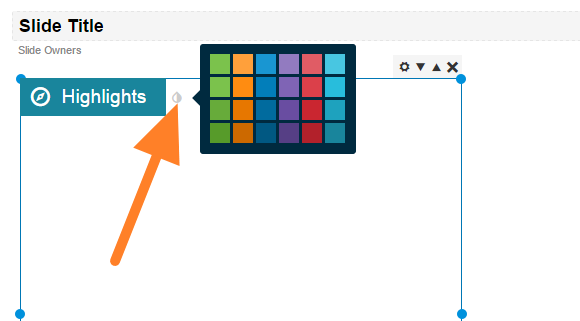
Change the box color. Change the color by clicking the small drop icon next to the box title.
-
Add more boxes and save. Add as many boxes as you need and save the template.
Las plantillas de informe le permiten definir de antemano el diseño de las diapositivas de su informe.
-
Agregue una plantilla de diapositiva. Abra el menú del módulo Informes, seleccione el submenú Plantillas de diapositivas y haga clic en el icono Agregar.
-
Asigne un nombre a la plantilla y agregue un cuadro. Escriba el nombre de la plantilla y el responsable, y haga clic en el icono Agregar cuadro.
-
Personalice el cuadro. Haga clic en el icono Configuración del cuadro y ajuste el título, el color y el icono del cuadro.
-
Cambie el nombre del cuadro. Haga clic en el título del cuadro y escriba el nuevo directamente.
-
Cambie el color del cuadro. Haga clic en el pequeño icono de gota junto al título del cuadro para cambiar el color.
-
Agregue más cuadros y guarde. Agregue todos los cuadros que necesite y guarde la plantilla.
¿Necesita más ayuda?
Escríbanos. En días laborables solemos responder en menos de una hora.