Jak vytvořit novou šablonu reportu
Strojový překlad z angličtiny. Zobrazen anglický originál.
Report templates help you predefine the slide layout of your report.
-
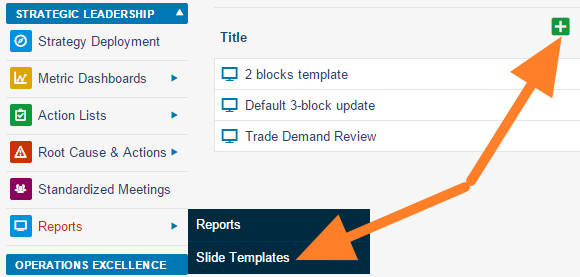
Add a slide template. Go to the Reports module menu, select the Slide Templates submenu and click the Add icon.
-
Name the template and add a box. Fill in the template name and the responsible person, and click the Add box icon.
-
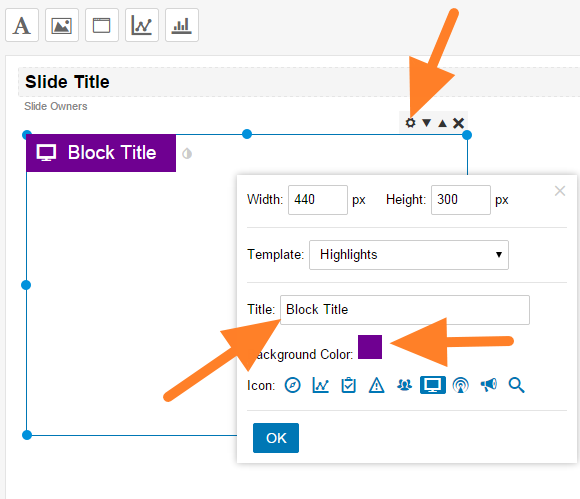
Customize the box. Click the Box Settings icon and customize the box title, color and icon.
-
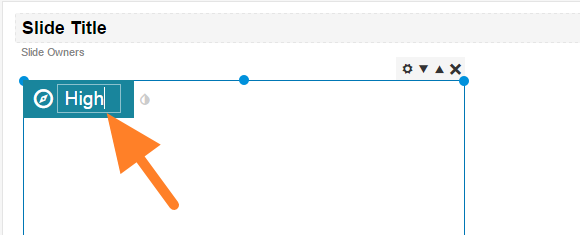
Rename the box. You can overwrite the box title directly after clicking it.
-
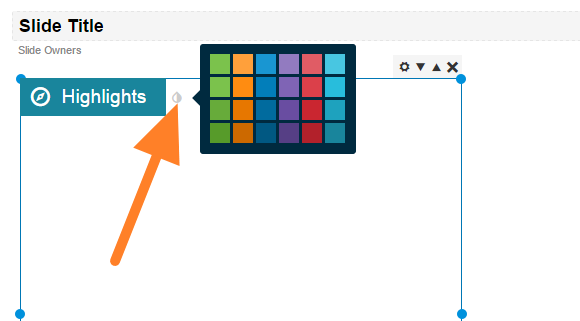
Change the box color. Change the color by clicking the small drop icon next to the box title.
-
Add more boxes and save. Add as many boxes as you need and save the template.
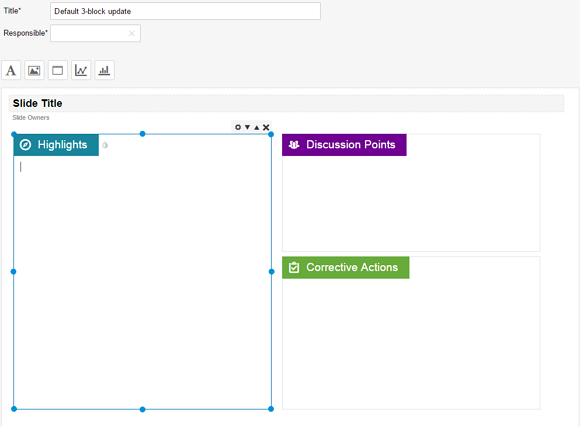
Šablona reportu vám předem nastaví rozvržení snímků.
-
Přidejte šablonu snímku. V menu modulu Reporty zvolte podmenu Šablony snímků a klikněte na ikonu Přidat.
-
Pojmenujte šablonu a přidejte box. Vyplňte název šablony a odpovědnou osobu a klikněte na ikonu Přidat box.
-
Upravte box. Klikněte na ikonu Nastavení boxu a nastavte nadpis, barvu a ikonu boxu.
-
Přejmenujte box. Nadpis boxu můžete přepsat přímo, stačí na něj kliknout.
-
Změňte barvu boxu. Barvu změníte kliknutím na malou ikonu kapky vedle nadpisu boxu.
-
Přidejte další boxy a uložte. Přidejte tolik boxů, kolik potřebujete, a šablonu uložte.
Potřebujete další pomoc?
Napište nám. V pracovní dny obvykle odpovídáme do hodiny.