如何创建报告模板
本文由英文机器翻译。 当前显示英文原文。
Report templates help you predefine the slide layout of your report.
-
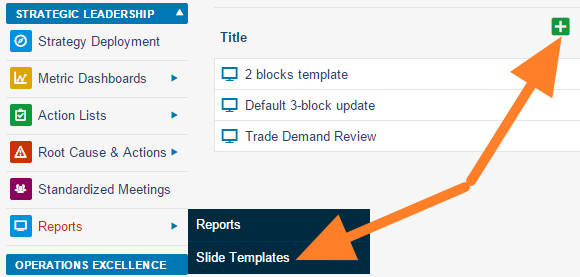
Add a slide template. Go to the Reports module menu, select the Slide Templates submenu and click the Add icon.
-
Name the template and add a box. Fill in the template name and the responsible person, and click the Add box icon.
-
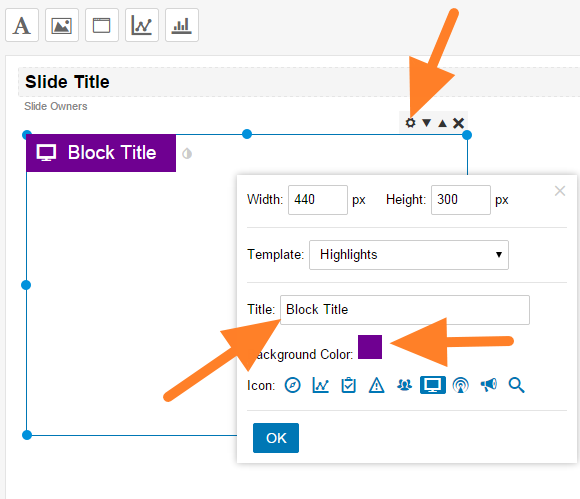
Customize the box. Click the Box Settings icon and customize the box title, color and icon.
-
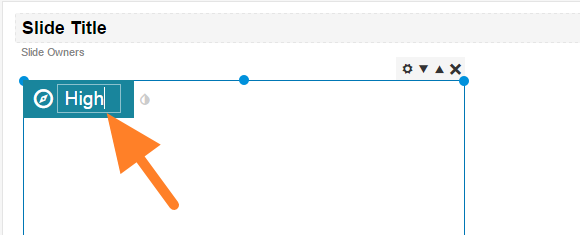
Rename the box. You can overwrite the box title directly after clicking it.
-
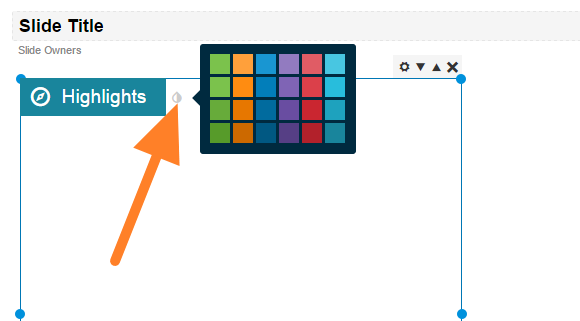
Change the box color. Change the color by clicking the small drop icon next to the box title.
-
Add more boxes and save. Add as many boxes as you need and save the template.
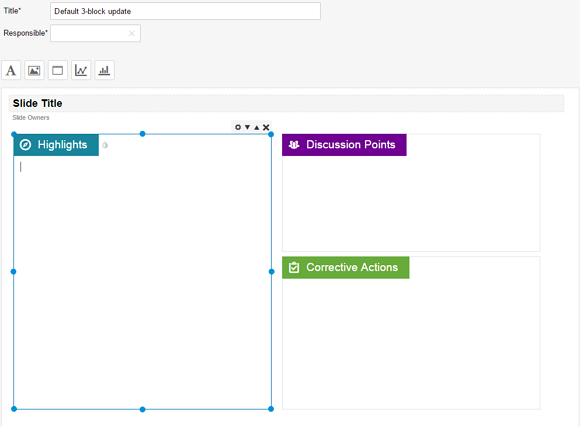
报告模板用于预先定义报告的幻灯片布局。
-
添加幻灯片模板。 打开 报告 模块菜单,选择 幻灯片模板 子菜单,然后点击 添加 图标。
-
为模板命名并添加框。 填写模板名称和负责人,然后点击 添加框 图标。
-
自定义框。 点击 框设置 图标,设置框的标题、颜色和图标。
-
重命名框。 点击框标题后,可以直接修改标题。
-
更改框的颜色。 点击框标题旁的小水滴图标即可更改颜色。
-
添加更多框并保存。 根据需要添加任意数量的框,然后保存模板。
还需要帮助吗?
请给我们留言。工作日我们通常会在一小时内回复。