Ako vytvoriť novú šablónu reportu
Strojový preklad z angličtiny. Zobrazený je anglický originál.
Report templates help you predefine the slide layout of your report.
-
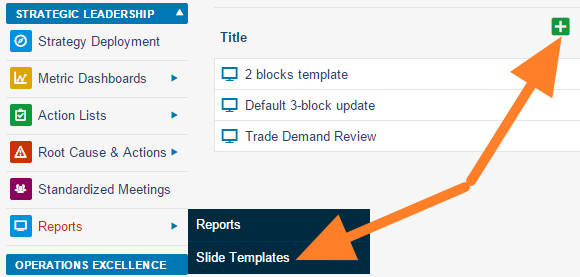
Add a slide template. Go to the Reports module menu, select the Slide Templates submenu and click the Add icon.
-
Name the template and add a box. Fill in the template name and the responsible person, and click the Add box icon.
-
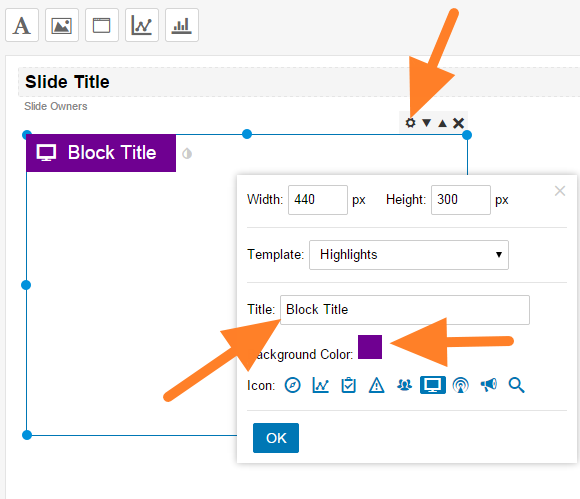
Customize the box. Click the Box Settings icon and customize the box title, color and icon.
-
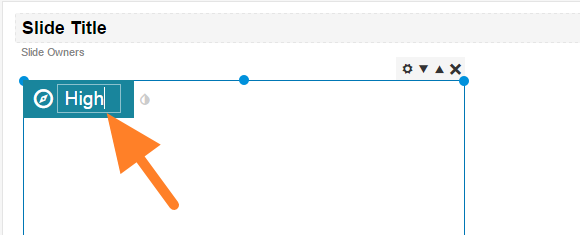
Rename the box. You can overwrite the box title directly after clicking it.
-
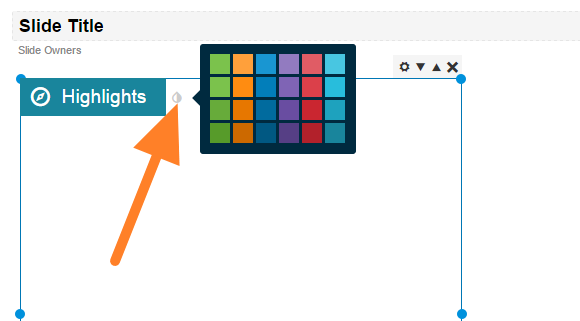
Change the box color. Change the color by clicking the small drop icon next to the box title.
-
Add more boxes and save. Add as many boxes as you need and save the template.
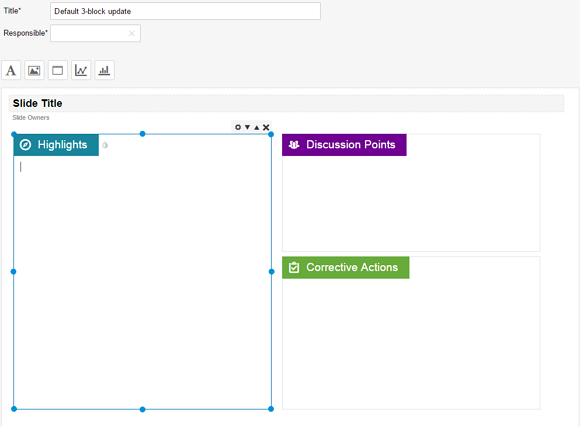
Šablóny reportov vám umožnia vopred pripraviť rozloženie snímok reportu.
-
Pridajte šablónu snímky. V menu modulu Reporty zvoľte podmenu Šablóny snímok a kliknite na ikonu Pridať.
-
Pomenujte šablónu a pridajte box. Vyplňte názov šablóny a zodpovednú osobu a kliknite na ikonu Pridať box.
-
Prispôsobte box. Kliknite na ikonu Nastavenia boxu a nastavte nadpis, farbu a ikonu boxu.
-
Premenujte box. Nadpis boxu môžete prepísať priamo, keď naň kliknete.
-
Zmeňte farbu boxu. Farbu zmeníte kliknutím na malú ikonu kvapky vedľa nadpisu boxu.
-
Pridajte ďalšie boxy a uložte. Pridajte toľko boxov, koľko potrebujete, a šablónu uložte.
Potrebujete ďalšiu pomoc?
Napíšte nám. V pracovné dni zvyčajne odpovedáme do hodiny.