Jak wyświetlić komentarze w raporcie
Tłumaczenie maszynowe z angielskiego. Wyświetlany jest oryginał po angielsku.
Monitor comments directly in your report with the Comments widget. Select the metrics, org. units and periods you want to display comments for, easily and quickly.
-
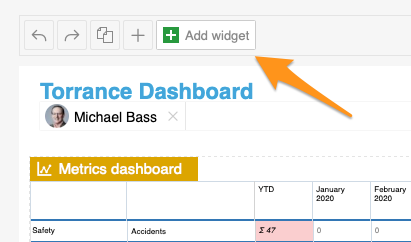
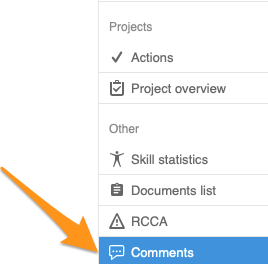
Add the Comments widget. Add the Comments widget to your slide.
-
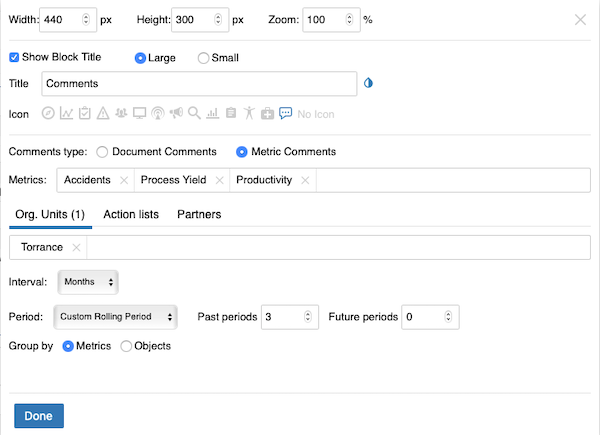
Set up the widget. Select the comment type (document or metric comments – you can view comments from different modules). Continue with all the other settings: metrics, org. units, time interval and others. When you finish your selection, click Done and save the changes.
-
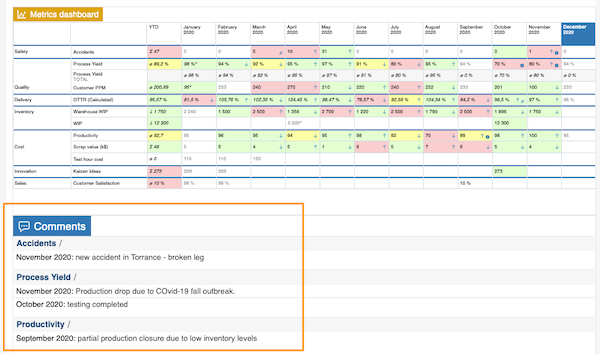
View the comments. The comments are displayed in your report.
Śledź komentarze bezpośrednio w raporcie dzięki widżetowi Komentarze. Szybko wybierz wskaźniki, jednostki org. i okresy, z których chcesz zobaczyć komentarze.
-
Dodaj widżet Komentarze. Dodaj widżet Komentarze do slajdu.
-
Ustaw widżet. Wybierz typ komentarzy (komentarze do dokumentów lub do wskaźników; możesz wyświetlać komentarze z różnych modułów). Uzupełnij pozostałe ustawienia: wskaźniki, jednostki org., przedział czasu i inne. Po dokonaniu wyboru kliknij Gotowe i zapisz zmiany.
-
Przejrzyj komentarze. Komentarze pojawią się w raporcie.
Potrzebujesz dalszej pomocy?
Napisz do nas. W dni robocze zwykle odpowiadamy w ciągu godziny.