Jak zobrazit komentáře v reportu
Strojový překlad z angličtiny. Zobrazen anglický originál.
Monitor comments directly in your report with the Comments widget. Select the metrics, org. units and periods you want to display comments for, easily and quickly.
-
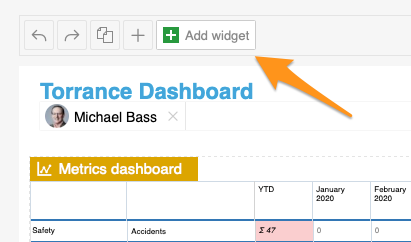
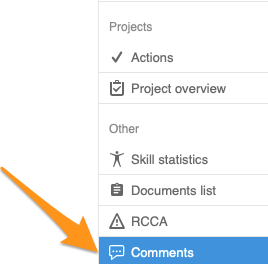
Add the Comments widget. Add the Comments widget to your slide.
-
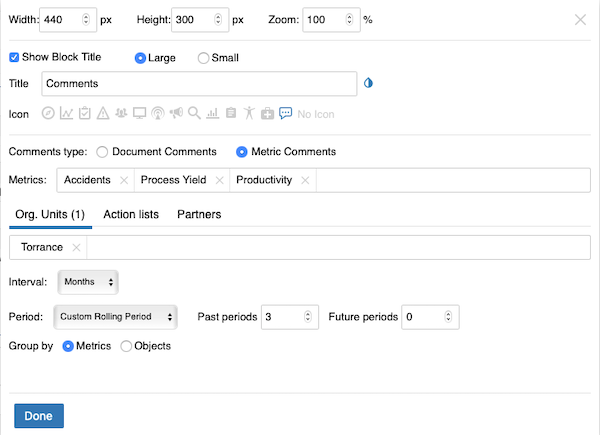
Set up the widget. Select the comment type (document or metric comments – you can view comments from different modules). Continue with all the other settings: metrics, org. units, time interval and others. When you finish your selection, click Done and save the changes.
-
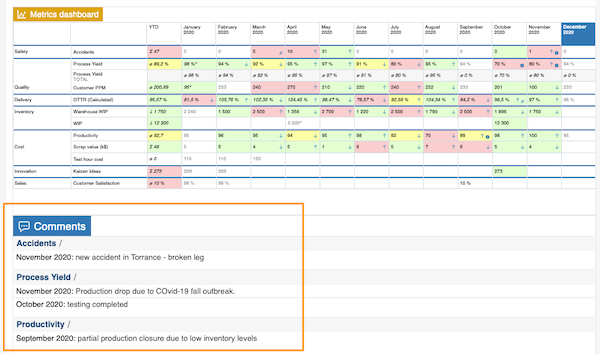
View the comments. The comments are displayed in your report.
Sledujte komentáře přímo v reportu pomocí widgetu Komentáře. Snadno a rychle vyberete metriky, org. jednotky a období, pro které chcete komentáře zobrazit.
-
Přidejte widget Komentáře. Přidejte na snímek widget Komentáře.
-
Nastavte widget. Vyberte typ komentářů (komentáře k dokumentům nebo k metrikám – zobrazit můžete komentáře z různých modulů). Pak dokončete ostatní nastavení: metriky, org. jednotky, časový interval a další. Po dokončení výběru klikněte na Hotovo a změny uložte.
-
Prohlédněte si komentáře. Komentáře se zobrazí v reportu.
Potřebujete další pomoc?
Napište nám. V pracovní dny obvykle odpovídáme do hodiny.